About SysFenix
Free tools that respect your files.
Last updated: August 22, 2026
SysFenix is a suite of file tools built on a simple idea: your files should never have to leave your device just to be converted, merged or compressed. Modern browsers are powerful enough to do the work themselves — so that's exactly what our tools do, using WebAssembly builds of trusted open-source software like FFmpeg and pdf-lib, alongside a few small client-side AI models for things like background removal and transcription.
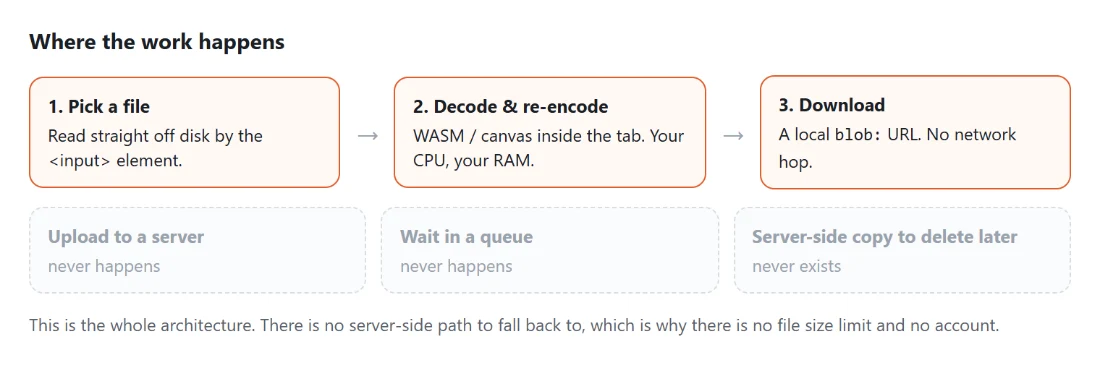
No uploads means no waiting for transfers, no file size caps, no "premium" paywalls to unlock your own documents, and no privacy questions. Everything happens in a browser tab on your own machine — close the tab and nothing of yours remains anywhere but your device.
Why so many tools
SysFenix started as a handful of video and audio converters and now covers 409 tools across 9 categories — Video, Audio, Image, PDF, Text Tools, Developer Tools, Calculators & Converters, Generators & Design Tools and Testers & Widgets. 408 of them are also published in Spanish, and 30 longer comparison guides sit above them to help pick between similar tools. The goal isn't to be everything to everyone — it's the opposite: each tool does one specific, narrow job well (crop to a passport photo, convert HEIC to JPG, generate a QR code) instead of bundling a dozen half-finished features behind a sign-up wall. New tools ship regularly, each one built around a specific thing people search for.
How it's funded
Running SysFenix costs almost nothing, because your browser does the processing instead of a server farm — that's what keeps every tool free with no account, no watermark and no usage limit. The site is supported by display advertising (see our Privacy Policy for details on what that involves). No tool is ever paywalled or feature-gated.
Who builds SysFenix
SysFenix is built and maintained by Javi Morales, an independent developer. It is a one-person project: there is no company, team or investor behind it, and every tool, article and FAQ answer on the site is written by the same person who wrote the code that runs in your browser. You can reach me directly at javi@moralesf.com — see Contact for what's useful to include.
Public profile: github.com/javi-moralesf.
How the site is built
SysFenix is a static site generated with Astro, with interactive tool interfaces written in Preact. It ships no backend at all — no API, no upload endpoint, no database, no user accounts — so the pages you load are plain pre-built HTML, CSS and JavaScript served from a CDN.
The actual processing is real software running inside your own browser tab, not a thin front-end over a server: WebAssembly builds of FFmpeg for video and audio, pdf-lib and PDF.js for documents, WebAssembly and JavaScript codecs for image formats browsers can't handle natively (AVIF, HEIC, TIFF), the browser's own Canvas and Web Audio APIs for image and sound editing, the Web Crypto API for hashing and encryption, and ONNX models run through onnxruntime-web for the handful of AI tools such as background removal, upscaling and speech transcription.
Why client-side, and what it costs
Processing in the browser is a deliberate constraint the whole site is designed around, for two reasons that reinforce each other. The first is privacy that doesn't depend on trusting anyone: a tool that never uploads your file cannot leak it, sell it, keep it after you leave, or be compelled to hand it over. The second is economics — no processing servers means running SysFenix is cheap enough that every tool can stay free, with no account, no watermark and no file-size cap, funded by ads alone.
The trade-off is real and worth stating plainly: a browser tab has less memory available than a server, and it does the work with your device's CPU rather than a datacentre's, so a very large video file takes longer here than on an upload-based service and can hit your browser's own memory limits. Some formats also need a sizeable WebAssembly module downloaded on first use. Those are the costs of the architecture, and they are the ones worth paying.
You don't have to take the "nothing is uploaded" claim on faith, either. Open your browser's developer tools, switch to the Network tab, and run any tool on this site: you'll see the page, its scripts and (for some tools) a WebAssembly module download, and then no request carrying your file anywhere.