- No uploads
- No sign-up
- No watermarks
Free online tools that run in your browser
Convert, compress and edit your files without handing them to a server. Every tool here is an ordinary web page that does its work on your own device, so there is nothing to upload, no queue to wait in and no file size cap to run into. Free to use, and no account is needed.
409 tools across 9 categories, plus 30 guides on choosing between them.
Results appear as you type. Use the up and down arrow keys to move through them, Enter to open one, Escape to close.
Featured
Start here
At least one tool from every category, led by the ones people most often find us for.
- Days Between Dates Calculator
Count the exact days between two dates, with a years and months breakdown and a weekday count, or find the date a number of days before or after another.
- Barcode Generator
Generate Code 128, EAN-13, UPC-A, Code 39 or ITF barcodes from text or numbers and download them as PNG or SVG, entirely inside your browser.
- BMI Calculator
Calculate your BMI from height and weight in metric or imperial units, and see the WHO category plus the healthy weight range for that height.
- Aspect Ratio Calculator
Simplify any width and height to its lowest terms, or lock a ratio (16:9, 4:3, 21:9, 1:1, 9:16 or custom) and solve for the missing dimension.
- HTML Decode
Turn named and numeric HTML entities back into real characters. Known names decode, unknown ones and bare ampersands are returned untouched.
- Split PDF
Split a PDF into separate single pages or extract one page range, right in your browser. Free and private, no upload, no watermark, no size limit.
- Tone Generator
Generate a pure tone from 1 Hz to 20 kHz in four waveforms, with seven hearing-range presets and an exponential frequency sweep. Free and private.
- Fraction Calculator
Add, subtract, multiply or divide two fractions or mixed numbers and read every step, plus an optional decimal to fraction conversion, in your browser.
- Roman Numeral Converter
Convert a number to a Roman numeral or a numeral back to a number, with strict standard-form validation and overline notation above 3,999.
- Signature Generator
Draw your signature with a mouse, stylus or finger, or type it in a script font, and download a transparent PNG. Free, private, no upload.
- Online Whiteboard
A blank drawing board with pen, highlighter, eraser, shapes and text, undo and redo, autosaved on your device and exported as a PNG or a PDF.
- Resize Video for Social Media
Reframe a clip to 9:16, 1:1, 4:5 or 16:9 at 1080p or 720p, either cropping to fill the frame or padding it with bars. Nothing is uploaded.
The catalog
Browse every category
Each band shows the tools the rest of the site links to most in that category. Follow the heading to see the full list, with its own search box.
Convert, compress and edit video files
- Trim Video
Cut a video to a start and end time in your browser. A stream copy trims MP4, MOV, M4V and WEBM in seconds with no quality loss and no upload.
- Compress Video
Re-encode an MP4 with x264 in your browser using CRF presets tuned for email, WhatsApp and Discord. Free, private, no upload, no watermark, no sign-up.
- Convert MOV to MP4
Convert iPhone and QuickTime MOV videos to MP4 right in your browser. Free and private, no upload, no size limit and no watermark.
- Convert MP4 to GIF
Turn short MP4 clips into animated GIFs right in your browser. Free and private, with no upload, no watermark, plus frame rate and size controls.
Convert and edit audio files
- Cut MP3
Cut a section out of an MP3 in your browser. The frames inside your range are copied straight across, so there is no re-encode, no upload and no watermark.
- Convert WAV to MP3
Convert uncompressed WAV recordings to MP3 in your browser. Free and private, with no upload, no size limit and no watermark.
- Convert MP4 to MP3
Extract the audio from an MP4 video as an MP3 file, right in your browser. Free and private, with no upload, no size limit and no watermark.
- Normalize Audio Loudness
Normalize MP3, WAV, M4A, OGG and FLAC to a chosen loudness target in your browser. Two-pass loudnorm, free and private, with no upload.
Convert, compress and resize images
- Resize Images
Resize JPG, PNG and WebP images to exact pixel widths or a percentage in your browser. Free and private, no upload, batch resize, aspect ratio kept.
- Compress Images
Compress JPG, PNG and WebP images with a quality setting and optional downscaling. Free and private, no upload, no watermark, batch support.
- Crop Images
Crop JPG, PNG and WebP photos to a square, 4:3, 16:9 or 9:16 centered frame in your browser. Free and private, no upload, batch cropping.
- Remove EXIF Data from Photos
Strip GPS location, camera model and timestamps from JPG and PNG photos in your browser. Free and private, no upload, batch support.
Merge, split and convert PDF documents
- Convert TXT to PDF
Turn a plain .txt file into a formatted PDF right in your browser. Choose page size and font size, with automatic wrapping and pagination. Private.
- Merge PDF Files
Combine several PDF files into one document in your browser. Free, no upload, no size limits, no watermarks, and mixed page sizes are kept.
- Convert JPG to PDF
Combine one or more JPG images into a single PDF in your browser. Choose page size and orientation. Free, private, no upload, no watermarks.
- Printable Calendar Generator
Build a printable month or full year calendar PDF for any year from 1 to 9999, in A4 or Letter, portrait or landscape, with an optional notes column.
Clean up, analyze and transform plain text
- Word Counter
Count words, characters with and without spaces, sentences and paragraphs, plus reading time at a speed you set. Runs entirely in your browser.
- Case Converter
Convert text to UPPERCASE, lowercase, Title Case, Sentence case, camelCase, snake_case or kebab-case in your browser. Nothing you paste leaves the tab.
- Markdown to HTML Converter
Turn Markdown into clean, sanitized HTML source without leaving the tab. GFM tables, task lists and code blocks are supported, and nothing is uploaded.
- Markdown Table Generator
Build a GFM Markdown table in a spreadsheet grid. Add rows and columns, set per-column alignment, paste from Excel or Sheets, and copy clean Markdown.
Encode, hash, format and validate code and data
- JSON Formatter & Validator
Pretty-print JSON with the indent width you pick, or strip it back to a single line. The text is parsed and rebuilt, so what returns is a normalized copy.
- Text Diff Checker
Compare two blocks of text and see added, removed and changed lines or words instantly in your browser. Nothing you paste is ever uploaded.
- URL Encode
Percent-encode text or a full URL right in your browser with encodeURIComponent or encodeURI. Instant results, and nothing ever leaves your device.
- Base64 Encode
Encode text to Base64 in your browser with correct UTF-8 handling for emoji and accents. Instant results, and nothing you paste ever leaves the page.
Everyday math, date and unit calculators
- Percentage Calculator
Three percentage questions in one box. X percent of Y, X is what percent of Y, and the change from A to B. Arithmetic runs in your own browser.
- Unit Converter
Convert length, weight, temperature, volume, area and speed against exact defined constants, with a quick reference line for the one unit case.
- Unix Timestamp Converter
Convert a Unix timestamp to a readable date, or a date back to epoch seconds/milliseconds, instantly in your browser, nothing uploaded.
- Sleep Calculator
Work backward from a wake-up time or forward from a bedtime, in 90-minute cycles, with an adjustable buffer for how long you take to fall asleep.
QR codes, palettes, gradients and other creative generators
- CSS Gradient Generator
Build linear, radial and conic CSS gradients visually, with a live preview, one-line copyable CSS and a PNG export up to 4000px. Free, no sign-up.
- QR Code Generator
Turn a URL or any text into a PNG QR code from 100 to 1000 pixels, with four error correction levels. Drawn in your browser, so nothing is logged.
- Color Palette Generator
Generate 5-color palettes with random, complementary, analogous or triadic harmony, lock the swatches you like, and export HEX, CSS variables or a PNG.
- Flashcard Maker
Build flashcard decks in your browser, study them with flip, shuffle or Leitner boxes, import or export CSV and JSON, and print a numbered PDF.
Timers, typing tests and hardware diagnostics
- Online Timer & Stopwatch
A free countdown timer and stopwatch that survives a background tab, with a synthesised alarm, fullscreen clock and 5, 10, 25 and 60 minute presets.
- Keyboard Tester
Press keys and watch a 63-key on-screen layout light up. Read the code and key values, count how many keys are held at once, catch a stuck key.
- Countdown to Date
A free live countdown to any date or event, with days, hours, minutes and seconds, a fullscreen mode, and a shareable link. Runs in your browser.
- Mouse Tester
Check all five mouse buttons, scroll wheel direction and delta, double-click intervals and an estimated polling rate, live in your browser.
Reading
Guides, newest first
In-depth explanations of how a format or a codec actually behaves, plus one long comparison per category: what each tool is for, which one to reach for first, and where they overlap.
PDF
What a PDF Password Actually Protects (and What It Leaves in Plain Sight)
A PDF can carry two passwords that do very different jobs. Which one encrypts the content, which one is only a request, and what stays visible either way.
Updated
Text Tools
Character Encodings: Why Your Text Turned Into Question Marks
What UTF-8 and Latin-1 actually do to bytes, where mojibake comes from, and why the same file opens correctly in one program and as garbage in another.
Updated
Image
Color Spaces: Why the Same Hex Code Looks Different Everywhere
What sRGB actually specifies, why a hex code is meaningless without it, and what a wide-gamut photo loses when a browser converts it.
Updated
Video
Frame Rate: What Changing FPS Really Does to Motion
Why 24, 30 and 60 fps feel different, why converting between them stutters, and what the fractional NTSC rates are actually doing in your files.
Updated
Developer Tools
Hashing vs Encryption vs Encoding: Three Things People Call Encrypting
Why Base64 protects nothing, why a hash cannot be reversed, and which of the three you actually need. With the parameters that make each one safe.
Updated
PDF
How OCR Actually Works, and Why It Fails on Some Scans
What text recognition needs from a scan, why adding a text layer leaves the page looking identical, and the input problems no engine can fix.
Updated
Audio
Loudness Normalization: What LUFS Is and Why Streaming Services Care
Why turning up the peaks does not make a podcast louder, what -16 LUFS means, and why every platform quietly re-levels what you upload.
Updated
Video
Subtitle Formats: SRT, VTT and the Ones Players Silently Ignore
Why a subtitle file works in VLC and does nothing in a browser, which formats hold text and which hold pictures, and what conversion cannot recover.
Updated
Image
What EXIF Metadata Reveals About Your Photos
Which fields a camera writes into a photo, why the GPS coordinates are precise enough to find a doorway, and what you lose by removing them.
Updated
How it works
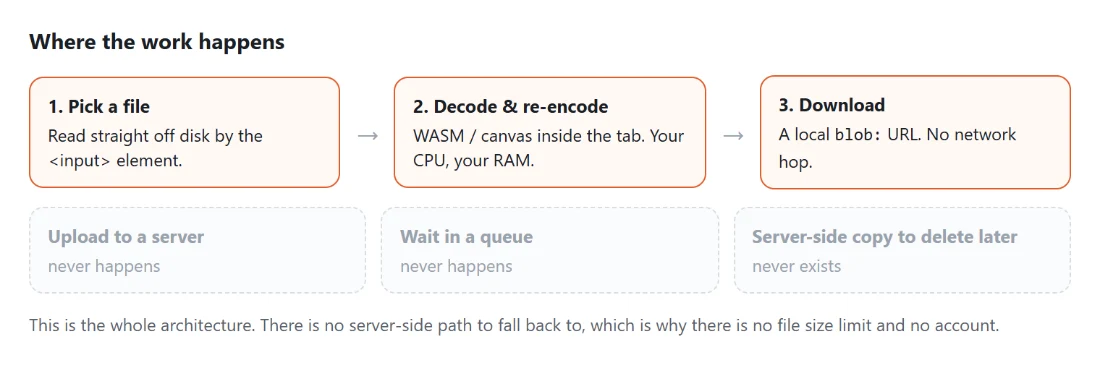
Three steps, and none of them is an upload
Open a tool
Every page does one job. Open it and the tool is already sitting there, ready for a file or a block of text. Nothing to install, nothing to log into, no upload progress bar.
Your browser does the work
The processing code runs inside the tab: WebAssembly builds of ffmpeg and pdf-lib, the browser's own canvas and audio APIs, and for a handful of tools a machine-learning model that downloads once and then runs on your hardware.
Save the result
The finished file is written straight to your downloads. Because it was never sent anywhere, there is nothing to delete afterwards and no retention window to go and read.
That is the entire architecture, and it is why you will not find an upload step anywhere on this site. What does cross the network is what any web page needs: the page itself, the processing code some tools fetch on demand, and the ads that pay for the hosting. The privacy policy sets out exactly what that involves, and the about page covers who builds this and why.