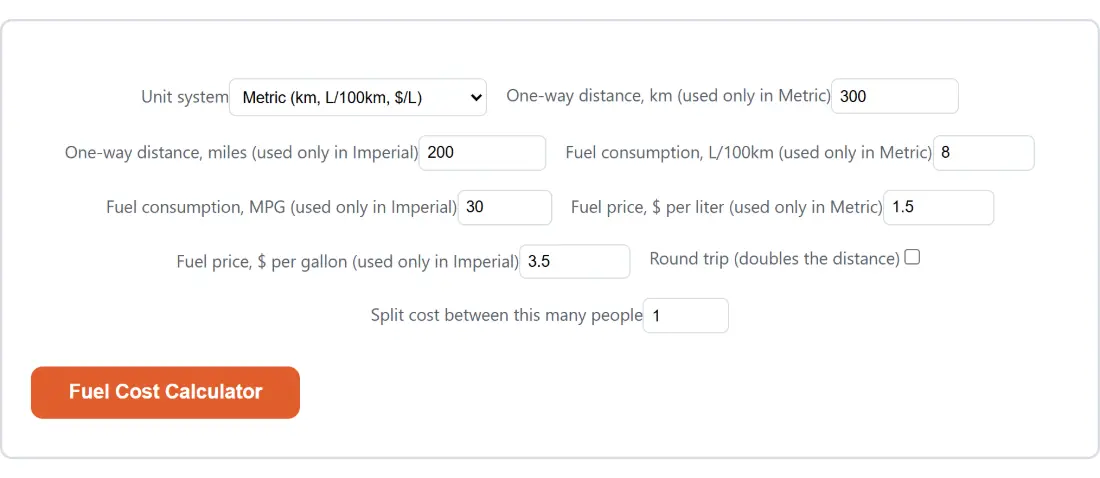
One selector switches distance, consumption and price together
The bug that ruins most fuel calculators is a mixed unit: a distance in kilometres paired with a consumption figure in miles per gallon, producing a number that looks plausible and is wrong by roughly the ratio between a mile and a kilometre. This page removes that possibility structurally rather than warning about it. There is one Unit system control, it switches all three quantities at once, and the calculation only ever reads the three fields belonging to the selected system.
That is why distance, consumption and price each appear twice on the form when only one copy of each is read, and why every one of those labels ends with the system it applies to. Whatever is sitting in the imperial boxes while Metric is selected is never referenced. It cannot leak.
- Choose
Metric (km, L/100km, $/L)orImperial (miles, MPG, $/gallon)under Unit system. - In metric, fill
One-way distance, km (used only in Metric),Fuel consumption, L/100km (used only in Metric)andFuel price, $ per liter (used only in Metric). In imperial, fill the three fields whose labels end with “used only in Imperial” instead. - Tick
Round trip (doubles the distance)if you are coming back. - Set
Split cost between this many peopleif more than one of you is paying. - Press the action button, which carries the page’s own name, Fuel Cost Calculator.
A 300 km drive at 8 L/100km, worked through to the cent
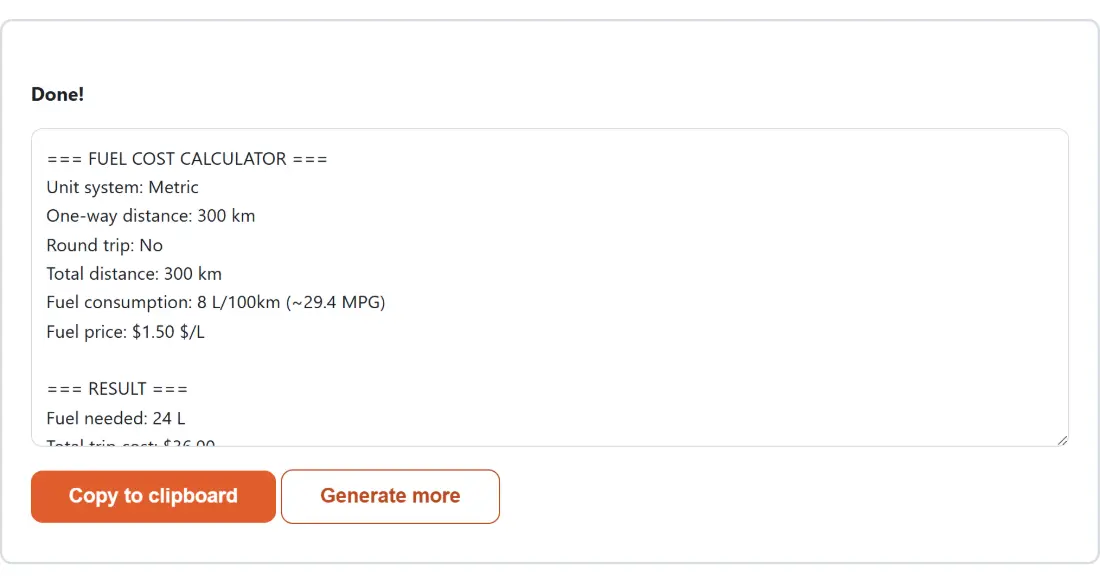
The metric defaults are a real worked example rather than placeholder numbers. Three hundred kilometres at 8 litres per 100 km needs 24 litres, and 24 litres at $1.50 each is a trip cost of $36.00. Leave the split at one person and the cost per person line repeats $36.00.
The imperial defaults tell the same story in the other convention. Two hundred miles at 30 MPG needs 200 divided by 30, which the report prints as 6.667 gallons because fuel needed is given to three decimals while everything else is given to two. At $3.50 a gallon that is $23.33.
Money is formatted by a helper imported straight from the Electricity Cost Calculator, which shows two decimals normally and switches to four for figures under ten cents. That is why a fuel price of one cent prints as $0.0100 rather than as an uninformative $0.01.
235.214583 is derived from two exact definitions
Litres per 100 km and miles per gallon do not convert with a multiplier, because they run in opposite directions. One counts fuel over a fixed distance, so lower is better; the other counts distance over a fixed volume, so higher is better. They are reciprocals, and the conversion is a constant divided by your value in both directions.
That constant is not typed in as a remembered 235.2. It is computed from the exact US gallon (3.785411784 litres) and the exact international mile (1.609344 km), which gives 235.2145833333333. Run it in either direction and the numbers land where a spec sheet says they should: 35 MPG becomes 6.72 L/100km, and 20 MPG becomes 11.76 L/100km. The bracketed figure the report prints next to your consumption is exactly this conversion, so 8 L/100km is echoed as roughly 29.4 MPG.
If you need plain unit conversions instead, distance or speed rather than fuel economy, the Unit Converter covers those categories separately.
Two dollar signs on the price line, and other rough edges
Worth flagging honestly, because it looks like a defect the first time you see it: the fuel price
line in the report reads Fuel price: $1.50 $/L. The currency marker is added by the formatter
and the unit label already contains one, so they double up. Nothing is doubled in the arithmetic.
The imperial version reads $3.50 $/gallon for the same reason.
The currency itself is generic. There is no currency selector anywhere; the dollar sign is a placeholder, and if you enter a price in euros, pounds or pesos then every figure in the report is in that currency too. The rest of the guardrails are quiet clamps. Distance floors at 0.1, consumption at 0.1 in metric and 1 in imperial, price at 0.01, and the number of people is rounded to a whole number and held between 1 and 50, so there is no route to a division by zero.
Round trip doubles first, the split divides last
Order matters here and it is worth stating explicitly. The round trip toggle acts on the one-way distance before fuel is calculated, so it scales fuel needed and total cost together. The split acts on the finished total, so it changes only the per-person line.
Combine them on the metric defaults and you get 600 km, 48 litres, a total of $72.00 and, across four people, $18.00 each. Untick the round trip and the same four-way split gives $9.00 each on a $36.00 total. Splitting a shared drive this way is the same arithmetic the Tip Calculator applies to a restaurant bill, and the rest of the everyday money tools sit together on the calculators hub.
What a fuel estimate cannot know about your drive
A rated consumption figure is a laboratory number, and a real trip is not a laboratory. Cold starts, roof boxes, headwinds, a full car, mountain passes and city traffic all push actual consumption above the sticker figure. Nothing here models any of that, because there is no field on the form that could carry the information.
Treat the output as a floor rather than a forecast. The most useful habit is to enter the consumption your own trip computer reports on the kind of road you are about to drive, not the manufacturer’s combined figure, and to run the calculation again with a slightly worse number to see how sensitive the total is. Fuel prices are not modelled either: the figure you type is applied to the whole trip, so a long drive across a price border needs to be split into two runs.