🔒 Private by design: everything is generated locally in your browser and never uploaded to any server.
Written and maintained by Javi Morales·Last updated
Six categories, one arithmetic problem
Unit conversion looks like many separate problems and is really one, repeated. Within a category, every unit is defined as a fixed multiple of a reference unit, so converting from one to another is a division followed by a multiplication. Centimetres to inches, grams to ounces, litres to gallons and kilometres per hour to miles per hour are the same operation with different constants.
Temperature is the exception, and it is the exception for an interesting reason. The scales do not share a zero, so Celsius to Fahrenheit is not a multiplication but a multiplication plus an offset. That single difference is why temperature conversion is the one people cannot do in their heads and why it needs its own handling here.
The six categories covered are length, weight, temperature, volume in US customary units, area and speed.
Converting a value
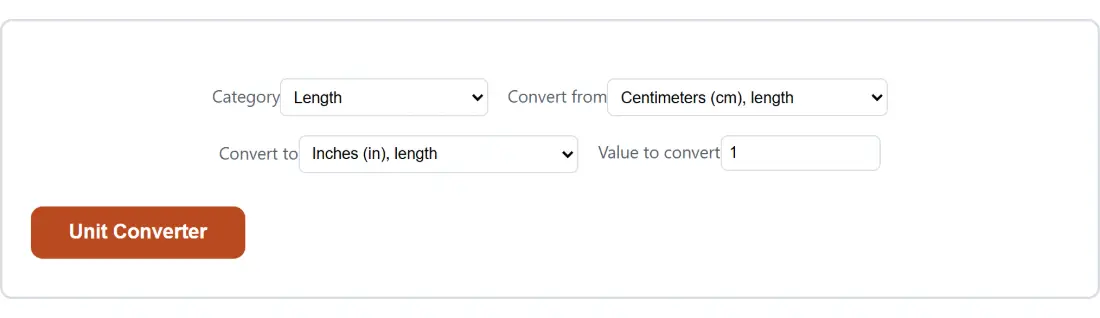
Pick a Category.
Pick a Convert from unit belonging to that category.
Pick a Convert to unit belonging to that category.
Enter a Value to convert.
Run it and read the result, along with either a quick reference or the formula used.
The flat unit list, explained rather than hidden
Both unit selects list every unit from every category, each tagged with the category it belongs to. That is not an oversight, it is a limitation of the option system this page is built on, which has no way for one select to change another’s choices.
Rather than let a mismatch produce nonsense, a unit that does not belong to the selected category is replaced by that category’s own default. Choosing kilograms while the category is set to length converts centimetres to inches instead of inventing a mass to distance conversion. It is a quiet correction, and knowing it happens explains a result that does not match what you thought you selected.
Exact constants, not remembered approximations
Most of the conversion factors people carry in their heads are rounded, and some of them are rounded badly. An inch is not about two and a half centimetres, it is exactly 25.4 by international definition. A pound is exactly 0.45359237 kilograms, again by definition rather than by measurement.
Using the defined values rather than approximations matters when a conversion is chained or scaled. Converting a single measurement with a rounded factor is harmless. Converting a thousand of them, or converting through an intermediate unit, accumulates the error.
Results are shown to six decimal places. That is more precision than any real measurement justifies, and it has one visible consequence: a genuinely tiny result can display as zero once rounded to six places, even though the underlying value is not zero.
The quick reference line
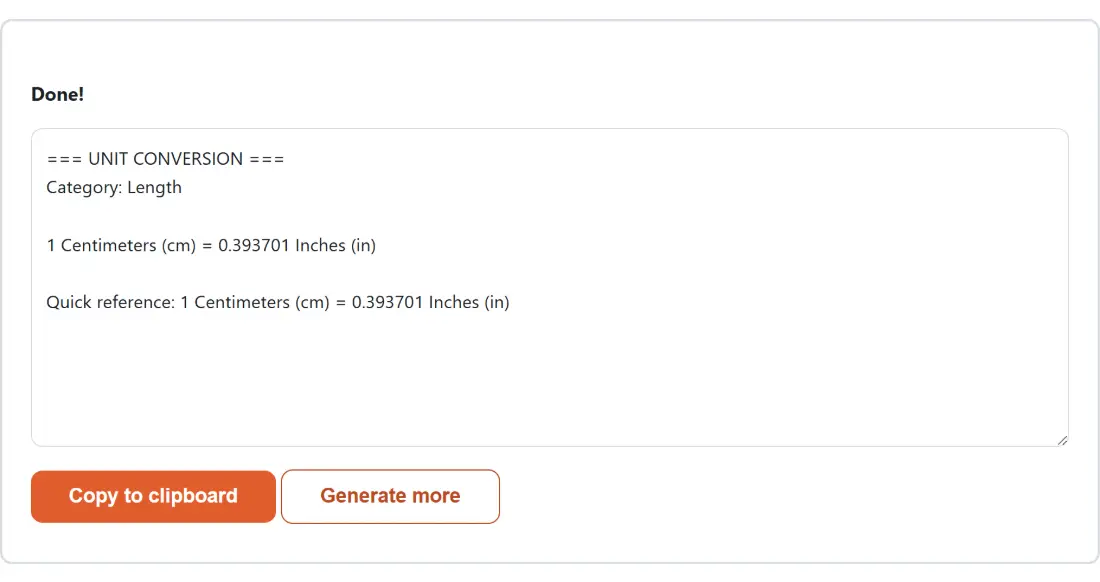
For every category except temperature, the report adds a line giving the conversion for one unit as well as for your value. Converting 70 kilograms to pounds tells you the answer and also that one kilogram is about 2.204623 pounds.
That second number is often the more useful one, because it is portable. Once you know a kilogram is a bit over two point two pounds you can estimate any weight without coming back. The specific answer you asked for is only good for that one question.
Temperature gets the formula instead, since a one degree reference would be actively misleading with an offset in play. Converting one degree Celsius does not tell you anything you can apply to twenty.
Related conversion tools
For conversions with their own domain logic rather than a plain factor, several dedicated tools exist. Cooking Converter handles ingredient specific volume to weight, which genuinely depends on what you are measuring. Shoe Size Converter covers a mapping with no formula at all. Feels Like Temperature combines temperature with humidity and wind rather than converting a scale.
Unit Converter mid-process: Category set to Length, Convert from set to Centimeters (cm), length.The finished result: the generated output “=== UNIT CONVERSION === Category: Length 1 Centi…”. The download link is a local blob URL — the file never leaves your device.
Frequently asked questions
Why do the from and to lists contain every unit rather than only the current category's?
Because the option system behind this page cannot change one select's choices based on another select's value. So both lists are flat and every entry is tagged with the category it belongs to. If you pick a unit that does not belong to the selected category, it falls back to that category's own default rather than attempting a meaningless conversion, so choosing kilograms while the category is set to length gives you centimetres.
Does it convert as I type?
No, and it is worth saying rather than implying otherwise. The result is produced when you run the tool, not on every keystroke, because that is how this page's option based interface works throughout the site. In practice you set four fields and press once, which for a single conversion is barely different, but it is not a live readout.
How accurate are the conversions?
They use the internationally defined exact constants rather than rounded approximations, so an inch is exactly 25.4 millimetres by definition and a pound is exactly 0.45359237 kilograms. Results are displayed to six decimal places, which is well beyond what any practical measurement justifies. One consequence of that display limit is that an extremely small result can round to zero on screen even though the underlying figure is not zero.
Why does a temperature conversion show a formula instead of a quick reference line?
Because a quick reference for one unit only makes sense when the conversion is a straight multiplication. Length, weight, volume, area and speed all are, so the report adds a line telling you what one of the source unit equals in the target, which is the number worth remembering. Temperature is not, because the scales have different zero points, so the report shows the actual formula used instead.
Which gallon is it, and which cup?
The US customary ones, which is stated in the volume category's own label. This matters because a US gallon and an imperial gallon differ by about a fifth, and US and imperial fluid ounces and pints differ too. If your recipe or fuel figure came from the UK, the numbers here will not match it, and that is a difference in the units rather than an error.
What does the quick reference line actually give me?
The conversion for a single unit, alongside your own conversion. So converting 70 kilograms to pounds gives you the answer and also tells you one kilogram is about 2.204623 pounds. That second figure is the one you can carry around in your head and apply to anything, which is often more useful than the specific answer you came for.
Count the exact days between two dates, with a years and months breakdown and a weekday count, or find the date a number of days before or after another.
Heat index from temperature and humidity, wind chill from temperature and wind speed, using the two National Weather Service formulas and their real limits.
Add, subtract, multiply or divide two fractions or mixed numbers and read every step, plus an optional decimal to fraction conversion, in your browser.
Enter each course's credit hours and letter grade for a live semester GPA on the plus/minus 4.0 scale, then fold in the cumulative GPA you already have.
An on-screen ruler in mm, cm and inches, calibrated against a credit card or your screen size so the tick marks match real life. Free, nothing uploaded.
Paste an IPv4 address with a CIDR prefix or a dotted netmask and get the network, broadcast, wildcard mask, usable range and host count in your browser.
Compare up to 12 products by true unit price. Mix grams, kilos, ounces, pounds, millilitres, litres, fluid ounces, gallons and counts. Free and private.