Tip Calculator

Work out a tip at 15, 18, 20 or 25 percent or your own figure, then split the bill and the tip across up to 100 people. Runs entirely in your browser.

🌐 Español

🔒 Private by design: everything is generated locally in your browser and never uploaded to any server.

The arithmetic is easy, the moment is not

Working out twenty percent of a bill is trivial on paper and unexpectedly awkward at the end of a meal, with a card machine waiting, several people talking and a figure that is not a round number. The calculation is not hard. Doing it correctly in a few seconds while being watched is.

That is the entire reason this exists. Four numbers in, six numbers out, no scrolling and nothing to interpret. The one figure that resolves most disagreements, the tip each individual is contributing, is included rather than left as an exercise.

Working out a bill

  1. Enter the Bill amount (before tip), as printed, before anything is added.
  2. Choose a Tip percentage from the four presets, or select custom.
  3. If you chose custom, enter your figure in the custom percentage field. Otherwise ignore it.
  4. Set the Number of people splitting the bill.
  5. Read the result, which shows the tip, the total, the per person amount and the per person tip.

What the report gives you and why each line is there

The first three lines echo your inputs back, including whether the percentage came from a preset or from the custom field. That sounds redundant until you have calculated the same bill twice with different assumptions and cannot remember which figure you are looking at.

Then the tip on its own, which is the number the card machine may ask for directly. Then the total, which is what the bill actually comes to. Then the amount per person, which is what everyone hands over. Then the tip per person.

That last line is quietly the most useful one. When someone at the table thinks the tip is too high, the number they care about is not the total tip, it is their own share of it, and having it on screen turns a debate into a two second decision.

Rounding, and why the shares do not add up

Money splits imperfectly, and this is the part worth understanding rather than being surprised by.

Every figure is computed from the unrounded values and rounded only for display, to the nearest hundredth. So a bill of 63.40 with a twelve and a half percent tip has a true total of 71.325 and a true per person share, across four, of 17.83125. Displayed, those become 71.33 and 17.83, and four times 17.83 is 71.32.

The alternative approaches are all worse. Rounding each share up collects a penny more than the bill. Rounding down collects a penny less. Distributing the remainder means telling one person at the table they owe a different amount from everyone else. Computing honestly and displaying to the cent is the least surprising option, and in real life somebody rounds up anyway.

What the presets are, and are not

The four preset figures are simply the ones that come up most often where tipping is customary. They are not a recommendation, and the tool has no view on what you should tip.

Tipping practice differs enormously between countries and between kinds of establishment, and in a good number of places adding a tip at all is unusual or actively discouraged. The custom field accepts anything from zero upward for exactly that reason, and zero is a legitimate answer in plenty of the world.

For the underlying operation without the restaurant framing, Percentage Calculator handles percentages of, changes between and shares of any two numbers. To decide which of two products is actually cheaper before the bill exists, Unit Price Calculator compares by price per unit.

For the other everyday running costs, Fuel Cost Calculator prices a journey and Budget Planner covers the month. The rest are on the calculators hub.
See it in action

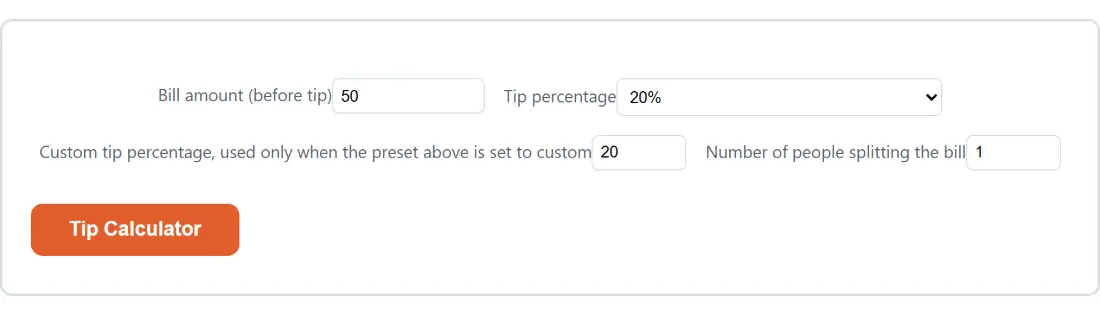
Screenshot of the Tip Calculator tool with Bill amount (before tip) set to 50, Tip percentage set to 20%
Tip Calculator mid-process: Bill amount (before tip) set to 50, Tip percentage set to 20%.
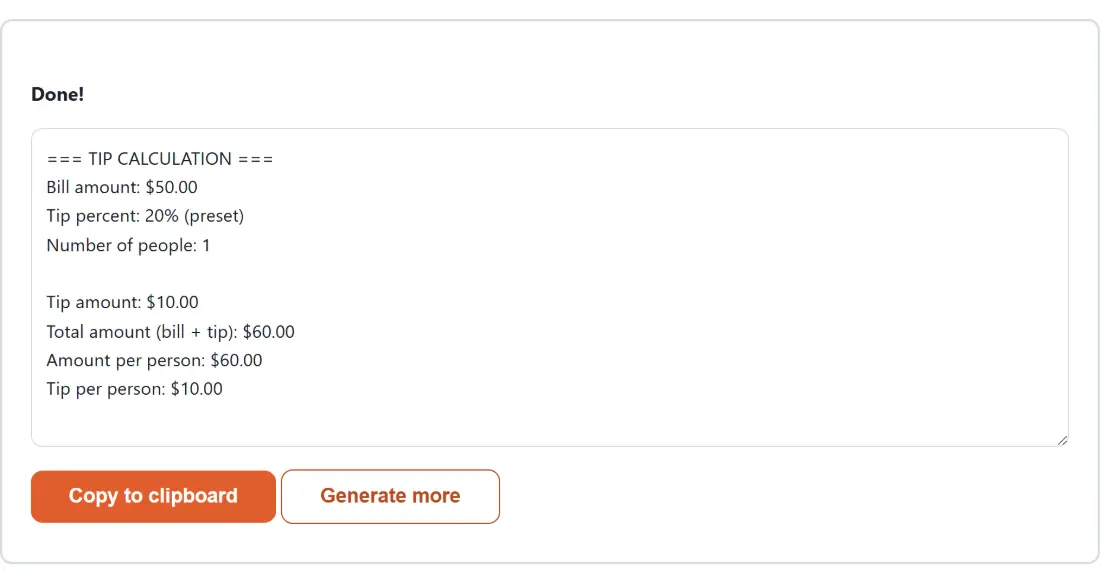
Screenshot of the Tip Calculator result screen showing the generated output “=== TIP CALCULATION === Bill amount: $50.00 Tip …”
The finished result: the generated output “=== TIP CALCULATION === Bill amount: $50.00 Tip …”. The download link is a local blob URL — the file never leaves your device.

Frequently asked questions

Which currency is it working in?

Whichever one your bill is in. The report prefixes figures with a dollar sign purely as a generic currency marker, not as a claim about US dollars, because every number here is a ratio, a sum or a division and none of that depends on the currency. A bill in euros, pounds, rupees or yen gives the same correct arithmetic.

What does the custom percentage field do when a preset is selected?

Nothing at all. It is read only when the preset is set to custom, and is completely ignored for 15, 18, 20 and 25, so leaving a stale value in it cannot affect a preset calculation. That is worth knowing because the field stays visible rather than disappearing, which keeps the form from jumping around as you change the preset.

Are the four presets meant as advice?

No, they are just the four figures that come up most often in places where tipping is customary, offered so you do not have to type them. Tipping norms vary enormously by country and by kind of establishment, and in many places the right answer is nothing at all. Use the custom field for any figure from zero upward.

What does it show me?

Six figures. Your inputs are echoed back as the bill, the percentage with a note of whether it came from a preset or the custom field, and the head count. Then the tip amount, the total of bill plus tip, the amount each person owes, and the tip each person is contributing. The last of those is the one that settles arguments, since it separates what everyone is paying for the meal from what they are paying as a tip.

Why can the per person figures not multiply back to the total exactly?

Because every figure is calculated from unrounded values and only rounded for display. A bill of 63.40 with a 12.5 percent tip produces a total of 71.325, shown as 71.33, and a per person share of 17.83125 across four people, shown as 17.83. Multiply the displayed share by four and you get 71.32, a penny short. Rounding each share up instead would overshoot. This is inherent to splitting money and is why somebody usually rounds up in practice.

What happens if I type something silly?

It is clamped rather than rejected. A negative bill becomes zero. A head count below one becomes one, above one hundred becomes one hundred, and a fractional one is rounded to a whole person. A custom percentage is held between zero and one hundred. There is no way to make it divide by zero or return a nonsense figure, which matters because the numeric fields can be edited past whatever limits the form itself declares.

Is anything sent anywhere?

No. The arithmetic is a handful of multiplications and divisions running in your browser tab, with no library and no network request involved. Your bill amount and party size are not transmitted, logged or stored, and the page works with no connection once it has loaded.

Related tools