Altitude bands, not a fixed sixty minutes
Golden hour is not a duration, it is a range of sun angles. This page uses the convention photography planning apps settled on: golden hour is every moment the sun’s centre sits between 4° below the horizon and 6° above it, and blue hour is the band from 6° below to 4° below. The sunrise and sunset rows use a separate altitude, 0.833° below the geometric horizon, which is the standard allowance for atmospheric refraction plus the sun’s own visible radius.
Because those are angles, the length of the window depends entirely on how steeply the sun climbs where you are standing. On 21 June 2026 the evening golden window runs about 83 minutes in London and about 44 minutes in Singapore, where the sun drops almost vertically. New York on 21 March 2026 falls between the two at about 53 minutes. The word “hour” is a rough average of a quantity that ranges from well under an hour to, at high latitude in summer, the entire night.
Everything is solved with the NOAA solar-position equations written out in plain JavaScript: Julian day, solar declination, the equation of time, and then the hour angle at which the sun reaches each altitude. Each event time is refined twice, re-evaluating declination and the equation of time at the candidate instant, because both drift enough within a single day to move a solstice sunrise by up to a minute. The project’s tests pin every scenario from 69.6°N to 33.9°S against an independent reference within two minutes.
Picking a place and a day
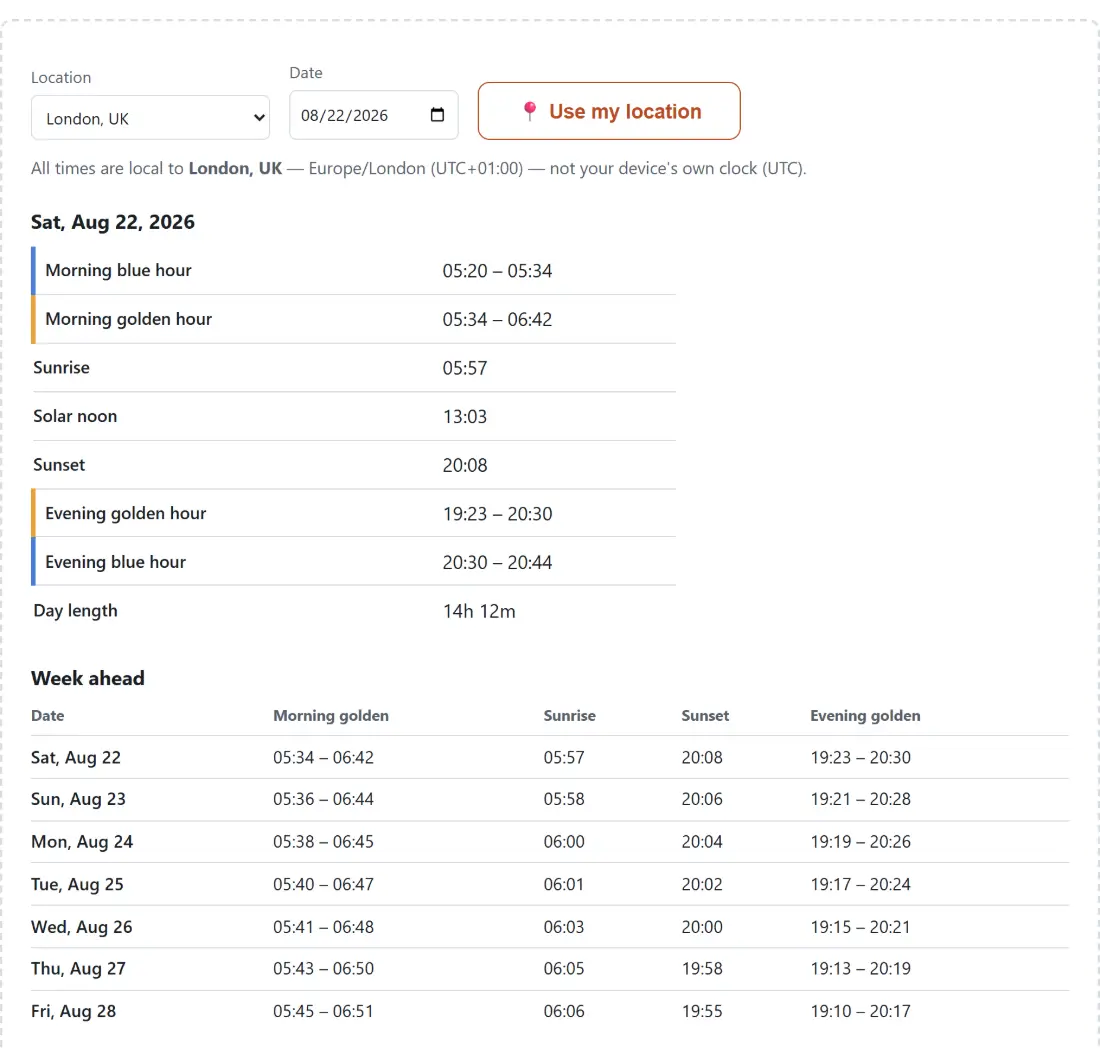
There is no calculate button. The whole widget recomputes as you change either control.
- Choose a city from the Location menu. It opens on London.
- Set Date using the date field, which starts on today and accepts any past or future day.
- Read the day card, which lists Morning blue hour, Morning golden hour, Sunrise, Solar noon, Sunset, Evening golden hour, Evening blue hour and Day length.
- Optionally press 📍 Use my location to swap the city for your browser’s coordinates. A new “My location (from browser)” entry then appears at the top of the location menu.
- Scroll the Week ahead table for seven consecutive days starting at the date you chose.
Two things about that table are worth noting before you plan around it. Its columns are Date, Morning golden, Sunrise, Sunset and Evening golden, so blue hour appears only in the day card above it, not in the week view. And the week always starts on your chosen date rather than on a Monday, which is what you want when you are counting forward from a travel day rather than reading a calendar.
Sydney times while you sit in Madrid
The classic way a sunrise table goes wrong is to compute a distant city’s sunrise correctly and then print it in the visitor’s own time zone. Every event here is computed as a genuine UTC instant and converted for display using the city’s own IANA zone, which is stored alongside its coordinates. A note under the controls names that zone and its offset for the day being shown, and when it differs from your device’s zone it says so outright.
The conversion machinery is not written twice. It is imported from the Time Zone Converter, which already had its Intl-based zone handling verified against real daylight saving transitions, and the calendar arithmetic that walks the week forward comes from Days Between Dates rather than from fresh month-length code. Reusing two already-tested modules is the reason this page has no date rollover bugs of its own to talk about.
The one case where the visitor’s own zone is used is the geolocation path, and there it is the correct answer: if the coordinates are where you physically are, your browser’s zone is that location’s zone.
The week London puts its clocks back, row by row
Set the location to London and the date to 22 October 2026 and the table shows the transition happening. Sunrise reads 07:36, 07:38 and 07:39 across Thursday to Saturday, then Sunday 25 October drops to 06:41. The single zone note under the controls follows the date you picked, so it reads UTC+01:00 here; set the date to 25 October and it becomes UTC+00:00. Sunset moves from 17:48 to 16:46 across the same boundary, and the evening golden window slides with it, from 17:01 to 18:09 on the Saturday to 15:58 to 17:07 on the Sunday.
Nothing in the solar mathematics changed overnight. The sun kept moving by about two minutes a day; only the labels attached to those instants jumped by an hour, because the browser’s zone database applied the change on the correct date. Being able to watch that in one seven-row table is a decent proof that the display layer is doing its job.
A sunset that lands after midnight reads as an early-morning time
Ask Reykjavík for 21 June 2026 and the day card looks briefly broken: sunrise 02:55, sunset 00:04. The sunset instant genuinely falls a few minutes into the next morning, and the cells print a clock time with no date attached, so it reads as an earlier time than its own sunrise.
The Day length row is what disambiguates it. It reads 21h 09m, which is only consistent with a sunset that belongs to the following day. If you are reading these numbers late at night before a shoot, that row is the one to sanity-check against. It is also worth remembering that the calculated horizon is a mathematical one. A ridge line, a terrace of houses or a bank of cloud will move your usable light by more than any algorithm’s error bar, which is why scouting the spot still matters more than the table does. If you want to know what a past shot’s light looked like at a given hour, the EXIF Viewer reads the capture timestamp back out of the photo, and you can set this page to that date to see the same window.
Midnight sun, polar night, and the words the table prints instead of numbers
At high latitude the sunrise and sunset story stops being a story, and the tool switches to plain statements rather than manufacturing times. Tromsø on 21 June 2026 is flagged as midnight sun, both the sunrise and sunset cells read Never sets, the day length cell shows a dash, and the golden columns of the week table read All night, because the sun never drops to the 4° below the horizon that would end the band.
The December version is more interesting than a blank page. Tromsø on 21 December is flagged as polar night, both cells read Never rises, and yet the day card still reports a morning blue hour from 09:31 to 10:29 and a golden window pinned to solar noon at 11:42, because the sun sits just below the horizon rather than far below it. The week table compresses that case to Around midday. Reykjavík at the June solstice shows a third variant: the sun does set, at 00:04, but never drops 4° below the horizon, so the golden band runs all night and the blue hour is reported as absent because the sun never gets low enough for it. Each of those outcomes comes from the geometry detecting that a crossing simply does not happen that day, not from a special case bolted on afterwards. The rest of the date and time tools sit together on the calculators hub.