Scheduling is a set problem, not a pair problem
Most time zone tools convert one time to one other zone. That answers a question nobody actually has. The real question is whether three in the afternoon in London is a reasonable hour for everyone on a call, and answering it pairwise means three separate conversions, three chances to read a result wrong, and no single view of the answer.
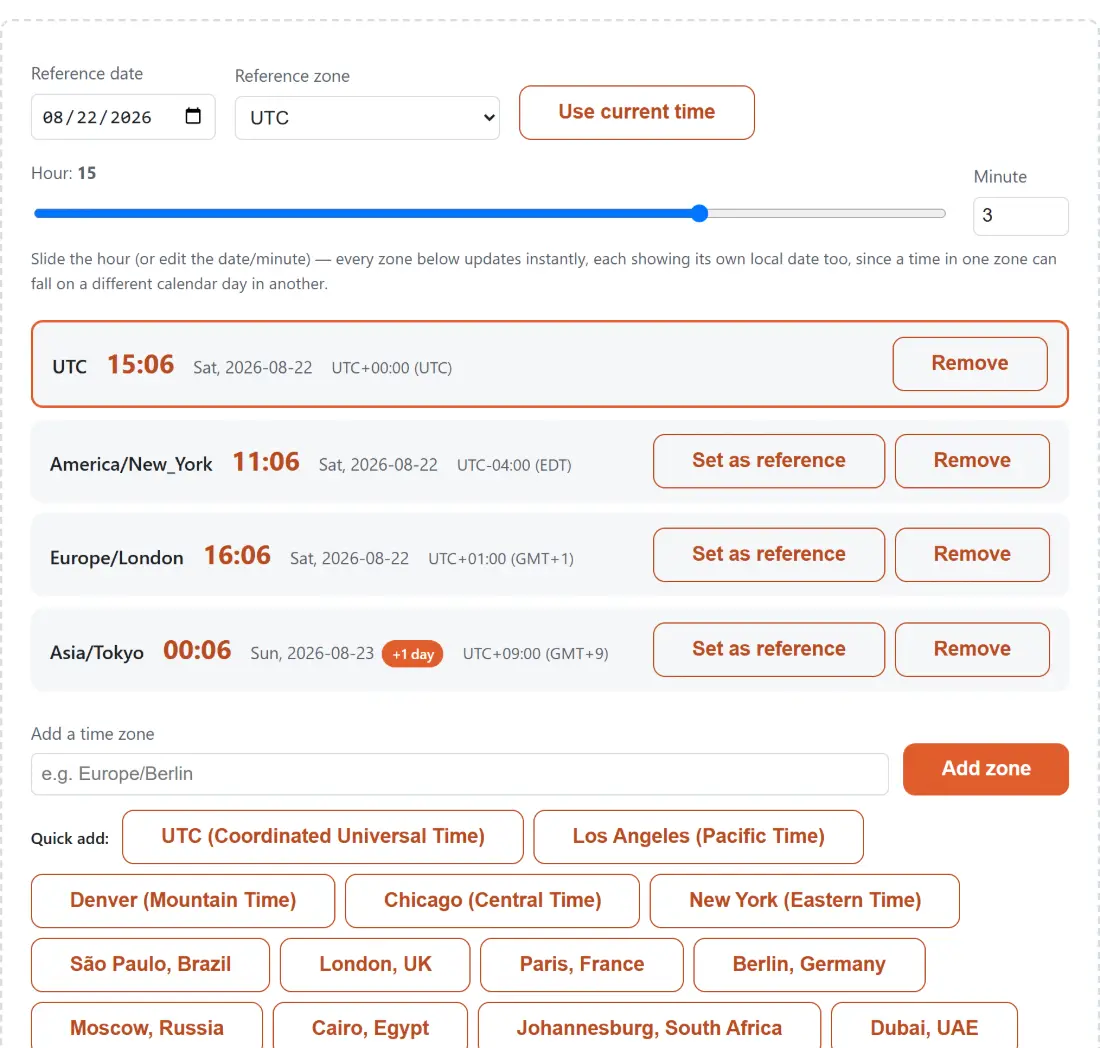
This page is built around the set. You keep a list of zones, you pick one of them as the anchor, and you move a slider. Every zone updates at once, each showing its own date, its own time and its own offset. The moment when someone in Sydney would be joining at six in the morning is visible immediately rather than deducible.
Planning a time
- Set the anchor zone and the date you are planning for.
- Drag the hour slider, or type a minute value, and watch every row move together.
- Use the now button to jump the whole board to the current instant.
- Add zones by typing an IANA name such as Europe/Berlin, or pick one of the quick add options.
- Promote any row to anchor if it is easier to think in that zone.
- Copy the whole board as text when you have found a slot.
Offsets belong to instants, not to zones
The mistake underneath most time zone bugs is treating a zone’s offset as a fixed number. It is not. New York is five hours behind UTC for part of the year and four for the rest, and the changeover dates differ from Europe’s, so for a couple of weeks each spring and autumn the usual gap between the two is an hour different from what everyone assumes.
Here every offset is computed for the specific instant on screen rather than looked up once for the zone. Slide the date across a transition and you will see an offset change under you. That is the tool being correct, and it is precisely the situation where a meeting invitation sent in March lands an hour out.
The two moments that have no right answer
Twice a year, in the zones that observe it, wall clock time stops being a well behaved function.
On the spring forward night an hour does not exist. If clocks jump from two to three, there is no such thing as half past two that day, and converting it is not a calculation with a correct result. It resolves here to the instant right after the jump, deterministically and always the same way.
On the fall back night an hour happens twice. Half past one occurs before the change and again after it, and both are real. It resolves here to the first occurrence.
Both choices match what most established date libraries do. Neither is right in an absolute sense, and the value of stating them is that you know which one you are getting rather than discovering it when a calendar entry lands in the wrong hour.
Reading a row
Each row carries the zone name, the weekday and date, the local time, and a numeric offset from UTC. Where the browser has a genuine short name for the zone at that instant, such as the eastern time abbreviations, it is shown as a hint. Many zones have no established abbreviation and get a generic offset string instead, which is why the numeric offset is the one to trust.
A row on a different calendar date from the anchor is marked with the difference. That marker is doing more work than it looks like. Crossing the date line is where scheduling goes wrong most reliably, and a row that says one day ahead is much harder to misread than a time that merely looks early.
Related date and time tools
For a fixed clock display rather than a planning board, World Clock shows the current time in several places at once. To turn the slot you picked into a calendar file, ICS Generator writes the invitation, and Discord Timestamp Generator produces a tag that renders in each reader’s own zone.
For arithmetic on dates rather than times, Days Between Dates and Week Number cover the usual questions, and Timestamp Converter handles epoch values. The rest are on the calculators hub.