The fifteen tones, and the ratio between them
Most pages that promise to tell you what you can hear play one long glide from low to high. That is enjoyable and close to useless as a measurement, because your reaction time is baked into the answer: by the time you register a tone and reach for a button, the sweep has already moved on, and the number you write down is systematically late.
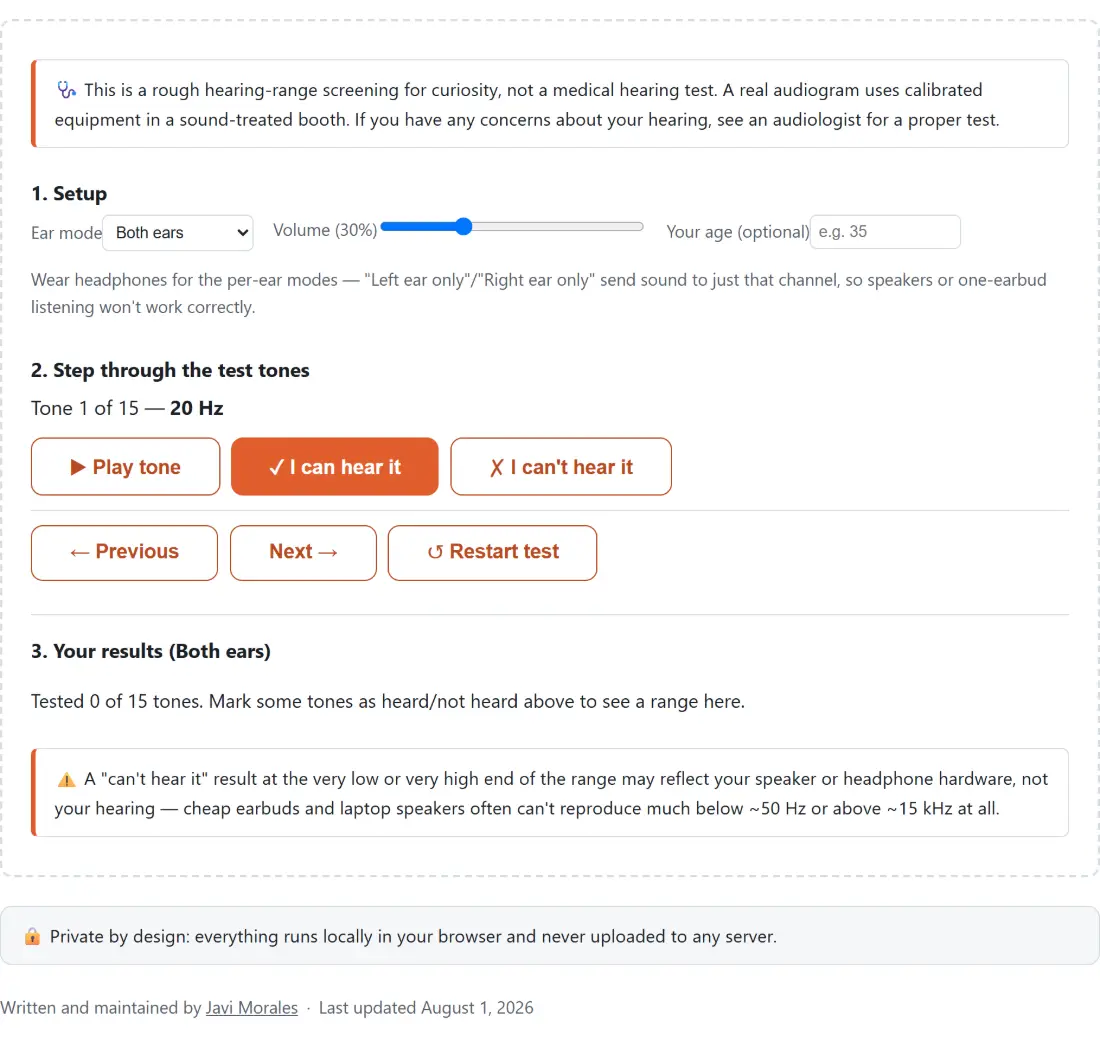
This page holds still instead. Fifteen fixed frequencies are generated across the 20 Hz to 20 kHz span, each one a constant ratio above the last rather than a constant number of hertz. That ratio works out at about 1.638, so the steps are 20, 33, 54, 88, 144, 236, 386 and 632 Hz, then 1, 1.7, 2.8, 4.6, 7.5, 12.2 and finally 20 kHz. Log spacing is the only sensible choice here: the gap from 20 Hz to 40 Hz is the same perceptual size as the gap from 10 kHz to 20 kHz, even though one is 20 hertz wide and the other is ten thousand.
Fifteen is a compromise. Enough points to place a high-frequency rolloff to roughly the nearest half octave, few enough that the test does not become a chore before you reach the interesting end of the range.
Marking a tone, then moving to the next one
- Choose an “Ear mode”: “Both ears” for a quick check, or “Left ear only” and “Right ear only” if you have headphones on.
- Set the “Volume” slider, which opens at 30 percent, and optionally type a number into “Your age (optional)” if you want the comparison line later on.
- Press ”▶ Play tone”. The line above the buttons names which tone you are on out of fifteen and its frequency, and the button turns into ”■ Stop” while the tone is sounding.
- Answer honestly with ”✓ I can hear it” or ”✗ I can’t hear it”. Either one stops the tone, records the answer against the current ear mode, and advances you one step.
- Use ”← Previous” and “Next →” to move without answering, and ”↺ Restart test” to wipe all three ear modes and go back to the first tone.
- Read the panel at the bottom, which reports how many of the fifteen you have marked and the lowest and highest frequency you said you could hear.
Turn the volume down before the first play if you are on headphones. A 20 Hz tone at a level that feels comfortable can be startling three steps later.
Hard channel separation comes from the audio graph, not a pan knob
The per-ear modes are not a pan control turned all the way over. Each tone is a single sine oscillator wired into a two-input channel merger, and the ear mode decides which of those inputs it is connected to: input 0 alone for the left ear, input 1 alone for the right, and both inputs for the centred mode. Nothing is routed to the other side at any level, because there is no connection to the other side to attenuate.
That distinction matters for a test whose whole purpose is confirming a signal reached one ear only. It also means the per-ear modes genuinely need headphones or earbuds. Play a left-only tone through speakers and the room mixes it back into both ears, which quietly turns a per-ear test into a slightly quieter both-ears test. If you want to confirm your channels are wired the way you think before you start, the speaker test has a dedicated left and right check for exactly that.
Each tone fades in and out over a 20 millisecond gain ramp rather than starting instantly, which removes the click a hard start would otherwise put at the front of every step. At the top of the range that click is loud enough to be mistaken for the tone itself.
The age bands behind the comparison line
Type an age and the results panel adds one extra sentence naming a rough typical upper limit for your band. Six bands are used: under 20, then one per decade through the twenties, thirties, forties and fifties, then a single open-ended band for 60 and older. The figures attached to them descend from roughly 19 kHz at the young end to roughly 10 kHz at the old end, and they are the widely cited ballpark numbers for age-related high-frequency loss, not measurements of anyone in particular.
Once at least one tone is marked as heard, the comparison says one of two things: your highest marked tone is at or above that rough benchmark, or it is below it. There is no pass, no fail, and no score. Plenty of people with entirely normal hearing land on either side of a population average, which is what an average is.
Your headphones set the floor and the ceiling
Before you conclude anything from a tone you could not hear, look at what is producing it. Laptop and phone speakers frequently have no meaningful output below about 50 Hz, which means the first two or three steps of this test are effectively inaudible on them regardless of your ears. The same hardware often rolls off well before 15 kHz at the other end. Cheap earbuds are just as uneven, and the unevenness is worst exactly where this test gets interesting.
The honest procedure is to repeat the test on a second, known-good pair of headphones. If the result moves, you measured a speaker. If it stays put on both, you have at least measured something consistent. To probe a single frequency freely rather than stepping through a fixed list, the tone generator will hold any value from 1 Hz to 20 kHz and includes labelled presets such as 440 Hz and 15 kHz.
A screening is not an audiogram, and the difference matters
Real pure-tone audiometry uses calibrated transducers in a sound-treated booth, presents tones at controlled levels rather than at whatever your volume slider happens to be, and is interpreted by someone trained to tell a hearing problem apart from a noisy room. None of that is available in a browser tab. This page can tell you that a 12.2 kHz tone reached you and a 20 kHz one did not; it cannot tell you why, at what level, or whether it matters.
Treat it as curiosity, a rough before-and-after when you change headphones, or a nudge toward booking a real appointment. If anything about your hearing genuinely concerns you, see an audiologist. When you are done here, the rest of the sound tools, including the binaural beats generator which also depends on true left and right separation, are collected under audio.