Two sine tones, one per ear, and a wobble that is not in the signal
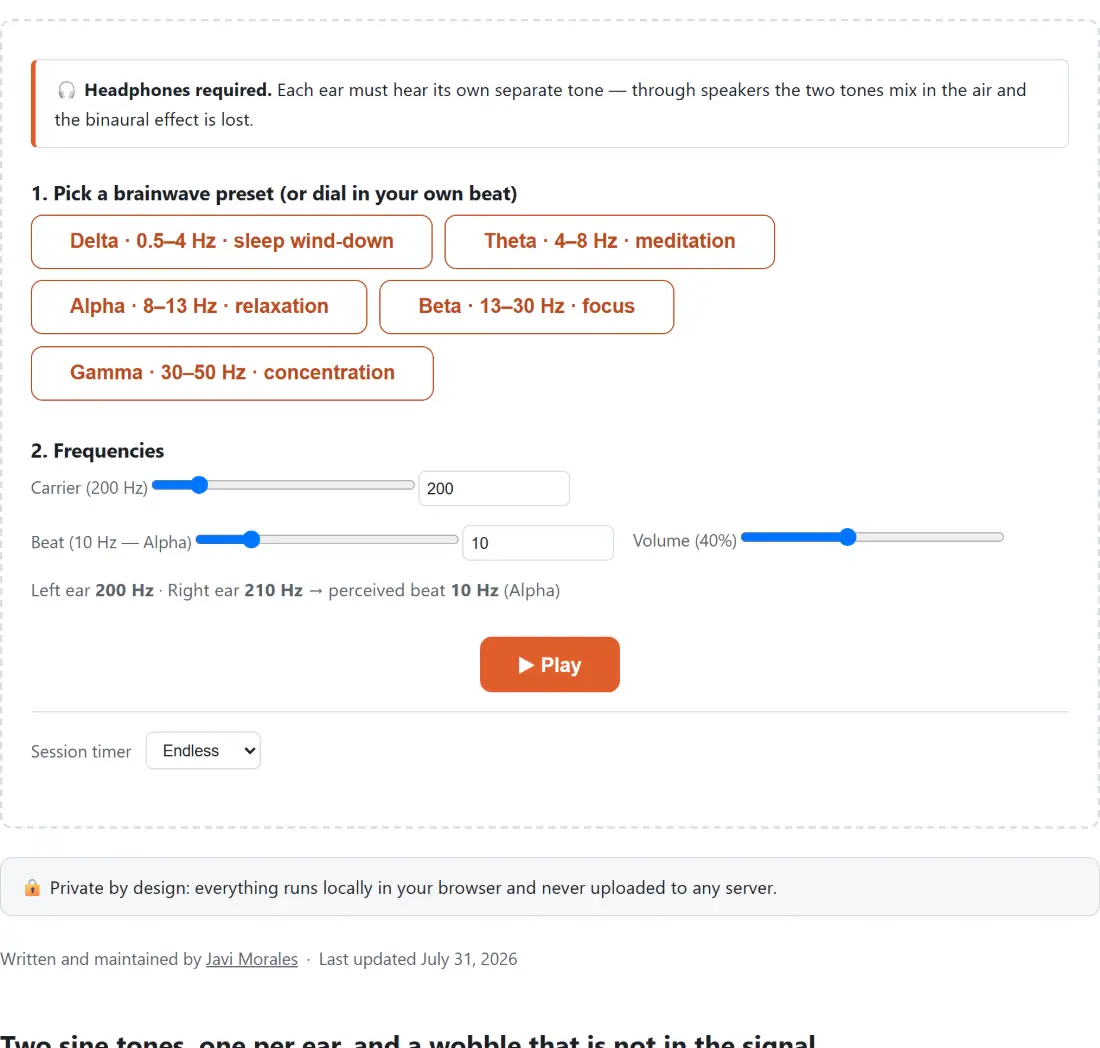
The generator does something simple and is completely open about it. Two sine oscillators start together, the first routed to the left channel and the second to the right, with the right one set slightly higher in pitch. On the default settings the left ear receives 200 Hz and the right ear 210 Hz, and the readout under the sliders states both numbers along with the difference between them.
Neither signal pulses. The slow throb you hear is constructed by your own auditory system out of the mismatch between the ears, which is why the phenomenon is described as an illusion rather than as a sound. The routing is structural rather than a setting: each oscillator is wired to exactly one input of a channel merger, so neither can leak into the other channel whatever else the page is doing.
That is also why the page opens with a headphones notice. Through speakers the two tones meet in the air before they reach your ears, and what you get is an ordinary acoustic beat, real but different.
The carrier slider stops at 1000 Hz on purpose
The carrier is the pitch you actually hear. The beat is the difference laid on top of it. They have separate ranges and separate reasons for them.
Carrier runs from 50 to 1000 Hz and starts at 200. The binaural percept is documented to be strongest for carriers of a few hundred hertz and to fade out above roughly a kilohertz, so the slider stops where the effect stops rather than covering the whole audible range. If you want tones outside that window for some other purpose, the tone generator runs from 1 Hz to 20 kHz and offers square, saw and triangle waves as well as sine.
Beat runs from 0.5 to 50 Hz in tenths of a hertz. Carrier and beat each have both a slider and a number box wired to them, so you can drag roughly or type exactly; volume is a slider only. The right ear is always carrier plus beat, which is why the two numbers in the readout are never symmetrical around the carrier.
Setting up a session
- Put on headphones or earbuds. Any pair will do, and going without is not an option.
- Click one of the five preset buttons to jump the beat to that band’s representative value, or set the beat yourself. The presets land on 2, 6, 10, 18 and 40 Hz for delta, theta, alpha, beta and gamma respectively.
- Adjust the carrier if 200 Hz is uncomfortable for you, and set the volume, which starts at 40 per cent. A moderate level is plenty, and loudness does not deepen the effect.
- Press ▶ Play. The tones fade in rather than starting abruptly, and every control keeps working while the sound runs.
- Choose a duration under Session timer if you want the session to end by itself, or leave it on Endless and press ■ Stop when you are done.
The band names are borrowed from EEG, not from an effect
The five presets are named after the conventional EEG frequency bands, and each button shows its range together with its conventional association: delta with sleep wind-down, theta with meditation, alpha with relaxation, beta with focus, gamma with concentration. Those associations describe what the bands are called in the research literature. They are not a promise about what the sound will do to you.
It is worth being blunt about that, because this genre of tool usually is not. Research on whether listening to binaural beats measurably changes attention, mood, anxiety or sleep is mixed, with small positive findings alongside null ones, and the better the study design the weaker the reported effect tends to be. What is not in dispute is that a great many people find a steady, even tone pleasant to work, meditate or fall asleep to, in much the same way they use rain or fan noise. That is a perfectly good reason to use this. Treat it as ambience rather than as treatment, and if you have tinnitus, a hearing condition or any concern about rhythmic stimulation, ask a doctor before making it a habit.
The timer fades the sound out rather than cutting it
Session timer offers Endless, 15 min, 30 min, 45 min, 1 hour and 1.5 hours. Picking one before you press play arms it at the start, changing it mid-session rearms it from that moment, and while it is running the page shows how much time is left.
When the time is up, the volume ramps down over about three seconds instead of stopping dead, which matters if the purpose of the session was to fall asleep. A manual stop uses a far shorter ramp, because someone pressing stop wants silence now and the ramp is only there to avoid the click a hard cut produces.
For a continuous background sound rather than a beat, the white noise generator mixes white, pink and brown noise with rain and ocean layers and carries the same kind of sleep timer. And if one ear seems to hear its tone more faintly than the other, the hearing frequency test checks each ear separately across the audible range, which is a more useful thing to know than any preset on this page.