Two different problems that look the same
Subtitles that do not match the picture fail in one of two ways, and telling them apart takes ten seconds and saves a great deal of frustration.
A constant offset means the subtitles are wrong by the same amount everywhere. Two seconds early at the opening line, two seconds early at the closing one. This is what you get when a file was timed against a version with a different length of opening credits, and a single shift fixes the whole thing.
Drift means the error grows. Nearly right at the start, a second out after twenty minutes, five seconds out by the end. This is a framerate mismatch, the classic case being subtitles made for a 25 frames per second broadcast played against a 23.976 film transfer, and no amount of shifting will fix it because the two timelines are running at different speeds.
Check the first line and a line near the end. If the error is the same, shift. If it grows, stretch.
Fixing an out-of-sync file
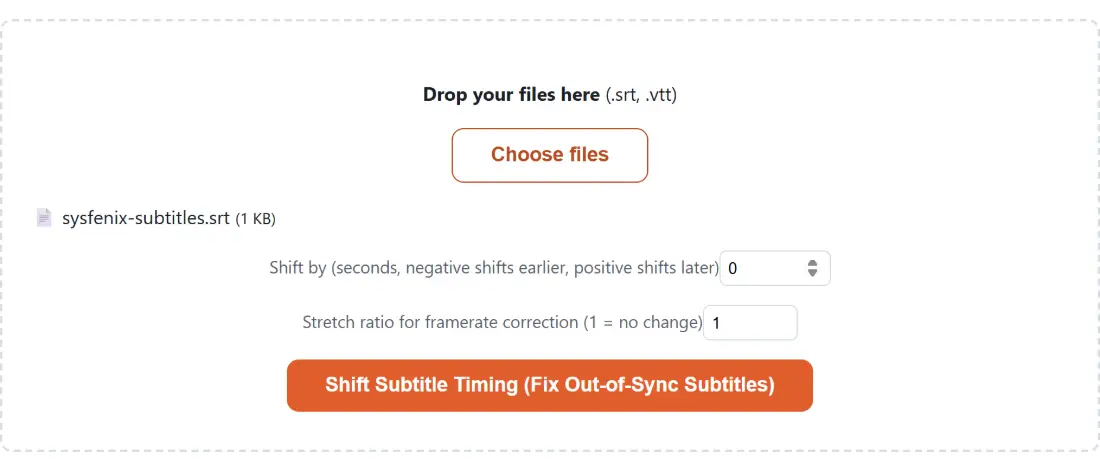
- Drop your subtitle files on the box or use Choose files. SRT and VTT are accepted, several at a time.
- Set Shift by (seconds, negative shifts earlier, positive shifts later). If a line appears two seconds late, enter minus two.
- Leave the stretch ratio at 1 unless you have diagnosed drift. Otherwise set it to the ratio of the two framerates.
- Click Shift Subtitle Timing (Fix Out-of-Sync Subtitles).
- Download each result, named after its source with a shifted suffix inserted before the extension.
- Load it against the video and check both the opening and a late scene, not just the opening.
- Process another clears the queue.
Fractions are fine in both fields. Sync errors are rarely whole seconds, and 1.4 is often closer than either 1 or 2.
Scale then translate, in that order
When both corrections are in play, the stretch is applied first and the shift second. Every new timestamp is the old one multiplied by the ratio, then offset by the fixed amount.
That order is not arbitrary. Stretching first corrects the rate at which the subtitle clock runs, fixing the drift across the whole file. The offset then slides the whole corrected timeline to line up with your chosen sync point.
Do it the other way round and the shift would itself be multiplied by the ratio, so asking to move things two seconds later would move them by 2.09 seconds under a typical framerate ratio. That is not what shift by two seconds means to anybody, so the arithmetic follows the intuition rather than the other way around.
This is a single ratio applied uniformly. It cannot correct a file whose drift changes partway through, which happens when a subtitle track was assembled from two sources.
The negative shift edge case
Shifting earlier eventually runs into the beginning of the file. A cue that starts at one second, shifted three seconds earlier, would begin at minus two.
Rather than dropping the cue or clipping it, both its start and end move forward by the same amount, so it starts at zero and keeps its original duration exactly. The subtitle appears immediately at the start of playback and stays on screen for as long as it was meant to.
Only cues near the very beginning are affected, and only when the negative shift exceeds their start time. Everything after that point is shifted normally. There is also a defensive check ensuring an end time can never end up before its own start.
Everything else is left alone
This does not parse and rebuild the file. It walks through it line by line, rewrites only the lines that look like cue timings, and passes everything else through unchanged.
The practical consequence is that nothing you did not ask about is touched. A WebVTT header stays. Note and style blocks stay. Cue identifiers, whether they are sequential numbers or names, stay exactly as they were, so a file with deliberately unusual numbering is not silently renumbered. Positioning and alignment settings written after the arrow on a timing line are carried across intact.
If no timing line is found anywhere in the file, the run stops rather than handing you an unchanged copy, since that means the file was not the subtitle format its extension claimed.
The rest of the subtitle set
To change format rather than timing, SRT to VTT converts between the two. To pull an existing track out of a video file, Extract Subtitles does that, and Subtitle Editor lets you fix individual cues by hand when a uniform correction is not enough.
Once the timings are right, Add Subtitles to Video burns or attaches them. If you trimmed the video after the subtitles were made, Trim Video tells you how much you removed, which is exactly the offset to enter here. The rest is on the video tools hub.