One format was specified, the other was just written
SubRip files are named after a Windows program from the late 1990s that ripped subtitles off DVDs. There is no standards document behind .srt; the format is simply whatever that program wrote, and everything since has copied it. A numeric index, a timing line, one or more lines of dialogue, a blank line, repeat. That informality is exactly why it became universal, and also why edge cases are decided by whichever player you happen to open the file in.
WebVTT went the other way. It was written up as a W3C specification because browsers needed something they could parse consistently for the HTML5 <track> element, and a spec means real rules: a mandatory file signature, a defined encoding, named cue settings, an optional identifier line. Anything that claims to be WebVTT and breaks those rules gets ignored rather than guessed at.
The everyday consequence is a mismatch nobody plans for. Editing software exports SubRip because that is still its default; a browser and every JavaScript player built on it want WebVTT and will silently drop a track that is not. Meanwhile captions downloaded from a web player arrive as .vtt and refuse to open in a desktop subtitle editor that only knows SubRip.
Why a WebVTT file must begin with the word WEBVTT
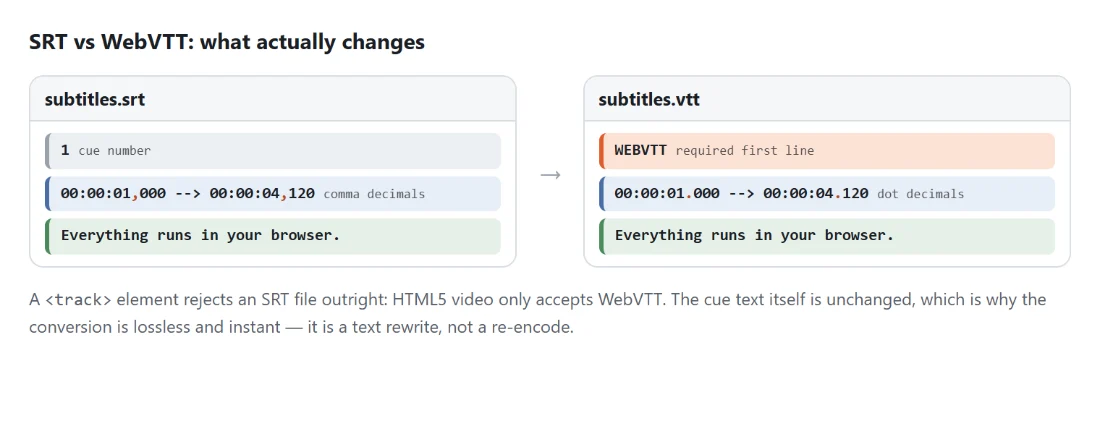
The first thing in a WebVTT file has to be the literal text WEBVTT, optionally preceded by a byte order mark. It is the format’s magic number, and a browser that does not find it treats the file as not-WebVTT and stops. This is the single most common reason a hand-renamed .srt produces a <video> element with a caption menu that does nothing at all: the content parses fine to human eyes and fails on line one for the parser.
Converting to WebVTT here writes that header and a blank line before the first cue. Going the other way it disappears, and so does everything else that is not a cue, through a mechanism worth knowing about: the parser only recognises a block as a cue if it contains a timing line. The header has none, so it produces nothing. NOTE and STYLE blocks have none either, so they vanish by the same rule rather than needing special handling.
The comma, the dot, and the optional hour
Both formats measure time as hours, minutes, seconds and milliseconds, so precision is never the issue. SubRip separates the milliseconds with a comma (00:00:01,000) and WebVTT with a full stop (00:00:01.000).
The asymmetry is in what each one allows you to leave out. WebVTT permits an abbreviated timestamp with the hours omitted, so 02:15.500 is a valid cue start. SubRip has no such allowance, so every timestamp is written back out complete and zero-padded, and that cue becomes 00:02:15,500. Values are converted to milliseconds and reformatted rather than patched with a string replacement, which is what makes an SRT to VTT to SRT round trip come back byte-identical.
Cue identifiers travel in only one direction
SubRip’s leading number is mandatory. WebVTT’s identifier line is optional, and most files in the wild, especially machine-generated captions, simply have none.
That asymmetry decides the behaviour in each direction. Going to WebVTT, each SRT index is kept as a cue identifier, because it costs nothing and gives you something to reference. Coming back to SubRip, identifiers are discarded and cues are renumbered from one, in order. Reusing them was never an option: a file with no identifiers has nothing to reuse, and one with identifiers like intro and outro would produce an SRT that no player indexes correctly.
What SubRip cannot express
WebVTT can put a caption somewhere specific. Settings after the timing line control alignment, vertical position, line placement and size, and none of that has a SubRip equivalent, so it is dropped. Styling blocks go the same way.
Cue text itself is passed through exactly as written. Bold and italic tags are understood by both worlds and come out fine. WebVTT’s voice spans and class spans do not exist in SubRip, and since nothing rewrites them, a player that does not recognise them will show the tag as visible text. Strip those before converting if the file is heading somewhere strict.
Encoding is the failure people actually hit
Malformed timings are rare. Wrong text encoding is common, and it looks like a broken conversion when it is not one.
Files are read as UTF-8, which is also the only encoding WebVTT allows. An SRT written years ago on Windows is often Windows-1252 or another single-byte encoding, and its accented letters, cyrillic or CJK characters will mis-decode into replacement characters. The timings will be perfect and the words will be wrong. Re-save the source as UTF-8 in any text editor and convert again.
When the format is right and the timing is not
Nothing here changes when a caption appears, so a file that is late throughout stays late. Shift Subtitle Timing moves every cue earlier or later and can stretch the whole track for a framerate mismatch, and the Subtitle Editor is the place to fix individual cues by hand. If you have no subtitle file at all yet, only a video with captions burnt into its stream, Extract Subtitles pulls the track out first.
Running a file through takes three steps, and there is nothing to configure:
- Drop your
.srtor.vttfiles into the box above, or click Choose files. Mixed extensions in one batch are fine. - Click Convert SRT to VTT, which is the action button’s label whichever direction your files are actually going.
- Take each download. An
.srtcomes back as.vttand a.vttcomes back as.srt, keeping the original base name.
Drop several files at once if you have a folder to get through; each is converted independently and gets its own download link. All of it is plain text processing inside the tab you are already looking at, which matters more than usual for this file type, since a subtitle file is frequently a complete script for a video that has not been published yet.