Word Search Maker

Turn your own word list into a printable word search from 5 to 25 squares, with three difficulty levels and an optional answer key. Free and private.

๐ŸŒ Espaรฑol

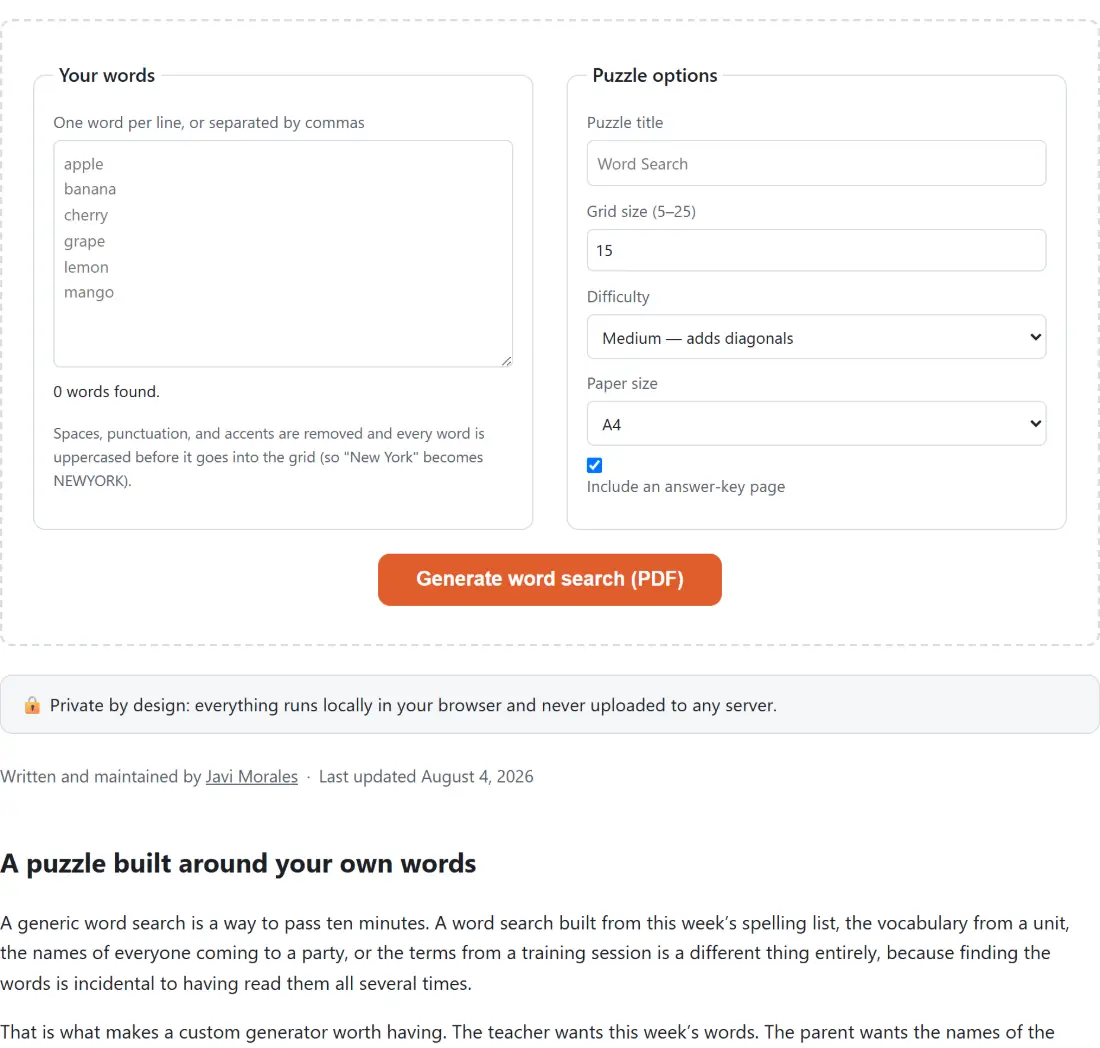
Your words

0 words found.

Spaces, punctuation, and accents are removed and every word is uppercased before it goes into the grid (so "New York" becomes NEWYORK).

Puzzle options

๐Ÿ”’ Private by design: everything runs locally in your browser and never uploaded to any server.

A puzzle built around your own words

A generic word search is a way to pass ten minutes. A word search built from this weekโ€™s spelling list, the vocabulary from a unit, the names of everyone coming to a party, or the terms from a training session is a different thing entirely, because finding the words is incidental to having read them all several times.

That is what makes a custom generator worth having. The teacher wants this weekโ€™s words. The parent wants the names of the guests. The trainer wants the jargon from the session. None of those are in a book of puzzles.

Making a puzzle

  1. Type or paste your words, separated by commas or line breaks.
  2. Set a Puzzle title for the sheet.
  3. Choose a grid size between 5 and 25.
  4. Choose a difficulty, which controls the directions words may run in.
  5. Decide whether to include an answer key page.
  6. Choose a paper size and download the PDF.

Difficulty is a direction count

The three levels are structural rather than decorative.

Easy permits only two directions, left to right and top to bottom. Every word reads the way text normally reads, which is the right level for a child who is still learning to scan a page.

Medium adds the two forward diagonals. Words still read left to right, but now they can slope, which introduces the scanning skill that makes a word search a puzzle.

Hard permits all eight directions, so words can run backwards and upwards as well. This is the adult version, and it is dramatically harder because it removes the assumption that lets you skim a grid quickly.

There is a secondary effect worth knowing. More permitted directions means more candidate positions for each word, so a hard puzzle fits more words into the same grid than an easy one. If words are coming back unplaced, raising the difficulty helps as much as enlarging the grid.

Placement, overlaps and packing

Words are placed longest first. That ordering matters more than it sounds, because a long word needs a long clear run and there are far fewer of those once a grid is partly full. Placing the difficult ones while there is room is what makes the whole list fit.

Overlaps are allowed wherever two words genuinely share the same letter in the same cell, and they are what makes a word search feel woven rather than scattered. A placement that would require overwriting a letter with a different one is rejected outright, so the grid can never end up self contradictory.

Everything left empty afterwards is filled with random letters, which is what hides the words.

Unplaced words are reported, not hidden

If a word cannot be placed, it is named after generation with the suggestion to try a larger grid or a harder difficulty.

This is the failure that ruins a home made word search. A word appears in the word bank, the child hunts for it for twenty minutes, and it was never in the grid because the generator quietly gave up on it. Being told which words did not fit, before you print, turns an unsolvable puzzle into a two second adjustment.

The usual cause is a word longer than the grid is wide, which no amount of retrying will fix. The second most common is a full grid, which a larger size or an extra direction usually solves.

For the classroom and the kitchen table, Bingo Card Generator and Flashcard Maker cover group and revision activities, and Times Tables Practice handles arithmetic drill.

For other puzzle types on the same PDF pipeline, Maze Generator and Sudoku Generator both produce sheets with solutions. Coloring Page Maker and Printable Calendar round out the set. The rest are on the pdf hub.
See it in action

Screenshot of the Word Search Maker tool with a word list entered one per line, with the normalisation stated plainly - spaces, punctuation and accents are stripped and every word is uppercased before it goes into the grid
Word Search Maker mid-process: a word list entered one per line, with the normalisation stated plainly - spaces, punctuation and accents are stripped and every word is uppercased before it goes into the grid.
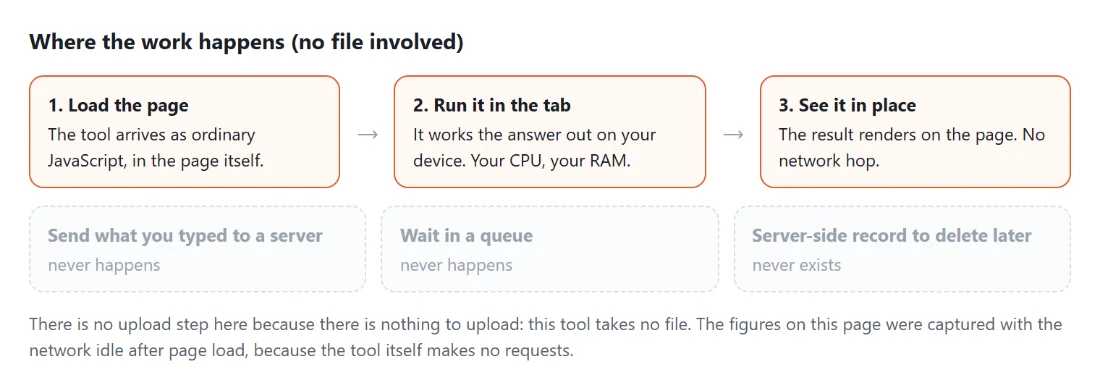
Diagram: where the work happens on a SysFenix page that has no file input at all: the tool arrives as ordinary JavaScript inside the page, works the answer out on your own device and renders it in place, so the upload, queue and server-side record a typical online tool needs never happen
Where the work happens on a SysFenix page that has no file input at all: the tool arrives as ordinary JavaScript inside the page, works the answer out on your own device and renders it in place, so the upload, queue and server-side record a typical online tool needs never happen.

Frequently asked questions

What do the three difficulty levels change?

Which directions words may run in. Easy allows only left to right and top to bottom, which is what a young child can manage. Medium adds the two forward diagonals. Hard allows all eight directions, including backwards and upwards, which is the adult puzzle. It is a real structural difference rather than a cosmetic label, and it also affects how many words fit, since more directions means more places to put them.

How large can the grid be?

From 5 by 5 up to 25 by 25, with 15 as the default. A value outside that is clamped rather than rejected. Bigger grids hold more and longer words but make the letters smaller on the printed page, so 15 is a good compromise for a full page puzzle with a list of a dozen or so words.

What happens if a word will not fit?

It is reported rather than silently dropped. Any word that could not be placed is listed by name after generation, with a suggestion to use a larger grid or a harder difficulty. That matters because a word missing from the grid but present in the word list makes the puzzle unsolvable, and finding that out from a frustrated child is worse than being told up front.

How is the list interpreted?

Split on commas and line breaks, so pasting a column from a spreadsheet or typing a comma separated list both work. Each entry is cleaned up to letters, duplicates are dropped, and the original order is kept for the printed word bank. A word longer than the grid can hold obviously cannot be placed and will appear in the unplaced list.

Can words overlap or cross each other?

Yes, wherever they share the same letter in the same cell, which is what makes a word search feel like a puzzle rather than a list of words scattered on a page. An overlap is only allowed when the letters genuinely match, so a placement that would require changing a letter already placed is rejected. Longer words are placed first, which packs the grid more densely and leaves better opportunities for the shorter ones to cross them.

Are the puzzles different every time?

Yes. Placement positions are drawn from a cryptographic random source, and the empty cells are filled with random letters from the same source, so generating twice from the same list gives two different puzzles. There is no seed field, so a specific puzzle cannot be reproduced once you have moved on.

What does the PDF contain?

The puzzle grid with your title, the word bank underneath, and optionally an answer key on its own page. It is a real vector PDF rather than a screenshot, so the grid lines and the letters stay sharp at any print size, and you can pick your paper size before generating.

Related tools