Recall is a lookup, not a calculation
The point of times tables practice is not that a child can work out 8 times 7. It is that they stop working it out. Fluent recall of the multiplication facts frees up the mental space that long multiplication, division, fractions and later algebra all need, and a pupil who is still counting up in sevens has nothing left over for the actual problem in front of them.
Which is why drill works here when it does not work for much else in maths. The eleven tables from 2 to 12 cover 132 facts in total, they never change, and the goal is measured in milliseconds rather than in method. Short, frequent, narrowly targeted sessions beat long ones. That is the shape this page is built around.
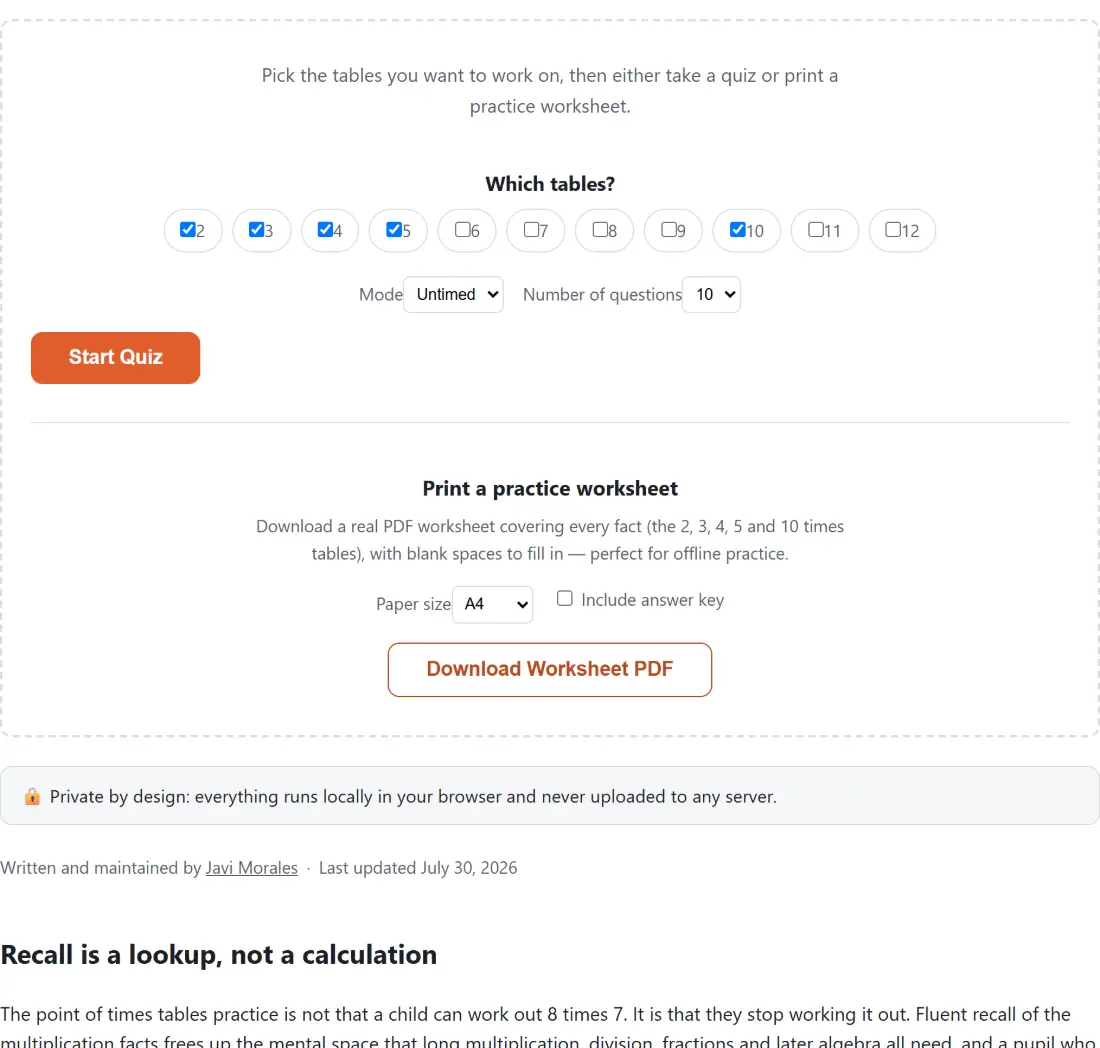
Targeting matters more than volume. A child who has the 2s, 5s and 10s cold gains nothing from re-answering them, and those easy tables inflate a score enough to hide the real gap. Every table from 2 to 12 has its own checkbox for that reason. The set that usually needs the work is 6, 7, 8 and 9, where neither a digit pattern nor a doubling trick helps, and 7 times 8 in particular has a reputation for being the last fact anyone learns.
How the question pool is built
Ticking a table adds all twelve of its facts, multiplied by 1 through 12, to the pool. Quizzes come in 10, 20 or 30 questions, and each one is drawn from that pool without replacement, so a short quiz on several tables never asks you the same thing twice.
When the requested length exceeds the pool size, the quiz starts a second lap. The obvious implementation would cycle the shuffled list from the beginning again, which is subtly bad practice: the questions come round in exactly the order you just saw them, and you start answering from memory of the sequence instead of memory of the fact. Each lap is therefore shuffled independently. One table selected with a 20 question quiz gives twelve unique facts followed by eight in a fresh random order.
Worked through: the 4s and 6s together give a 24-fact pool. A 20 question quiz on them touches 20 different facts and skips four. A 30 question quiz answers all 24, then six more from a reshuffled pass.
Timed mode, and what the clock actually measures
Untimed is for learning a table. Nothing is running, you can stare at a question as long as you like, and the only feedback is right or wrong.
Timed mode puts 30, 60 or 120 seconds on the whole quiz, not on each question, and that distinction changes the tactics. The clock keeps ticking through the roughly 1.1 second pause that shows you whether you were right, so on a 30 second setting a real slice of the budget goes to feedback rather than arithmetic. Expiry ends the quiz on the spot and scores only what you answered, so an unfinished timed quiz is a legitimate result rather than a failed one.
Use it once accuracy is already solid. Putting a clock on a table someone is still figuring out tends to produce guesses, and guesses are exactly what fact fluency practice is supposed to be replacing. Get the answers right untimed, then add speed.
From screen to paper, 40 problems a page
Scroll past the quiz for the worksheet builder. It takes the same table selection, offers A4 or Letter, and produces a real PDF rather than a print stylesheet, which means margins behave and nothing is at the mercy of browser print settings. Both halves of the page share one setup:
- Tick the tables you want under Which tables?. Everything below reads from this one selection.
- For the on-screen quiz, set Mode to Untimed or Timed, pick a Number of questions, and on timed set a Time limit.
- Press Start Quiz, type each answer into the Your answer box and press Submit.
- For paper, drop to Print a practice worksheet and choose a Paper size.
- Tick Include answer key if you want the answers filled in, then press Download Worksheet PDF.
The layout is a four by ten grid, so 40 problems fit on a page and anything longer flows onto extra pages headed “Page 1 of 2” and so on. Four tables selected gives 48 problems, so you get one full page plus a short second one. Problems appear table by table in ascending order rather than shuffled, on purpose: a worksheet is meant to be reproducible so a teacher can hand out the identical sheet to a class and mark it against one key.
Ticking “Include answer key” fills the answers in rather than printing blanks, and the filename gains a suffix accordingly. If you want a wider mix of operations on paper, Math Worksheet Generator covers addition, subtraction and division too, and Flashcard Maker is the better fit for a card-based revision session.
What the history strip can and cannot tell you
Finished quizzes are logged locally, newest first, up to 30 of them, along with your best accuracy and longest streak ever recorded. That is enough to answer the question a parent actually has, which is whether this week looks better than last week.
Two honest caveats. Streak is the longest unbroken run of correct answers within a single quiz, and it resets to zero on any mistake, so a 30 question quiz with one error in the middle can show a shorter streak than a 10 question clean run despite being the better performance. And because scores are stored per browser and never uploaded, two children sharing a device share one history. There is no login, no profile switch and no sync, which is the trade for a practice tool that collects nothing about anyone.