Printable Calendar Generator

Build a printable month or full year calendar PDF for any year from 1 to 9999, in A4 or Letter, portrait or landscape, with an optional notes column.

๐ŸŒ Espaรฑol

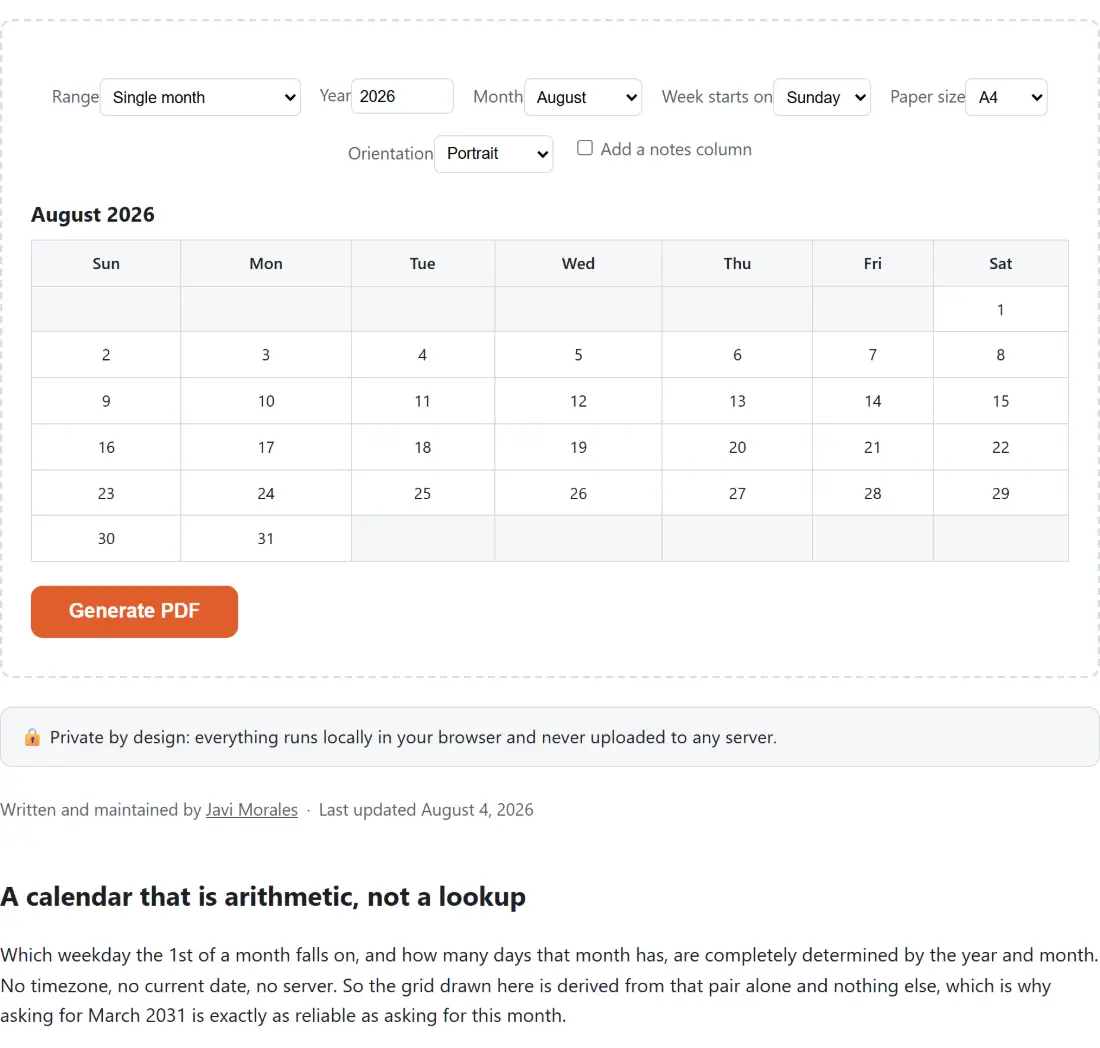
August 2026

SunMonTueWedThuFriSat
1
2345678
9101112131415
16171819202122
23242526272829
3031

๐Ÿ”’ Private by design: everything runs locally in your browser and never uploaded to any server.

A calendar that is arithmetic, not a lookup

Which weekday the 1st of a month falls on, and how many days that month has, are completely determined by the year and month. No timezone, no current date, no server. So the grid drawn here is derived from that pair alone and nothing else, which is why asking for March 2031 is exactly as reliable as asking for this month.

The one place the current date is consulted is the moment the page loads, purely to prefill the year and month dropdowns with something sensible. After that it is never read again. That single local read is a deliberate, documented compromise, because mixing local and UTC dates is a classic source of off-by-one-day bugs and this codebase has been bitten by it before.

The PDF itself is assembled in your browser with a document library that runs the same way in a browser as it does anywhere else, which is why the whole pipeline including the date maths can be tested properly rather than eyeballed.

Printing next month, or the whole year

  1. Choose a Range. Single month gives one page, Whole year (12 pages) gives twelve.
  2. Set the Year. Anything from 1 to 9999 is accepted.
  3. In single month mode, pick the Month from the dropdown.
  4. Set Week starts on to Sunday or Monday, whichever your part of the world uses.
  5. Choose Paper size, A4 or Letter, and Orientation, portrait or landscape.
  6. Tick Add a notes column if you want a blank eighth column beside each week.
  7. Check the live preview table, which redraws with every change. In whole year mode it shows the selected month only, with a note saying the PDF will carry all twelve.
  8. Click Generate PDF. The file is named for what you asked for, so a single month becomes calendar-august-2026.pdf and a full year becomes calendar-2026.pdf.

Print at 100 percent with scaling switched off. Page fitting is what turns a correctly sized A4 grid into a slightly shrunken one with uneven margins.

Whole weeks, padded ends, and variable row height

The grid always contains complete weeks. The days before the 1st and after the last are drawn as blank cells rather than being borrowed from the neighbouring months.

That means the number of rows varies. A 31 day month that begins on a Saturday spills into a sixth row. February 2026 is the opposite extreme: 28 days beginning on a Sunday, which with a Sunday start fills exactly four rows with no padding anywhere.

Row height is the available vertical space divided by however many rows that month needs, so a four row February prints with noticeably taller boxes than a six row March. If you are producing a matched set for a wall, that variation is worth knowing about before you print twelve pages.

The notes column costs width

Ticking the notes option does not squeeze an extra narrow strip in beside a fixed seven column grid. It changes the grid to eight equal columns across the same usable width.

On A4 portrait the usable width between the 36 point margins is a little over 523 points. Split seven ways that is about 74.8 points per day. Split eight ways it is about 65.4, so every day cell loses roughly an eighth of its width and the notes column is exactly as wide as a day. Row heights are untouched.

If your priority is room to write inside the day boxes rather than a separate notes strip, landscape without the notes column gives you far more space than portrait with it.

For the arithmetic behind a date rather than a printed grid, Days Between Dates counts the span between two dates, and Week Number answers which ISO week a given date falls in, which no printed calendar here marks.

Other things worth printing on the same paper: Graph Paper Generator for squared and dotted sheets, Handwriting Worksheets for tracing practice, and Label Maker for a sheet of labels. Timesheet Calculator covers the hours side of a work month. The rest of the PDF set is on the PDF tools hub.
See it in action

Screenshot of the Printable Calendar Generator tool with a calendar builder offering a single month or a whole 12-page year, with the week starting Sunday or Monday, A4 or Letter paper and orientation, previewed before the PDF is generated
Printable Calendar Generator mid-process: a calendar builder offering a single month or a whole 12-page year, with the week starting Sunday or Monday, A4 or Letter paper and orientation, previewed before the PDF is generated.
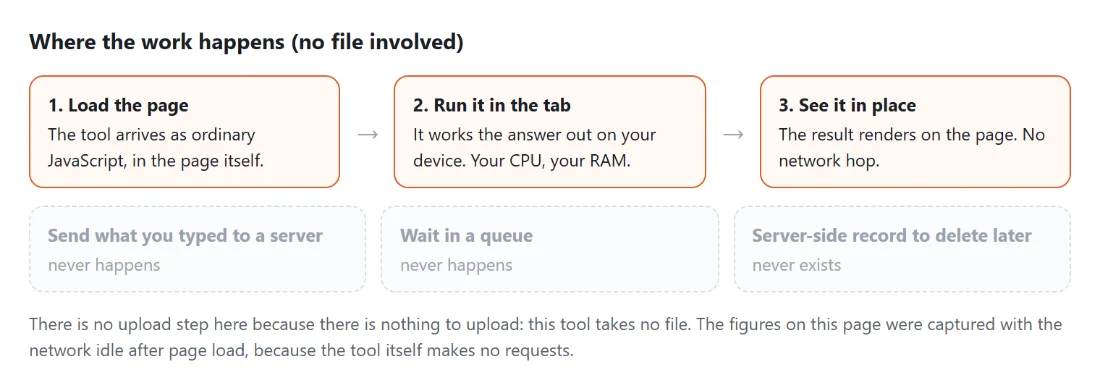
Diagram: where the work happens on a SysFenix page that has no file input at all: the tool arrives as ordinary JavaScript inside the page, works the answer out on your own device and renders it in place, so the upload, queue and server-side record a typical online tool needs never happen
Where the work happens on a SysFenix page that has no file input at all: the tool arrives as ordinary JavaScript inside the page, works the answer out on your own device and renders it in place, so the upload, queue and server-side record a typical online tool needs never happen.

Frequently asked questions

What does whole year mode actually produce?

Twelve pages, one calendar per page, in month order. It is not a compact single sheet showing all twelve months at once. That keeps every page identical to what single month mode would have produced, which is what you want if you are printing a wall set or a planner, and it means the grid drawing logic is exactly the same code in both modes.

How does the notes column change the layout?

It adds an eighth column and splits the usable page width into eight equal parts instead of seven, so every day cell gets narrower. On A4 portrait a day cell goes from about 74.8 points wide to about 65.4. The rows keep their height. If you want the widest possible day boxes, leave the notes column off and switch to landscape instead.

Why do some months print with six rows and others with four?

Because the grid always shows whole weeks and pads the ends with blanks. A 31 day month whose first day lands late in the week needs six rows to fit. At the other extreme, February 2026 has 28 days and starts on a Sunday, so with a Sunday start it fits in exactly four rows and no padding at all. Row height is divided by however many rows the month needs, so a four row month gets taller boxes.

Does switching between Sunday and Monday start change the number of rows?

It can. The same month may need five rows starting on Sunday and six starting on Monday, or the reverse, because the offset before the first of the month changes. If you are printing a set and want them consistent, check a few months in the preview before you generate the whole year.

Which year can I ask for?

Anything from 1 to 9999. The calculation is calendar arithmetic on a year and month pair, with no reference to today's date at all, so a calendar for 2031 or 1970 is drawn exactly as correctly as one for this year. The only place the current date is read is to prefill the form when the page loads.

Do the calendars mark public holidays?

No. There is no holiday data of any kind, in any country, and adding it would mean picking a jurisdiction and keeping a list current. The notes column is the intended workaround for a printed sheet. What you get is a clean grid of numbered days with the weekday labels across the top.

What paper sizes are supported?

A4 and Letter, in portrait or landscape. A4 is drawn at 595.28 by 841.89 points and Letter at 612 by 792, which are the standard sizes, so printing at 100 percent with no scaling gives you the real thing. Margins are 36 points, half an inch, on every side.

Related tools