Alfa and Juliett: the spellings this converter writes out
The table this page encodes from is the ICAO one, with the official spellings rather than the everyday ones. A becomes Alfa, not Alpha. J becomes Juliett, with two Ts. X becomes X-ray, with the hyphen. Those spellings were not chosen to look tidy; they were chosen so that a speaker whose first language treats “ph” or a soft “j” differently still arrives at the same sound over a poor radio link.
The digits get words too, which people forget. Zero through Nine each have an entry, so a reference number mixing letters and digits converts in one go rather than leaving you to read the numerals out separately. The reference chart on the page holds thirty six entries in total, laid out in eighteen rows of two columns: A through R down the left, then S through Z and the ten digits down the right.
Decoding is deliberately more forgiving than encoding. Because a transcript typed up by a person very often uses the common spelling, the reverse table accepts Alpha for A, Juliet for J and Xray without a hyphen for X, on top of every official word. You get the strict spellings when you write and the loose ones when you read.
The slash that separates one word from the next
Encoding “HI” gives you Hotel India. Encoding “HI THERE” gives you Hotel India, then a space, a slash and another space, then the words for the second word. Without that marker a multi-word phrase would be an unbroken stream of phonetic words with no way to see where one ended. A slash wrapped in spaces can never be confused for a phonetic word, which is exactly why the Morse Code Translator on this site marks its word boundaries the same way.
Reading in the other direction is looser about spacing than writing is. Any run of whitespace splits one phonetic word from the next, and a slash with any amount of whitespace around it, or none at all, splits one original word from the next. That means a pasted transcript with inconsistent spacing still decodes cleanly, and stray or doubled slashes are simply dropped rather than producing empty words.
Spelling a booking reference down the phone
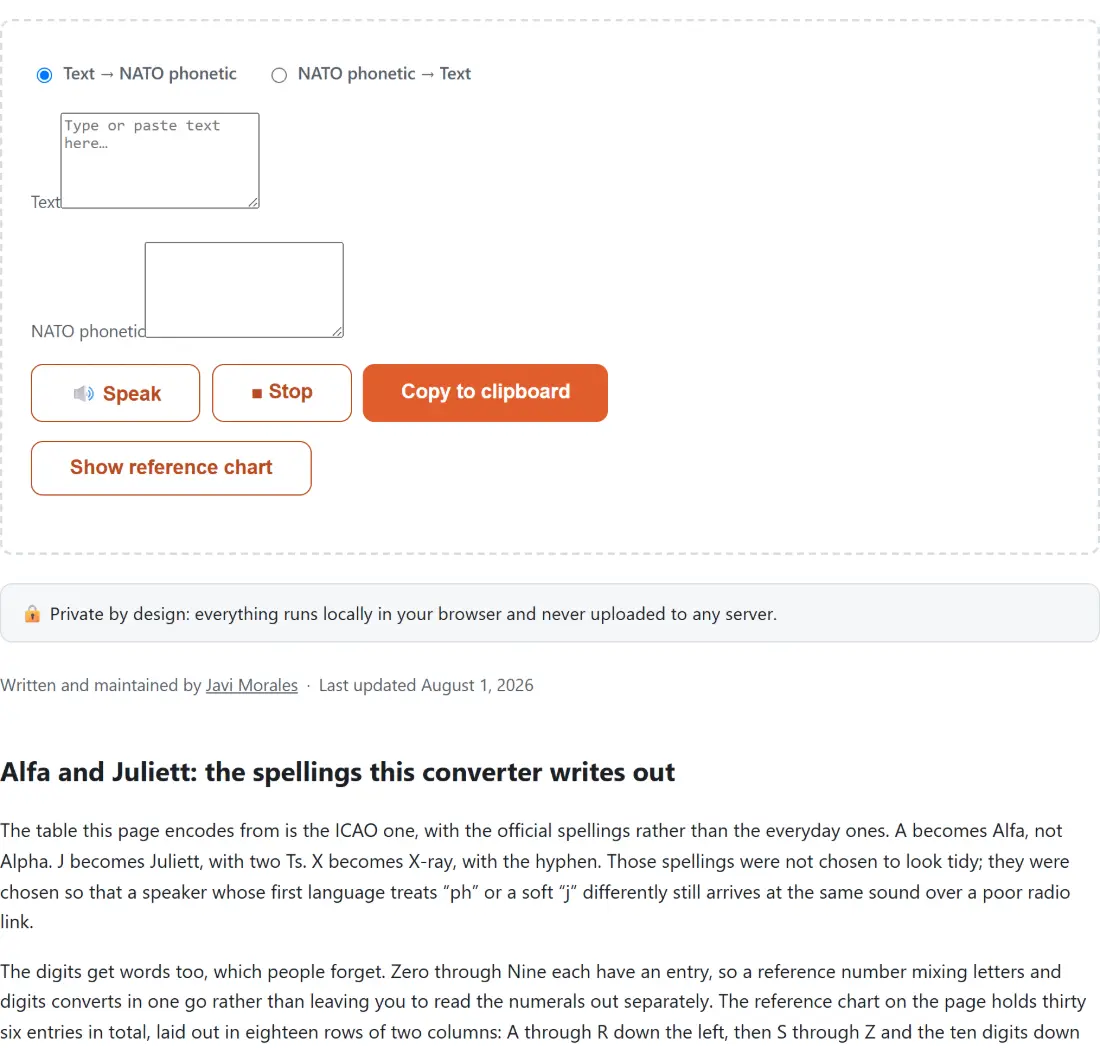
- Leave the direction on Text → NATO phonetic, which is the option already selected when the page loads.
- Type or paste the reference into the box labelled Text. The box below, labelled NATO phonetic, fills in as you type. There is no convert button to press, because the conversion is a cheap pure function that runs on every keystroke.
- Press 🔊 Speak if you want to hear the rhythm before you say it yourself, and ■ Stop to cut the playback short.
- Press Copy to clipboard to take the spelling with you, or Show reference chart to open the full table on the page and read straight from it.
Letters and digits only, and what stops it dead
Anything outside A to Z and 0 to 9 halts the conversion. A hyphen in a phone number, a dot in an email address, an accented letter in a surname, an emoji pasted in by accident: none of them have a phonetic word, and rather than silently dropping the character the converter refuses and tells you which character it choked on. That is the right trade, because a spelling that quietly lost a character is worse than no spelling at all.
The practical consequence is that punctuation has to come out first. Convert the letters and digits of an email address and say the at sign and the dot in plain English, which is what people do out loud anyway. If you need to copy an unusual symbol for some other purpose, the Special Characters Picker is the tool for that, and the rest of the text tools are listed on the hub.
What pressing Speak actually does
There is no audio file involved and nothing is downloaded. The button hands a string to the speech engine already built into your browser, slightly slowed down, and lets it read the words. The one transformation applied first is that the slash separators are replaced with commas, because a speech synthesizer will happily read a slash out loud as the word “slash” whereas a comma is heard as a short pause. That single substitution is the pure, tested part of the playback; the rest is browser built-in.
Support for that engine is broad but not guaranteed, so the page checks for it on load and disables the button when it is missing, with a note explaining why. Leaving the page cancels any speech still in progress. In the reverse direction the button reads whatever phonetic text you pasted into the input box, since that is the box holding phonetic words in that mode.
Round trips, and the one thing that does not survive one
Type “hello world”, switch direction, and you get HELLO WORLD back: correct letters, wrong case. Nothing is broken. A phonetic word carries a letter and no case information whatsoever, so there is nothing for the decoder to restore. Encoding ignores case for the same reason, and lower case input produces exactly the same phonetic spelling as upper case input.
If the capitals matter, the Case Converter will put the decoded text back into sentence case or lower case in one pass. And if letter-by-letter code systems are your thing, the Braille Translator solves a related problem with a completely different mapping: cells of raised dots rather than words you can shout across a radio channel.