Special Characters Picker

Click to copy 145 curated Unicode characters across seven tabs, currency, math, arrows, punctuation, legal, accents and invisible, with code point search.

🌐 Español

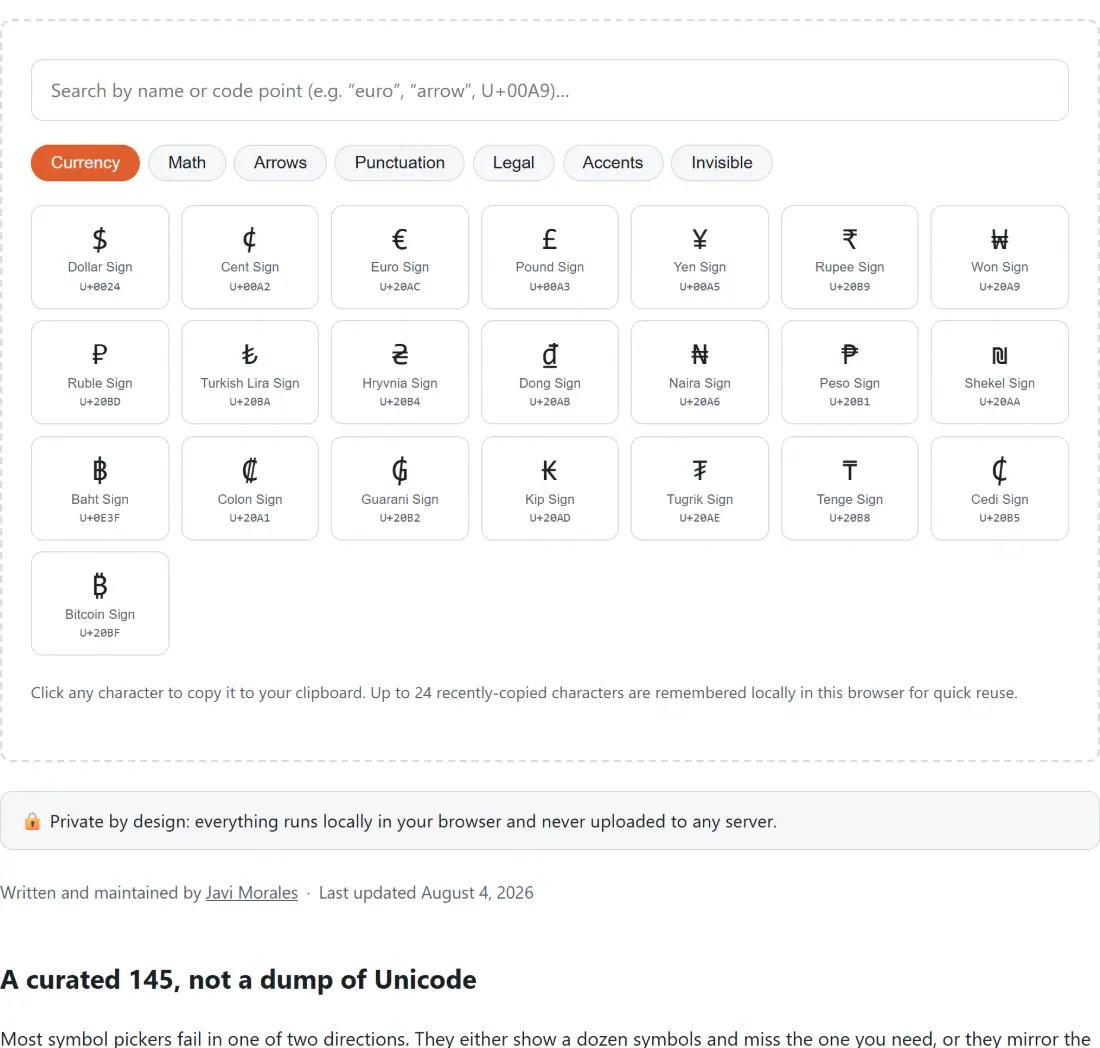
Click any character to copy it to your clipboard. Up to 24 recently-copied characters are remembered locally in this browser for quick reuse.

🔒 Private by design: everything runs locally in your browser and never uploaded to any server.

A curated 145, not a dump of Unicode

Most symbol pickers fail in one of two directions. They either show a dozen symbols and miss the one you need, or they mirror the whole Unicode table and leave you paging through thousands of Han characters looking for an em space.

This one takes the middle road: 145 characters, split across seven tabs, every one of them present because it comes up in ordinary writing. Currency covers 22 signs, math 30, arrows 18, punctuation 19, legal 6, accents 35 and invisible 15. Every entry’s glyph is machine checked against its own recorded code point in the test suite, so a typing slip in either field fails the build rather than shipping a button that copies the wrong character.

Getting a character onto your clipboard

  1. Pick a tab, or type into the search box to search across every category at once.
  2. Read the name and code point printed under each glyph if two candidates look alike.
  3. Click the character. It goes straight to your clipboard and the page confirms which one it copied by name and code point.
  4. Paste it wherever you need it.
  5. Come back later and your last 24 copies are waiting in a row at the top.

Searching by code point, including the sloppy ways

Searching by name is the obvious path, but code point search is the one that saves time when you already know what you want. The field accepts the hex value in whatever form you happen to have it. U+00A9, 0x00a9, 00a9 and a9 all reach the Copyright Sign, because the query is stripped of a U plus or 0x prefix and then matched as a substring against the zero padded lowercase hex.

The substring behaviour has a consequence worth knowing. A two character query like a9 matches any code point containing those digits anywhere, so it returns the Won Sign at U+20A9 and the Hooked Left Arrow at U+21A9 alongside the copyright sign. That is a feature when you half remember a code point and a mild nuisance when you know it exactly, in which case type the full four digits.

The tab most people do not expect

Invisible characters are the reason this tool gets bookmarked. A non-breaking space keeps a number and its unit on the same line. A thin space or hair space tunes typographic spacing where a full space is too wide. A zero width joiner is what holds a compound emoji together. A byte order mark is what someone accidentally left at the front of the file you are debugging.

None of them can be typed on a normal keyboard and none of them are visible once pasted, which is exactly why having them behind named buttons with their code points printed is worth more than the visible symbols. If you are dealing with the opposite problem and need to turn characters into escaped markup instead, HTML Encode converts them to entities, and Base Converter is the place to convert a code point between hex, decimal and binary.

Where the recent list lives

The recently used row is stored in your browser’s local storage under a single key, holding just the glyphs themselves rather than full records, most recent first and capped at 24. Reopening the page rebuilds the full names and code points from those glyphs. Corrupt or missing stored data resolves to an empty list rather than throwing, so a bad value can never break the page.

Nothing about this touches a server. There is no account, no sync between devices and no history beyond the last two dozen characters on the browser you used.

For changing the case of a whole passage rather than inserting one symbol, use Case Converter. To spell out a string unambiguously over a phone or radio, NATO Phonetic Converter maps each letter to its code word. For decorative Unicode variants of the normal alphabet rather than genuine symbols, Fancy Text Generator is the right tool. The rest are on the text hub.
See it in action

Screenshot of the Special Characters Picker tool with a browsable grid of special characters grouped by category, each tile showing the glyph above its code point and copying to the clipboard when clicked
Special Characters Picker mid-process: a browsable grid of special characters grouped by category, each tile showing the glyph above its code point and copying to the clipboard when clicked.
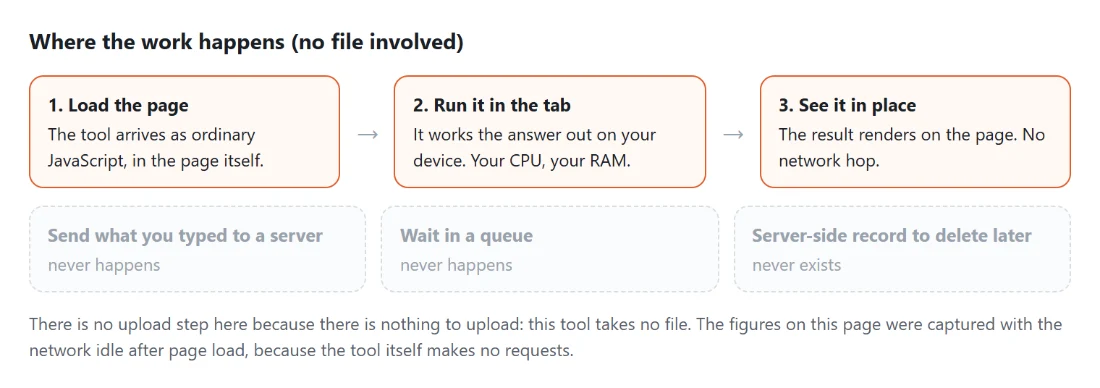
Diagram: where the work happens on a SysFenix page that has no file input at all: the tool arrives as ordinary JavaScript inside the page, works the answer out on your own device and renders it in place, so the upload, queue and server-side record a typical online tool needs never happen
Where the work happens on a SysFenix page that has no file input at all: the tool arrives as ordinary JavaScript inside the page, works the answer out on your own device and renders it in place, so the upload, queue and server-side record a typical online tool needs never happen.

Frequently asked questions

Is this the whole of Unicode?

No, and it is not trying to be. The picker holds 145 hand-checked characters across seven categories, chosen because they are the ones people actually hunt for. Unicode itself has well over a hundred thousand assigned code points, the large majority of which are letters of scripts you either already have a keyboard for or would never search a symbol picker to find. A shorter curated grid you can scan is more useful than an exhaustive one you have to search blindly.

How is the search field matching what I type?

Three ways, tried in order. An exact match on the glyph itself, so pasting a symbol finds it. A case insensitive substring of the character's name, so typing euro finds the Euro Sign. And a substring of the code point in hex, with the U plus prefix, an 0x prefix or no prefix at all, and with or without the leading zeros. Because it is a substring match on hex, a short query can pull in neighbours, and typing a9 returns the Won Sign, the Hooked Left Arrow and the Copyright Sign together.

What are the invisible characters for?

That tab holds 15 characters that occupy space or affect layout without drawing anything, including the non-breaking space, five different fixed width spaces, the zero width space, the zero width joiner and non-joiner, the left to right and right to left marks, the word joiner and the byte order mark. They are used to stop a line breaking in the wrong place, to control how emoji and scripts join, or to force text direction. Each still copies as a real character even though the button shows only its name and code point.

Does the recently used row survive a page refresh?

Yes. Up to 24 recently copied characters are kept in your browser's own local storage on your device, most recent first, and they reappear the next time you open the page in the same browser. Nothing is sent anywhere and there is no account. If storage is unavailable, for example in a private window, the list still works for the current session and simply is not saved.

What is shown on each button?

The glyph itself at a large size, its Unicode name underneath, and its code point in the conventional U plus four digit hex form. Hovering shows the same name and code point as a tooltip, and screen readers get a copy label naming both. The code point is there because it is the only unambiguous way to identify a character when two of them look nearly identical at small sizes.

How many characters are in each tab?

Accents is the largest with 35, then math with 30, currency with 22, punctuation with 19, arrows with 18, invisible with 15, and legal with 6. Legal is small on purpose, since the copyright, registered and trademark signs plus a few relatives cover essentially every request.

Clicking a character did nothing. What happened?

Copying uses the browser clipboard interface, which can be refused, typically on a page served without a secure connection or in a browser configuration that withholds clipboard access. When that happens the page says so and asks you to select the character and copy it manually instead, so the character is still reachable. The recently used list only records a character after a copy actually succeeded.

Related tools