Typing in one box and playing what comes out of the other
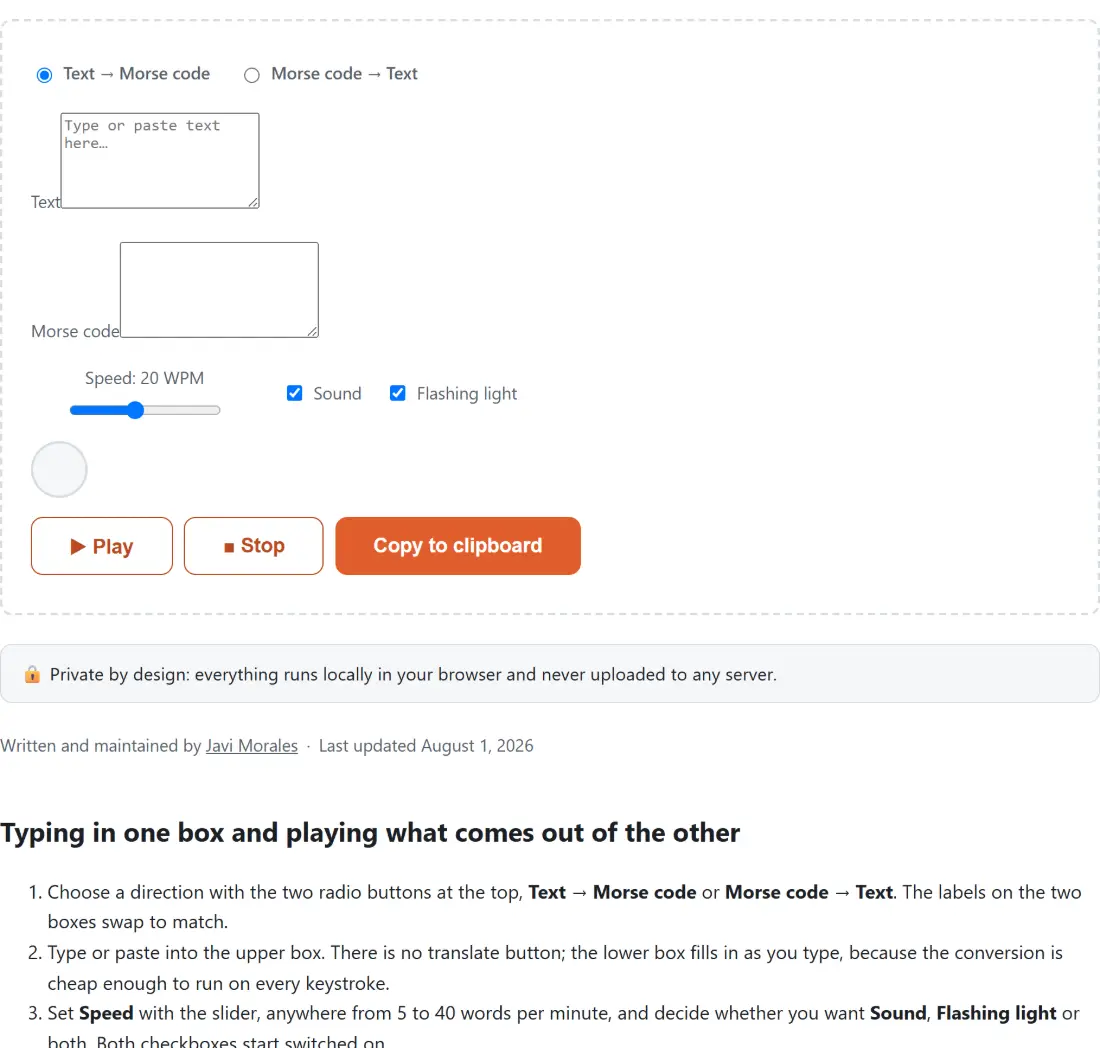
- Choose a direction with the two radio buttons at the top, Text → Morse code or Morse code → Text. The labels on the two boxes swap to match.
- Type or paste into the upper box. There is no translate button; the lower box fills in as you type, because the conversion is cheap enough to run on every keystroke.
- Set Speed with the slider, anywhere from 5 to 40 words per minute, and decide whether you want Sound, Flashing light or both. Both checkboxes start switched on.
- Click ▶ Play. The tone sounds and the circle above the buttons lights in step with it. The button reads back as playing while it runs, and ■ Stop cuts it off early.
- Click Copy to clipboard to take the contents of the lower box with you. Switching direction afterwards moves that result up into the input box, so you can round-trip a message without pasting it again.
The 54 entries in the table, and what happens to the 55th character
The table is the International Morse alphabet: 26 letters, 10 digits and 18 punctuation marks. Case never enters into it, because Morse has no notion of capitals, so typing a phrase in lower case and in upper case produces byte-identical output. The same fact runs the other way with less flexibility: decoding can only ever return upper case, since there is nothing in the dots and dashes to recover case from. That is not a limitation of this implementation, it is the code.
Anything outside those 54 characters stops the run. An accented letter, an emoji, a curly quotation mark pasted in from a word processor, all of them raise an error that names the exact character it choked on and lists what is supported. This page is a bespoke widget rather than one of the shared text shells, which is why you get the specific message rather than a generic apology. Curly quotes are the one to watch: the straight apostrophe and the straight double quote are both in the table, and their typographic cousins are not.
If the goal is to spell something out loud rather than in dots and dashes, the NATO Phonetic Alphabet Converter has the same two-box shape but speaks the result through your system voice instead of generating a tone. For another substitution system entirely, the Braille Translator maps the same alphabet onto six-dot cells, and the Caesar Cipher Encoder & Decoder covers shift ciphers if what you are holding is a puzzle rather than a transmission.
One space between letters, a slash between words
There is more than one convention for writing Morse as plain text, so here is exactly the one used. A letter’s dots and dashes are written with nothing between them. A single space separates letters. A space, a slash and a space separates words. So HI comes out as two tokens, and HI THERE comes out as those two tokens, then a slash, then five more.
Decoding is looser than encoding on purpose. Any run of whitespace, including a line break, counts as a letter separator, and a slash counts as a word separator whether or not it has spaces around it. Morse copied out of a forum post with tabs, wrapped lines or tight slashes still comes back correctly. A doubled slash produces an empty word, which is dropped rather than turned into a stray space.
PARIS timing, and why 20 WPM makes a dot 60 milliseconds
Speed in Morse is defined by a reference word, and the reference word is PARIS. The convention gives one dot unit as 1200 divided by the words per minute, so the default of 20 words per minute makes a dot 60 milliseconds. Everything else is a multiple of that single unit: a dash is three units, the gap inside a letter is one, the gap between letters is three, and the gap between words is seven.
The arithmetic checks out, and it is satisfying that it does. Encode PARIS at 20 words per minute and the schedule this tool builds runs for 2,580 milliseconds. Add the 420 milliseconds of word gap that would follow it in a real transmission and you land on exactly 3,000, which is one twentieth of a minute. Twenty of those a minute is 20 words per minute, exactly as the reference promises.
A worked case for the most famous message: at 20 words per minute, three dots, three dashes and three dots becomes 17 alternating segments totalling 1,620 milliseconds. At the slider’s slowest setting of 5 words per minute the dot stretches to 240 milliseconds and the same message takes 6,480. At the fastest setting of 40 the dot drops to 30 milliseconds and it takes 810. Note that no gap is appended after the final symbol, so the light goes out the instant the last dash ends.
A 700 Hz sine and the ramp that stops it clicking
The tone is a sine wave at 700 Hz, a comfortable listening pitch that sits well clear of most background hum, played at a peak gain of 0.3 so it is audible without being painful in headphones. It is one continuous oscillator for the whole message, gated by a gain node rather than started and stopped per symbol.
Gating matters more than it sounds. Switching a gain from zero to full instantly produces an audible click of its own, which is exactly the wrong artefact in a tool made of clicks, so each transition is a short linear ramp instead. The ramp is capped at ten milliseconds or half the segment it is entering, whichever is smaller. In practice the cap never bites: the shortest possible segment is a 30 millisecond dot at the top of the speed range, and half of that is still 15, so every transition gets the full ten milliseconds.
The playback loop itself is a plain chain of timers rather than the audio-clock scheduler a metronome needs. That is a deliberate trade. A metronome runs indefinitely and accumulates drift; a Morse message is short and finite, and one callback driving both the gain automation and the light keeps the two in step by construction.
Decoding someone else’s copy when the spacing is off
Almost every failed decode is a spacing problem, not a table problem. The decoder needs to know where each letter ends, and if a message arrives as one unbroken run of dots and dashes, that information is genuinely gone. The error will name the run it could not match; break it into letters and try again.
The other frequent trip-up is a character that looks like a dash but is not. A hyphen typed on a keyboard is fine, but an en dash or em dash pasted from formatted text is a different character and will be rejected. If a paste refuses to decode and the spacing looks correct, retype one suspicious dash by hand and see whether the error moves.
For the wider set of encoding and conversion utilities, the text tools hub lists them, and the text tools guide puts them in context.