Privacy Policy Generator

Answer a short questionnaire and get a privacy policy template in HTML, Markdown or plain text, with optional GDPR and CCPA sections. Not legal advice.

🌐 Español

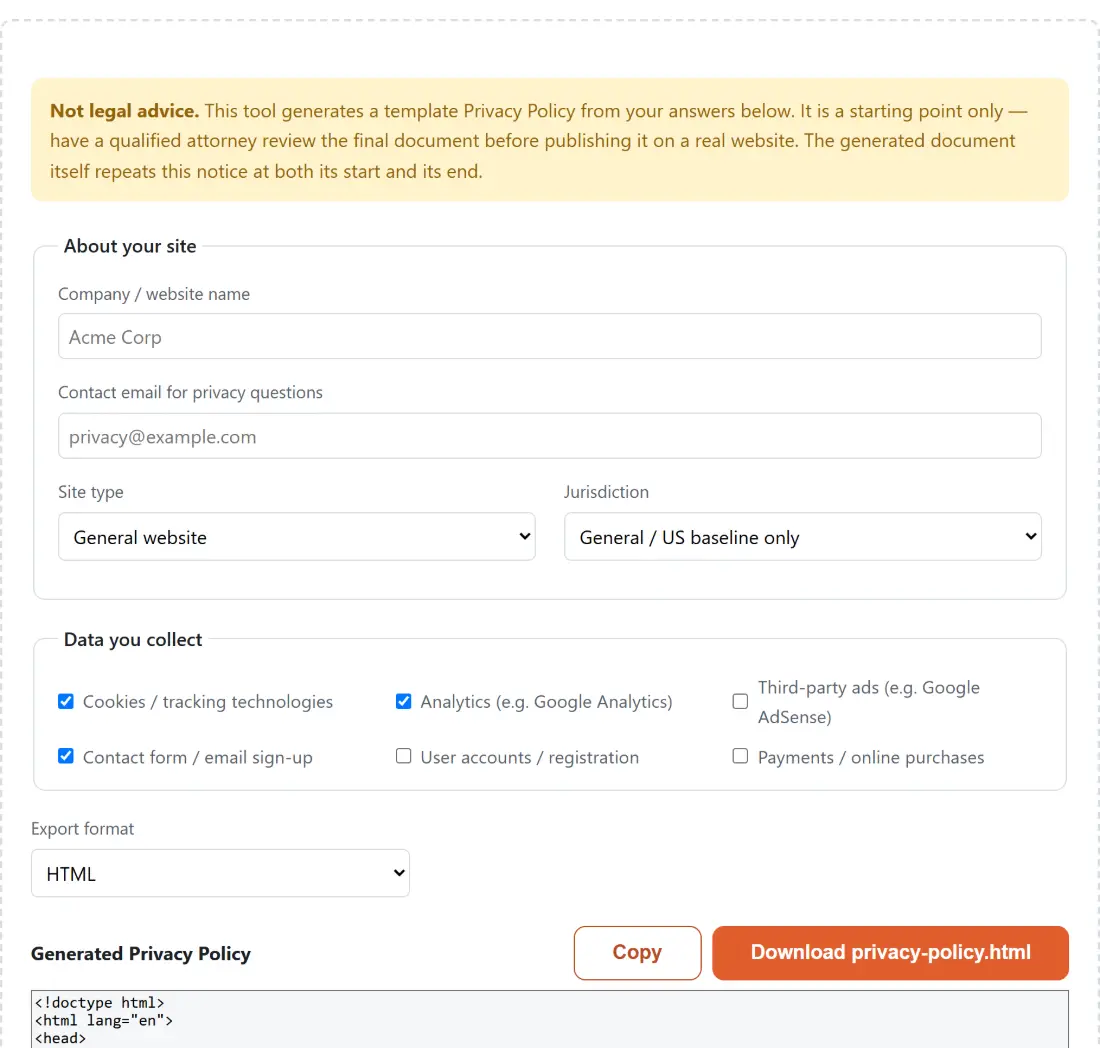
Not legal advice. This tool generates a template Privacy Policy from your answers below. It is a starting point only — have a qualified attorney review the final document before publishing it on a real website. The generated document itself repeats this notice at both its start and its end.

About your site
Data you collect

Generated Privacy Policy

🔒 Private by design: everything runs locally in your browser and never uploaded to any server.

What a template can and cannot do for you

A generated privacy policy is a checklist made of prose. Its real value is structural: it makes sure you have said something about what you collect, why, who you share it with, how long you keep it, what rights users have, and how to contact you. Those are the sections a reviewer expects to find, and a blank page is where most people forget half of them.

What it cannot do is know your business. It does not know that your analytics vendor stores data in a particular region, that you retain order records for seven years for tax reasons, or that your sector has its own reporting duty. Those are the parts that make a policy accurate rather than merely present.

So the honest framing is that this gets you from nothing to a reviewable draft in about ninety seconds, and the review still has to happen. The document says exactly that, in its own first section and again in its last, so the warning cannot be lost when the text is copied elsewhere.

Filling in the questionnaire

  1. Type your Company / website name and a Contact email for privacy questions. Leave either blank and a bracketed placeholder is used instead.
  2. Pick a Site type. The four options are General website, Blog, Online store (e-commerce) and Web app / SaaS. This changes how the document refers to your service throughout.
  3. Pick a Jurisdiction. General / US baseline only, GDPR (European Union / UK), CCPA (California), or Both GDPR and CCPA.
  4. Under Data you collect, tick the boxes that are true. Cookies / tracking technologies, Analytics (e.g. Google Analytics), Third-party ads (e.g. Google AdSense), Contact form / email sign-up, User accounts / registration and Payments / online purchases.
  5. Choose an Export format of HTML, Markdown or Plain text.
  6. Read the draft in the output box, which regenerates as you change any answer.
  7. Use Copy for the clipboard, or the download button, which is labelled with the filename it will produce.

Tick honestly rather than defensively. A policy claiming you collect payment information when you do not is a promise you have to keep, and a policy that omits your ad network is the kind of gap that gets noticed.

Which sections your answers switch on

The document is not one fixed block of text with names substituted. It is assembled from a list of sections, some of which only exist if you asked for them.

The cookies checkbox adds a dedicated tracking technologies section and also adds a line to the list of information collected. The advertising checkbox adds a section about third-party ad networks. The jurisdiction dropdown is the biggest lever: choosing GDPR appends a section covering European rights, choosing CCPA appends the California one, and choosing both appends both, in that order.

Everything else is unconditional, because everybody needs it: an introduction with the effective date, what is collected, how it is used, who it is shared with, how long it is kept, a baseline rights section, children’s privacy, how changes are announced, and how to get in touch.

Three formats that cannot drift apart

The policy is built once as an ordered array of headings and paragraphs. Each export format is then a small independent serializer over that same array.

That structure is the reason the three outputs can never disagree. Nobody is maintaining three parallel copies of the text, so a section added for one format automatically exists in all three. The plain text version numbers its sections and separates paragraphs with blank lines, the Markdown version uses headings, and the HTML version escapes anything you typed before writing it into markup, so an ampersand in your company name cannot break the page.

Pick HTML if it is going straight into a website, Markdown if it lives in a repository alongside your docs, and plain text if you are pasting it into an email or an app store form.

The rest of the launch checklist

A policy is one of several files a site needs before it goes live. Robots.txt Generator covers what crawlers may fetch, and Meta Tags Generator produces the title, description and social preview tags for each page.

If your policy mentions email, the sending side needs its own records: Email DNS Generator builds the SPF, DKIM and DMARC entries that keep those messages out of spam folders. For server-level redirects, security headers and caching rules, Nginx and .htaccess Config Generator writes the configuration block. And when somebody asks for a signed paper copy of the policy, TXT to PDF turns the plain text export into a document. The rest is on the dev tools hub.
See it in action

Screenshot of the Privacy Policy Generator tool with a questionnaire that assembles a template privacy policy from the answers, opening with an explicit warning that it is not legal advice and should be reviewed by a qualified attorney before publishing
Privacy Policy Generator mid-process: a questionnaire that assembles a template privacy policy from the answers, opening with an explicit warning that it is not legal advice and should be reviewed by a qualified attorney before publishing.
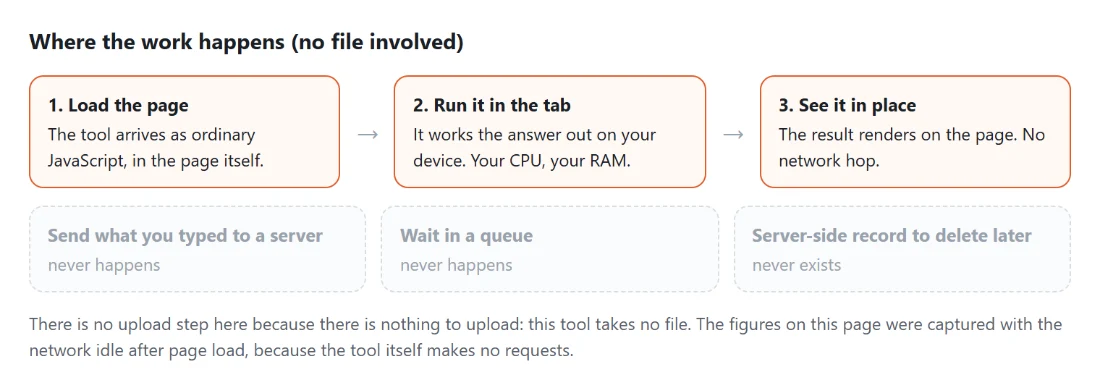
Diagram: where the work happens on a SysFenix page that has no file input at all: the tool arrives as ordinary JavaScript inside the page, works the answer out on your own device and renders it in place, so the upload, queue and server-side record a typical online tool needs never happen
Where the work happens on a SysFenix page that has no file input at all: the tool arrives as ordinary JavaScript inside the page, works the answer out on your own device and renders it in place, so the upload, queue and server-side record a typical online tool needs never happen.

Frequently asked questions

Is the generated document safe to publish as is?

No, and the document itself says so twice. A template cannot know what data your business really collects, where your users are, or what your industry regulator expects. Treat it as a structured first draft that stops you forgetting whole sections, then have a qualified lawyer in the relevant jurisdiction review it before it goes near a live site.

Why is the disclaimer inside the document rather than only on this page?

Because the document is what travels. A warning printed on this page disappears the moment somebody copies the output into a file and sends it on. So the notice is the first section of every generated policy and appears again as the final section, in all three export formats, where it cannot be separated from the text it applies to.

What actually changes when I tick the boxes?

Whole sections appear or disappear. Ticking cookies adds a tracking technologies section, ticking third-party ads adds an advertising section, and the jurisdiction dropdown adds a GDPR section, a CCPA section, or both. The unticked options add nothing at all rather than adding a clause that says you do not do the thing.

Do the three export formats say the same thing?

Yes, by construction. The policy is assembled once as an ordered list of sections, and each format is a separate small serializer over that same structure. None of them can gain or lose a section relative to the others. What differs is only the wrapping, so the plain text version numbers its sections and the HTML version escapes your typed values.

What happens if I leave the name or email blank?

A clearly bracketed placeholder is written in instead, so the sentence still reads correctly and the gap is obvious when you scan the draft. That is safer than emitting a broken sentence with a hole in it, which is easy to miss in a long document and embarrassing to publish.

How is the effective date decided?

It is today's date, formatted in UTC rather than in your local timezone, so the same document generated at the same instant reads identically wherever the person generating it happens to be. Change it by hand afterwards if you want the policy to take effect on a specific future date.

Does it cover jurisdictions other than the EU and California?

Not with named sections. The baseline covers the sort of general disclosures most privacy regimes expect, and the two optional blocks are for GDPR and CCPA. If you serve users in a country with its own specific statute, that is exactly the sort of gap the legal review is meant to catch.

Are my answers sent anywhere?

No. The questionnaire, the assembly and the preview all happen inside this page, and nothing is transmitted. That matters more than usual here, because the answers amount to a list of what data your business collects and how it monetises, which is not something you want sitting in a third party's logs.

Related tools