Four numbers that have to agree
Comparing a salaried offer against a contract rate is a small arithmetic problem that people get wrong constantly, because the two sides are quoted in different units and the conversion has a trap in it.
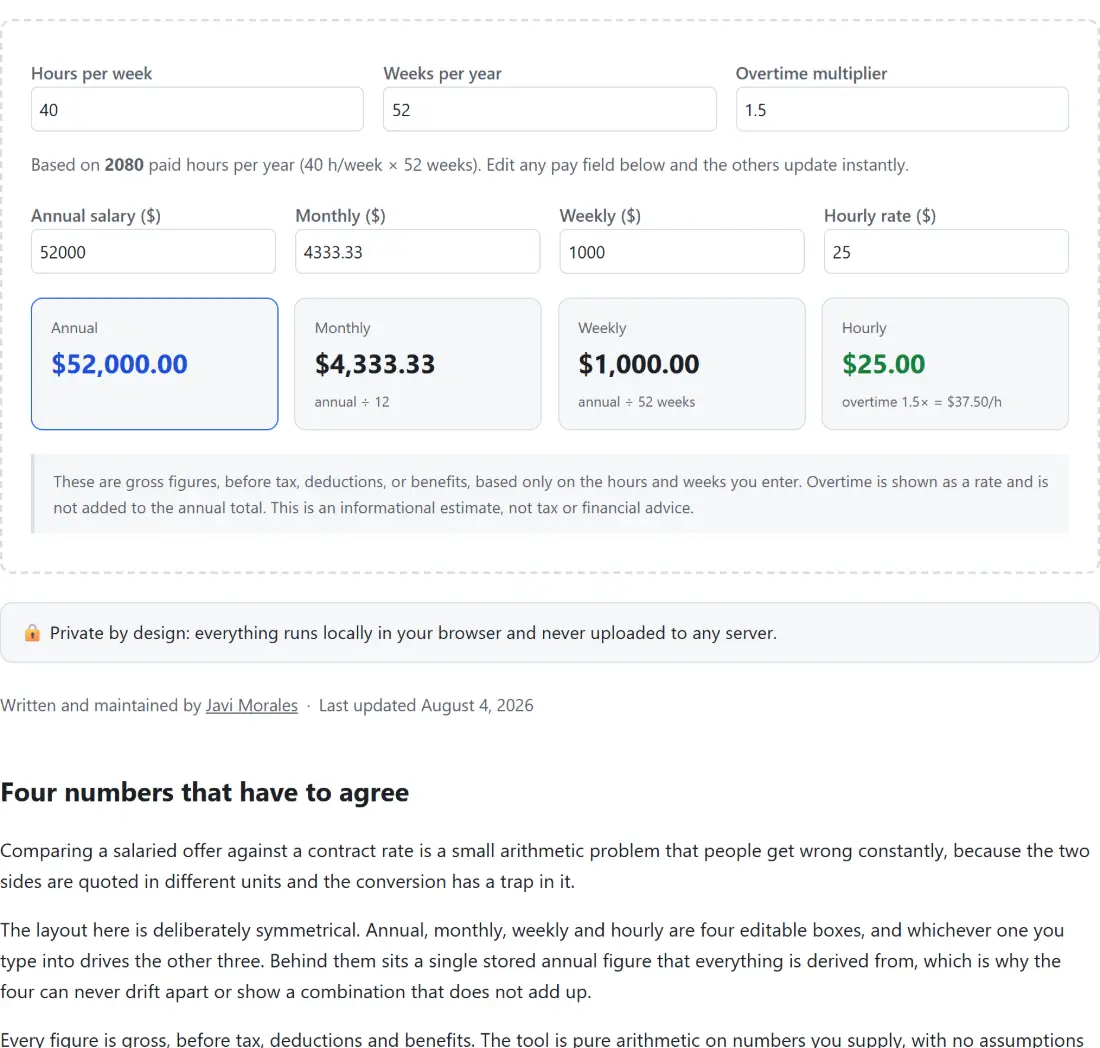
The layout here is deliberately symmetrical. Annual, monthly, weekly and hourly are four editable boxes, and whichever one you type into drives the other three. Behind them sits a single stored annual figure that everything is derived from, which is why the four can never drift apart or show a combination that does not add up.
Every figure is gross, before tax, deductions and benefits. The tool is pure arithmetic on numbers you supply, with no assumptions about any tax system, which is also why it shows a generic currency symbol rather than pretending to know where you are.
Comparing an offer against a contract rate
- Set Hours per week to your real contracted hours. The default is 40.
- Set Weeks per year to the number you are actually paid for. The default of 52 assumes every week is paid, including your leave.
- Read the line underneath, which states the resulting total paid hours per year and how it was worked out.
- Type the annual salary into the Annual salary ($) box.
- Read the Hourly figure in the summary underneath the boxes. That is the number to compare against a contract rate.
- Adjust Overtime multiplier if your rate is not time and a half. The overtime rate appears under the hourly figure.
- To go the other way, type a rate into the Hourly rate ($) box instead and read the annual.
The default of 40 hours across 52 weeks gives 2,080 paid hours a year, which is the figure most published salary comparisons quietly assume.
The four-week month is the classic mistake
Weekly pay times four looks like monthly pay and is not. Four weeks in each of twelve months comes to 48 weeks, which is four weeks short of the year.
If you are paid weekly and you budget by multiplying by four, you will underestimate your annual income by roughly a month’s pay, and if you are quoting a monthly figure derived that way you are quoting yourself short. A month here is a twelfth of the year, full stop, and the display prints that division under the monthly number so the definition is visible rather than assumed.
The weekly figure is the annual divided by the paid weeks you entered, so it also stays consistent with whatever you set rather than assuming 52.
Hours and weeks are where the real difference lives
Two jobs quoting the same salary are not the same job if one expects 37.5 hours and the other 45.
That is the comparison the two configuration fields exist for. Drop the hours per week and the hourly rate rises, because the same money is spread across fewer hours. Drop the paid weeks and it rises too. If four weeks of your leave is unpaid, set weeks to 48 and watch what happens to the hourly figure, because that is the number a contractor would be quoting against.
Both fields accept fractional values, so a 37.5 hour contract does not need rounding.
Rounding, and the round trip that nearly works
Money is displayed to two decimal places. The arithmetic underneath keeps full precision, which is what makes the four boxes internally consistent.
The visible consequence is a small asymmetry. A clean fifty thousand a year over 2,080 hours works out to a rate whose third decimal place is not zero, and the display shows it rounded. Type that rounded rate back in and the annual comes back very slightly different. Nothing is wrong; you have simply thrown away the fraction of a cent that the exact figure carried.
For anything that has to reconcile to the penny, work from the annual figure and let the hourly be the derived one rather than the other way around.
What to do with the number
Once you have a comparable figure, Budget Planner is the natural next step, since a monthly figure is only useful against monthly commitments. For a percentage change between an old and a new salary, Percentage Calculator gives you the rise directly rather than making you do it in your head.
If the offer involves a move, Mortgage Calculator works out what a monthly payment would actually be, and Compound Interest Calculator covers what the difference between two salaries becomes if it is saved rather than spent. The rest is on the calculators hub.