Three notations for one set of numbers
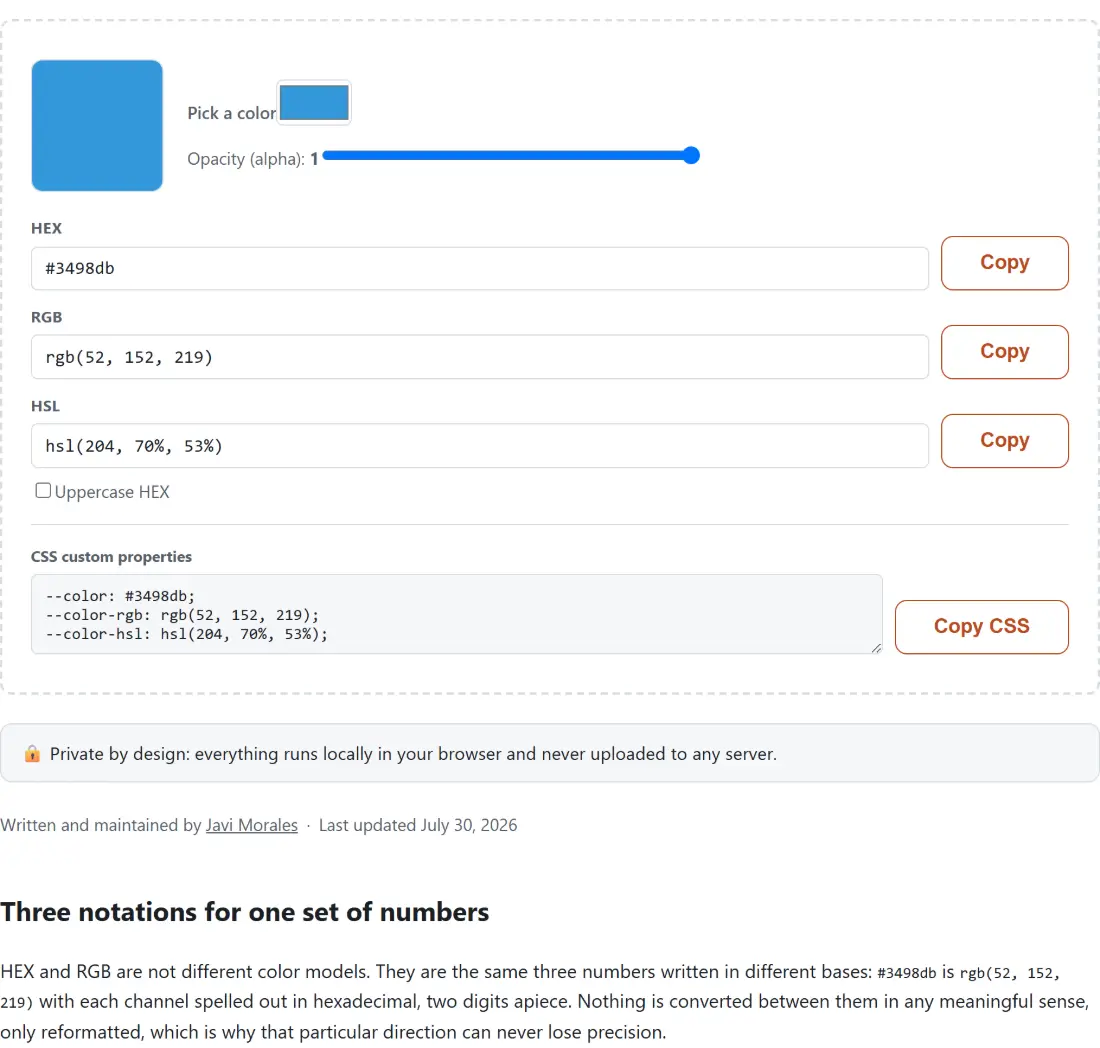
HEX and RGB are not different color models. They are the same three numbers written in different bases: #3498db is rgb(52, 152, 219) with each channel spelled out in hexadecimal, two digits apiece. Nothing is converted between them in any meaningful sense, only reformatted, which is why that particular direction can never lose precision.
HSL is a real transformation. It takes the RGB cube and remaps it into a cylinder, where a color is a hue angle around the wheel, a saturation from grey to vivid, and a lightness from black through the pure color to white. The arithmetic is exact in both directions, but the shape of the space is genuinely different, and that difference is the reason HSL is worth having.
All three describe sRGB, so none of this changes the color your screen shows. Alpha is the fourth number, and it is the one place the notations disagree about spelling: hex appends two more digits, RGB and HSL switch to their four-argument rgba() and hsla() forms.
HSL is the notation worth learning
Hex is compact and universal, and it is also opaque to human reasoning. Given #3498db, make it 20% darker. You cannot, not without arithmetic, because the three channels are entangled and there is no digit in there that means “brightness”.
Convert it and the answer falls out. #3498db is hsl(204, 70%, 53%). Lightness is right there as a number you can move. Take it to 30% for a hover state that stays recognisably the same blue. Take it to 88% and you have a background tint for a callout box. Hold the hue and the saturation, step the lightness, and you have a complete tint ramp built from one brand color with no guessing at all. Rotate the hue by 180 and you have the complement; move it 30 degrees either side and you have neighbours that will not clash.
This is also why HSL is the natural format for CSS custom properties. Store the hue once, derive the whole scale from it, and a rebrand becomes a one-number edit. The block of ready-made custom properties under the fields exists for exactly that workflow. If a full scheme rather than one ramp is what you need, Color Palette Generator does the harmonies for you.
Every syntax the three boxes will accept
The parsers are deliberately generous, because colors arrive pasted from wherever the designer had them.
HEX takes #RGB, #RGBA, #RRGGBB and #RRGGBBAA, with or without the leading #, in any mix of upper and lower case. The short forms double each digit, so #f90 is exactly #ff9900, not an approximation of it.
RGB takes the classic comma syntax, rgb(52, 152, 219) and rgba(52, 152, 219, 0.5), and also the modern space-separated CSS Color 4 syntax with a slash before alpha, rgb(52 152 219 / 50%). Channels may be given as 0 to 255 numbers or as percentages. Alpha may be a 0 to 1 number or a percentage.
HSL takes hsl(204, 70%, 53%) and hsla(204, 70%, 53%, 0.5), the same space-and-slash variant, a hue with a trailing deg, and saturation or lightness written with or without the % sign.
Values out of range are clamped rather than refused, which matters when you paste something a script generated. A hue of 420 normalises to 60 and a hue of -30 becomes 330. While a box holds text that is not yet a valid color, the other two keep displaying the last color that was, instead of blanking out mid-keystroke.
Converting one color is four moves:
- Paste or type your color into whichever of the HEX, RGB and HSL boxes matches what you already have. There is no convert button and no source-format dropdown, because the box you typed in is the source.
- Read the other two boxes, which have already rewritten themselves, and check the swatch above them. Pick a color and the Opacity (alpha) slider are there if you would rather choose visually than type.
- Tick Uppercase HEX if your codebase writes
#FF9900rather than#ff9900. - Press Copy beside the notation you want, or Copy CSS under the CSS custom properties box to take all three as ready-made variables.
Rounding, round trips, and the one digit HSL loses
RGB is the single source of truth internally, and everything else is derived from it. That design decision has a precise, testable consequence: hex to RGB to HSL and back to hex returns byte-identical output for every color there is.
The caveat lives in the display. Real HSL values are rarely integers, and printing hsl(203.79, 69.85%, 53.14%) would be useless to a human, so hue, saturation and lightness are each rounded to a whole number. #3498db shows as hsl(204, 70%, 53%), and if you copy that rounded triple and paste it back in, you land on the nearest RGB value to those integers, which may sit one step away from where you started in a channel or two. Every color tool that prints integer HSL behaves this way; it is rounding, not a conversion error.
Greys are the other footnote. When the maximum and minimum RGB channels are equal, the hue is mathematically undefined, since there is no dominant direction on the wheel. The convention here is to report zero, so #808080 is hsl(0, 0%, 50%) rather than a leftover value from whatever came before.
Alpha: 8-digit hex or rgba()
Alpha is only shown when the color is actually translucent. At full opacity you get #3498db, rgb(52, 152, 219) and hsl(204, 70%, 53%); drop the slider and the same color becomes #3498db80, rgba(52, 152, 219, 0.5) and hsla(204, 70%, 53%, 0.5). Suppressing a pointless ff or a trailing , 1 keeps copied values tidy.
Which form to paste is a real decision. Eight-digit hex is supported by every browser in current use and is compact enough to sit in a design token. It is also the form most likely to confuse a colleague reading the stylesheet later, or to trip an older build tool or preprocessor that only pattern-matches six digits. For a shared codebase, rgba() is the conservative choice; for your own design tokens, the 8-digit hex is fine.
The alpha slider is separate from the swatch picker for a mundane reason worth knowing. The browser’s native color input only speaks 6-digit hex and has no alpha concept whatsoever, so it receives the opaque version of your color and the slider handles transparency independently. Pick a new hue and your opacity setting survives.
When a converter is the wrong tool
Converting a notation is not the same as evaluating a color. If the question is whether your text will be readable on that background, the ratio is what matters and Contrast Checker computes it against the WCAG thresholds. If the color you need is sitting in a screenshot or a photograph rather than in a value you can type, Image Color Picker pulls it out. And if the end product is a gradient rather than a flat fill, CSS Gradient Generator will write the stops for you.
Everything on this page is arithmetic running in the tab, with no request going out and nothing recorded, so an unreleased brand palette can be converted here without the values existing anywhere but your own machine. It keeps working with the network switched off, too, which is more than most color pickers can say.