The bookstore document, and why it is the one loaded
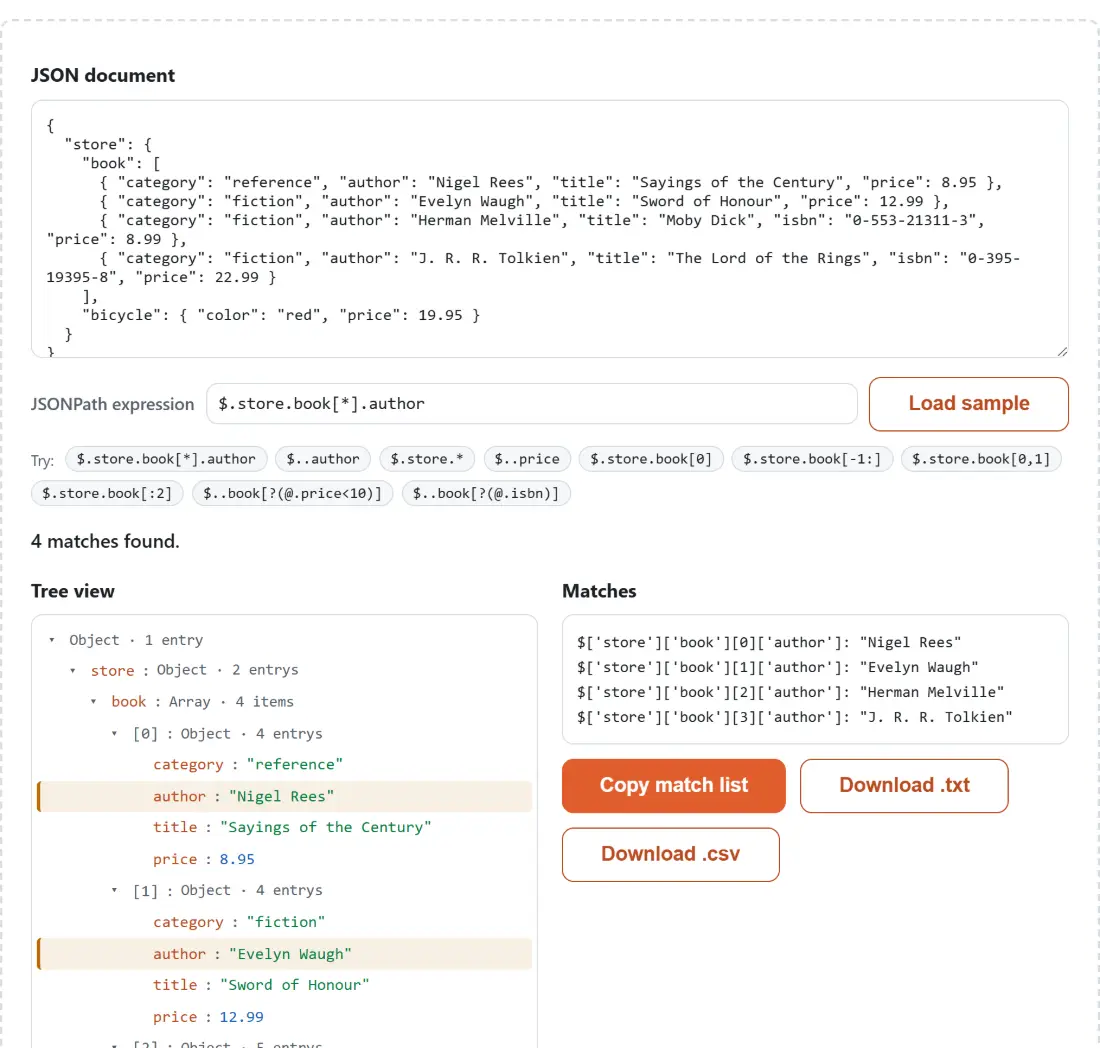
The sample sitting in the document box when the page opens is the bookstore object from Goessner’s original JSONPath article: a store containing four books with a category, an author, a title, a price, and an ISBN on two of them, plus a red bicycle. Nearly every JSONPath implementation uses it in its own documentation, so an expression you found in a Stack Overflow answer or a library README can usually be pasted here and tried against the exact data its author had in mind. The starting expression, $.store.book[*].author, returns all four authors.
- Paste your own JSON into the JSON document box, or leave the sample in place while you learn the syntax.
- Type into the JSONPath expression box and watch the summary line, the highlighted Tree view and the Matches panel update as you type.
- Click any of the ready-made queries in the Try row to drop a working expression into the box, or open the JSONPath syntax cheatsheet at the foot of the page for the operator list.
- Press Copy match list, Download .txt or Download .csv to take the results with you. All three are disabled while there are no matches.
- Load sample puts the bookstore document and the starting expression back if you want to experiment from a known state.
Recursive descent finds more than you asked for
The .. operator is the one that most often surprises people, and the sample shows why in two queries. $..author returns four results, because only books have authors. $..price returns five: the four books, and then the bicycle’s price, which is nowhere near the part of the document you were thinking about. Recursive descent means every property with that name at any depth, and a document large enough to be worth querying is usually large enough to hide a second property with the same name somewhere unrelated.
That is precisely the class of bug the tree matters for. The Matches panel gives you the values; the tree beside it shows you where in the document each one lives, with every ancestor of every match already unfolded so nothing is hiding behind a collapsed arrow. Seeing the bicycle’s price light up next to the books is faster than reading a flat list of five numbers and wondering why there is one too many.
Filters, and the evaluator that runs them
A filter such as $..book[?(@.price<10)] keeps only the elements for which the expression is true, with @ standing for the element under test. Against the sample, that one returns two books. Presence checks work the same way: $..book[?(@.isbn)] keeps the two books that have an ISBN. Conditions combine, so $..book[?(@.price<10 && @.category=="fiction")] narrows to a single book, Moby Dick. A filter always attaches to something that selects the elements it tests, so the bracket on its own, with no path in front of it, matches nothing at all.
Running a filter means executing something the visitor typed, which historically meant some JSONPath libraries reached for the browser’s eval. This one does not. The default safe evaluator parses the filter into a syntax tree and interprets it with a restricted walker that knows about comparisons, boolean operators and member access and nothing else. There is also a tolerance built in for filters that read a property some elements do not have: rather than aborting the whole query, an element whose test cannot be evaluated is simply treated as not matching, which is why $..book[?(@.foo.bar)] returns zero matches instead of an error.
Three states, kept honestly separate
A query here ends in one of three places, and they are never disguised as one another. There is a genuine parse error, shown as a message with the tree and the results hidden. There is a syntactically acceptable expression that matches nothing, shown as an explicit statement that no matches were found rather than as an empty panel. And there is a result, shown as a count plus the matches themselves. Empty the expression box completely and the summary drops back to inviting you to type one.
The middle state is where the leniency of the parser shows. $.store.book[*].nope matches nothing because no such property exists, which is the answer you wanted. $.store.book[-1] also matches nothing, but for a much less obvious reason: a single negative index is not implemented, and the slice [-1:] is what you need instead. Meanwhile $.store.book[ returns the whole book array without complaint. All three land in the same “no error” bucket, so a zero or a suspicious result is always worth rereading rather than trusting. As a smaller curiosity, $..book.length returns 4 here, which is a property of the JavaScript array rather than anything the JSONPath specification promises, so do not carry that trick to another implementation.
Taking the answer somewhere else
Once an expression does what you want, the Matches panel is already in a shape you can use. Each line is the bracket-notation path followed by the matched value as compact JSON, which pastes straight into a ticket or a chat message. The CSV export is the same information with path and value columns for a spreadsheet, and the text export is the panel verbatim.
An expression is often only one step. If the document you are querying is too large to read in the box, open it in the JSON Tree Viewer first, which takes a .json file and collapses the parts you do not care about. Once you have found the field, change it in the JSON Editor rather than hand-editing raw text. If a query surprises you because the document is not shaped the way you assumed, the JSON Schema Validator will tell you whether it matches the contract at all, and JSON Diff will tell you whether it changed since the last time your query worked. For a document that arrived minified, run it through the JSON Formatter before pasting so the document box is easier to read. The tree is rebuilt from the parsed structure either way, so indentation changes nothing about it.