Structure beats indentation once the payload gets big
Pretty-printing answers one question: is this valid, and can I read a line of it. That is genuinely useful for a minified blob of a few hundred bytes. It stops helping the moment the document is a paginated API response with two hundred records in it, because indentation just converts one very long line into several thousand medium ones, and you still have to scroll past every record you do not care about to reach the one you do.
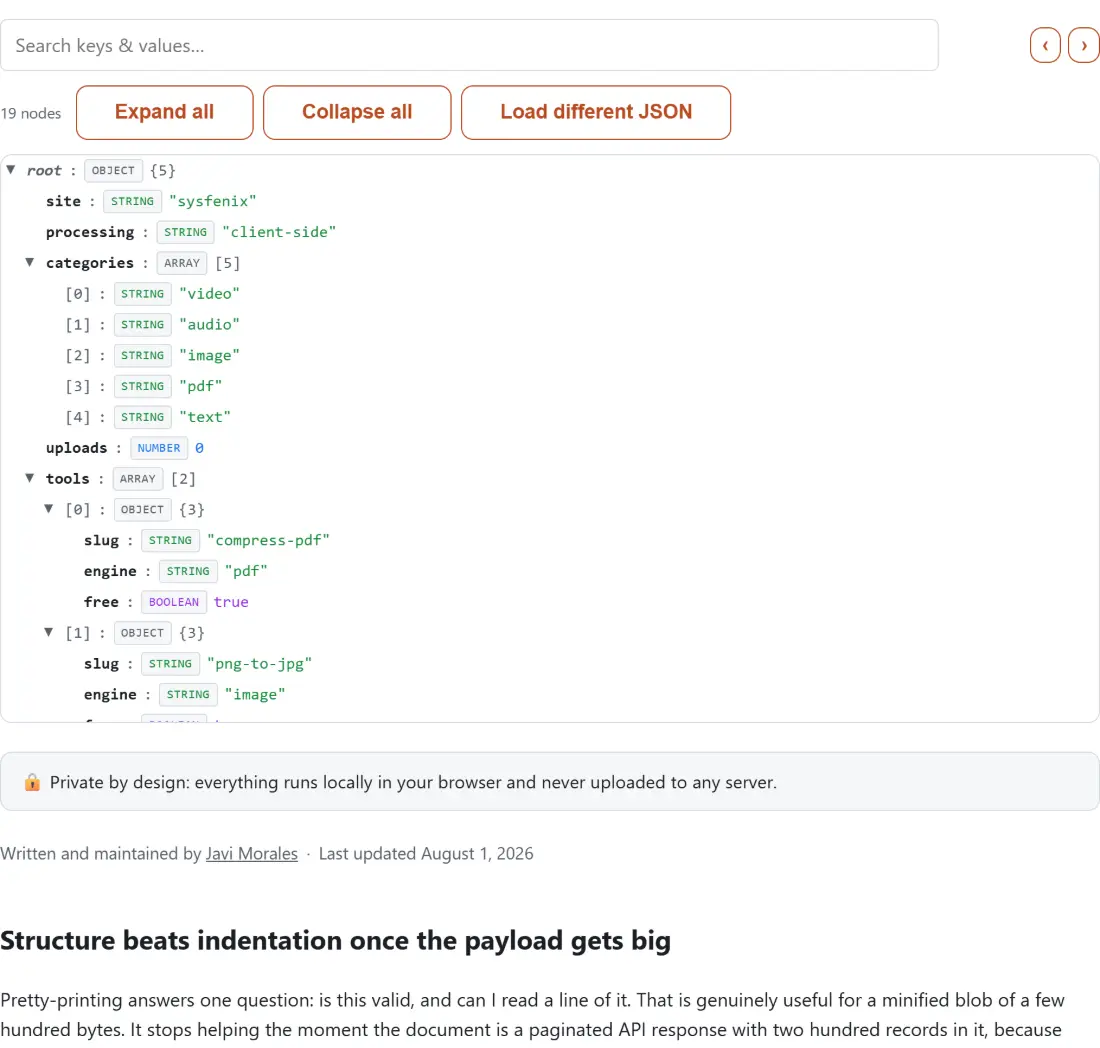
A tree answers a different question: what shape is this. Every value becomes one row carrying its key, a type badge from the six JSON types, and either a preview of the value or a child count. Containers can be folded away. The JSON Formatter & Validator and this page are solving genuinely different problems, and most debugging sessions want the second one.
Load the built-in sample and the toolbar reads 14 nodes for a six-key object, because the count
includes the root, every nested element and every leaf, not just the top level. That number is the
first honest signal of what you are dealing with.
From a paste to a tree, in the order the controls appear
- Drop a file on the box, or click Choose a file. A file is read, checked and drawn the moment it lands, with no second click to press.
- If the JSON is already on your clipboard, paste it into the text area instead and click View as tree, which is where the parse, the size check and the tree build happen for pasted input. Try a sample fills the box with a small demo object and opens it in one go.
- Click the triangle on any non-empty object or array row to fold that branch, or use Expand all and Collapse all. Collapse all deliberately leaves the root row open, so you always keep the top level in view.
- Type into the Search keys & values box, then step through hits with the ‹ and › buttons next to it. The counter beside them reads as a position over a total, or says there are no matches.
- Click the path button on the right of a row to copy that node’s accessor path. The button briefly reads a copied tick, then returns to showing the path.
- Click Load different JSON to clear the tree and get the input back.
The accessor path on every row, and the keys that break dot notation
Finding a value is half the job. The other half is referring to it afterwards, in a test assertion, a log line or a message to whoever owns the API. Each row’s right-hand button is both a label and a copy action: it shows the path and puts that exact string on your clipboard.
The rules are the ones a careless path builder gets wrong. A key that matches the JavaScript
identifier pattern is joined with a dot. Anything else, a key with a space, a key containing a dot
of its own, a key starting with a digit, gets bracketed and quoted through JSON.stringify, which
also escapes any quote or backslash inside it. Array elements always use a numeric bracket, never a
dot. Top-level entries are emitted bare so the whole path reads as something you can paste after
your own variable. Here is the sample document’s own path column:
$
id
name
active
roles
roles[0]
roles[1]
address
address.city
address["zip code"]
scores
scores[0]
scores[1]
scores[2]
Only the root shows $, the JSONPath convention for the document itself. Every descendant is
relative to it. If you want to run real queries rather than copy one path at a time, the
JSONPath Tester evaluates expressions against a document live.
Search walks the tree, not the text
The search is a case-insensitive substring test performed against two things: an object key’s own name, and the text of a primitive value. Container rows never match on their contents, and array position labels are not searched at all, so looking for a small integer will not jump you to element zero. Matches are collected in document order, which is the order the arrow buttons step through, and stepping past either end wraps around.
The part that took the most care was matches hiding inside folded branches. When you jump to a hit, every ancestor of that node is removed from the collapsed set first, so the row genuinely becomes visible, and only then does the pane scroll it to the middle. The node itself is left as you had it, since opening a matching container’s own subtree is not needed to see the container.
The 50 MB ceiling, and what virtualization does not fix
The tree pane is a fixed-height scroller with uniform rows, and only the slice currently on screen exists in the DOM. That is what keeps a document with hundreds of thousands of nodes responsive to scroll, and it is the single reason a browser tab can host this at all.
It does not, however, make the document smaller. The whole string is read, then measured against the
50 MB limit, then handed to JSON.parse, which materializes every object and array in memory. Past
that size the honest answer is a streaming parser or a command-line tool, and the error says so
rather than letting the tab freeze. When the text is not valid JSON, the message relays the parser’s
own complaint, adding the line, the column and the raw character offset computed from your own text
whenever the engine reported a position at all, and shows it in place rather than replacing it with
a generic failure banner.
Read-only by intent, and the neighbours that write
Nothing here modifies your document, which is what makes it safe to open a production payload in. When you do need to change something, JSON Editor Online edits values in a tree and keeps a raw text view in sync, and JSON Diff compares two documents structurally so that reordered keys report no change at all. For captured network traffic, the HAR File Viewer understands the request-level structure of a DevTools export instead of showing it as one enormous generic tree, and tabular data is usually easier in the CSV Viewer.