Key order is not data, and a text diff cannot tell
Two exports of the same record are rarely byte identical. One came from a service that serializes a struct field by field, the other from a map that iterates in whatever order it feels like. Feed that pair to a line-based comparison and you get a screen of red and green describing a difference that does not exist, with the one field that genuinely changed hidden somewhere in the middle of it.
This page parses both sides first and then compares the parsed values. An object is walked by looking each key up by name in the other document, so where a key sits in the file has no bearing on the result. Paste {"a":1,"b":2} on the left and {"b":2,"a":1} on the right and the answer is that the two documents are structurally identical. For plain text, or for code where line position genuinely is the meaning, the Text Diff Checker remains the right tool; this one is for the case where the text is a serialization detail and the data is the point.
What the loaded sample actually reports
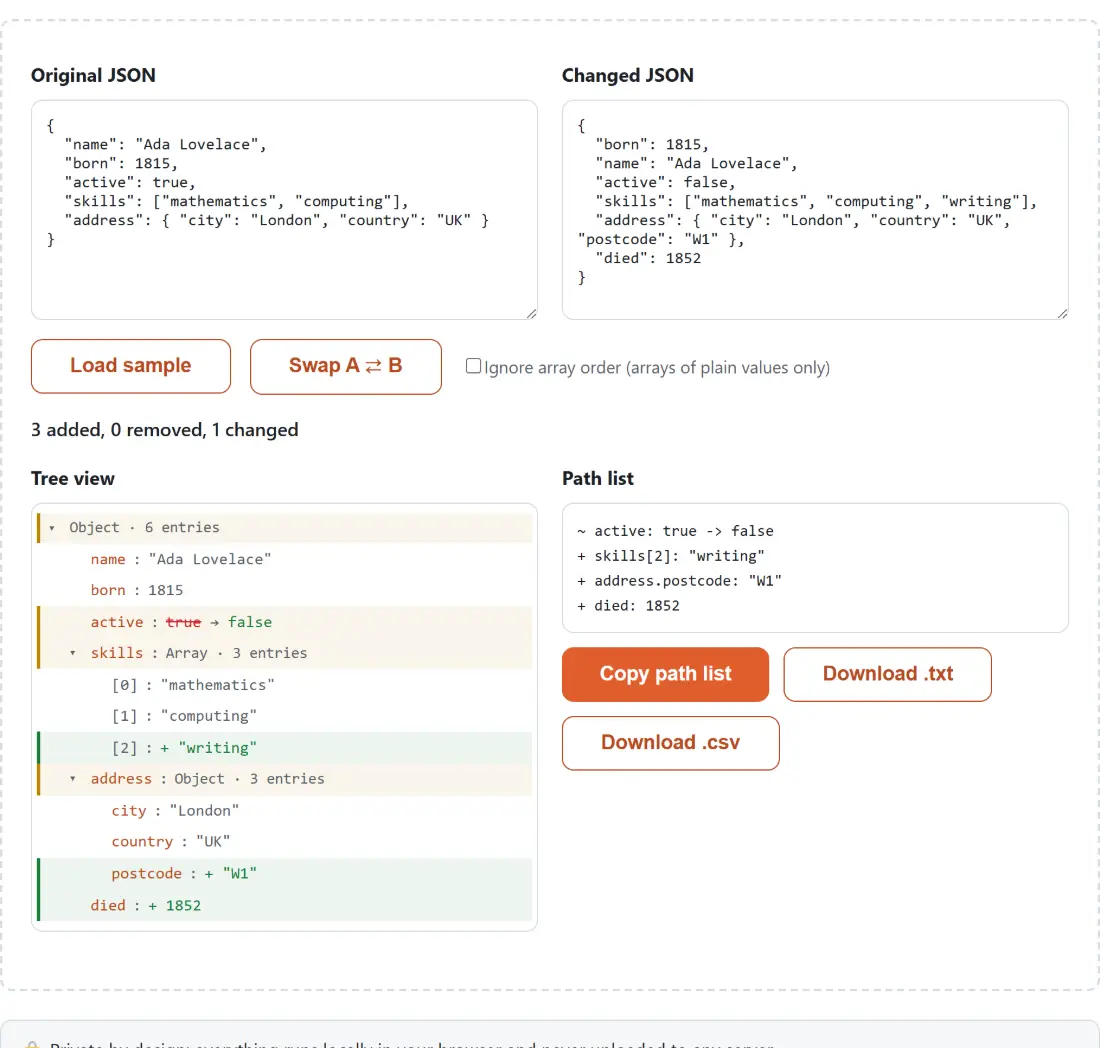
The page opens with a pair already in the boxes, which is the fastest way to read the output format. The left document describes Ada Lovelace with five keys; the right one repeats them with the first two swapped, flips active, adds a third skill, adds a postcode inside address, and adds a died key. The summary line reads “3 added, 0 removed, 1 changed” and the path list underneath reads:
~ active: true -> false
+ skills[2]: "writing"
+ address.postcode: "W1"
+ died: 1852Three things are visible in four lines. The swapped name and born keys produced nothing, as promised. A changed value is written with a tilde and shows the before and after value around an arrow. A path uses dots for object keys and square brackets for array positions, so a new array element reads skills[2] and a nested addition reads address.postcode. A difference at the very top of the document, such as an object on one side and an array on the other, has no path to print and appears as (root).
- Replace the contents of the Original JSON box with your older document, and the Changed JSON box with the newer one.
- Read the summary line, then the Tree view panel, where anything that differs is already expanded and containers with nothing to report start folded away.
- Tick Ignore array order (arrays of plain values only) if position carries no meaning in your arrays.
- Press Swap A ⇄ B if you pasted them the wrong way round, rather than cutting and pasting twice.
- Take the result from the Path list panel with Copy path list, Download .txt or Download .csv.
Arrays are the hard part, and the checkbox covers half of it
Position often is the meaning in an array. A list of pipeline steps, a queue, a ranked result set: reordering those is a real change and the default treats it as one. Compare ["a","b","c"] with ["c","a","b"] in the default mode and you get three changed entries, one per index, which is correct if the index means something.
Tick the checkbox and the same pair reports no differences at all. The order-insensitive path counts how many times each value occurs on each side, treats the overlap as unchanged, and reports only the surplus on either side as removed or added. A duplicate that appears twice on one side and once on the other is still caught, because it is the counts that are matched, not just the distinct values. One thing to read carefully in this mode: the bracketed number on a surplus line is a running counter, not a position in either array. Comparing ["a","a","b"] with ["a","b"] this way reports the extra copy as - [2]: "a", even though both copies sit at the front of the left document.
The limitation is deliberate and it is written into the checkbox label. Both arrays must consist entirely of plain values. Compare [{"id":1},{"id":2}] with [{"id":2},{"id":1}] with the checkbox on and you still get two changed entries, because the presence of objects sends the comparison back to index against index. Matching objects across positions would mean guessing which field identifies a record, and this tool does not guess. If your data is really tabular and the row identity lives in a column, Compare Excel & CSV Files is built around exactly that idea and asks you to nominate the key column.
The path list is the part you paste into a ticket
The tree is for looking; the flat list is for sharing. Every difference is one line, prefixed with a plus for an addition, a minus for a removal or a tilde for a change, which is close enough to the markers a unified diff uses that nobody has to be told how to read it. The clipboard button copies that block verbatim, and the two download buttons save it as json-diff.txt or as json-diff.csv with path, kind, before and after columns, ready to open in a spreadsheet. In the CSV, an added row leaves before empty and a removed row leaves after empty, so a column filter picks out one kind of change at a time.
When a different JSON tool is the better answer
A comparison is a poor way to explore a document you have never seen. To fold a large payload down to the branch you care about, the JSON Tree Viewer is read-only, virtualized and takes a .json file directly. To change a value rather than observe one, the JSON Editor turns the same tree into a click-to-edit surface. If both documents come back messy, the JSON Formatter will pretty-print or minify one document at a time. And when the real question is not what changed but whether the newer document still satisfies a contract, hand it and the contract to the JSON Schema Validator instead.