One document, two views, always in agreement
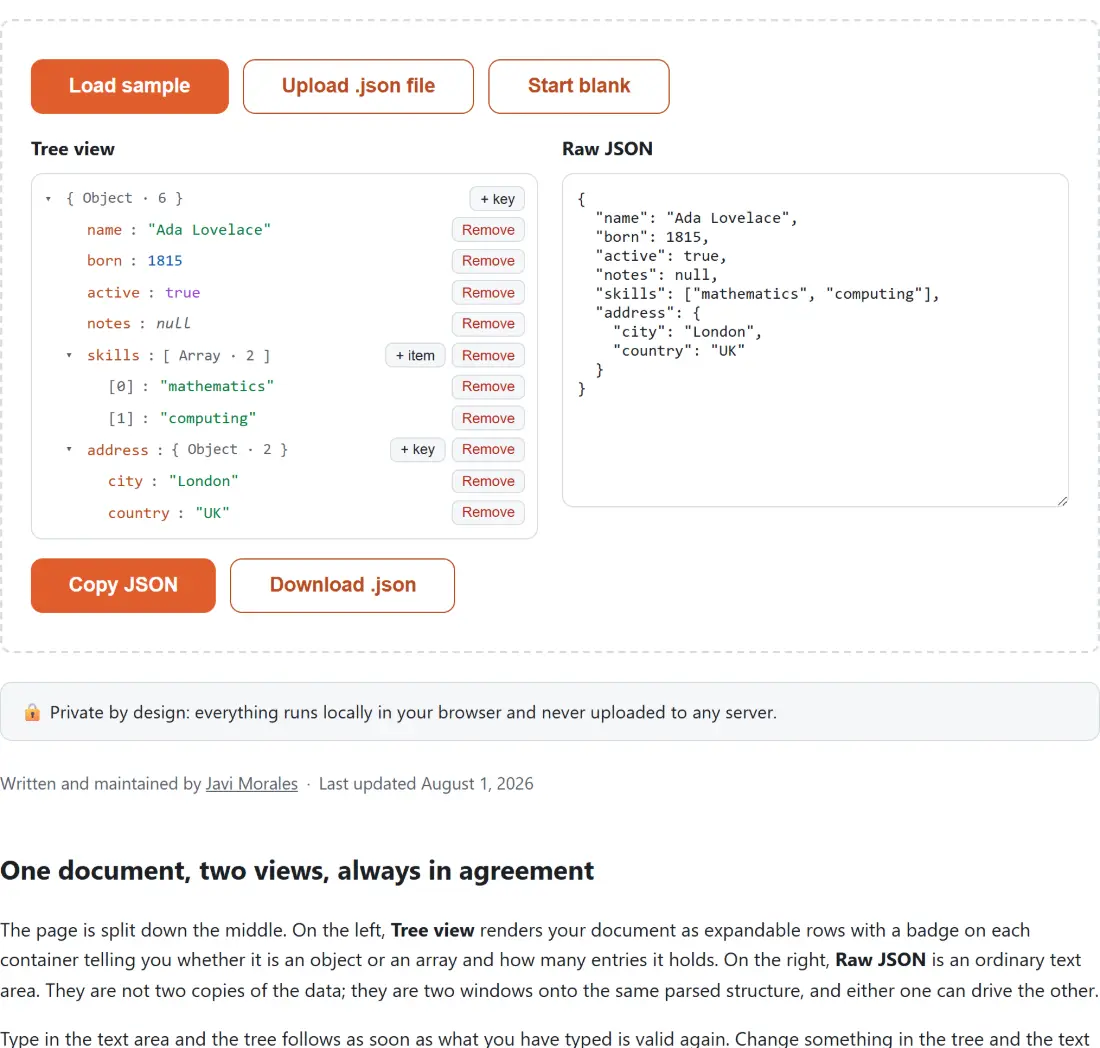
The page is split down the middle. On the left, Tree view renders your document as expandable rows with a badge on each container telling you whether it is an object or an array and how many entries it holds. On the right, Raw JSON is an ordinary text area. They are not two copies of the data; they are two windows onto the same parsed structure, and either one can drive the other.
Type in the text area and the tree follows as soon as what you have typed is valid again. Change something in the tree and the text area is rewritten from the edited structure with two-space indentation; merely expanding a node or opening the value editor leaves your text alone. That second direction has a consequence worth knowing before you paste a carefully hand-formatted config file in: the first tree edit you make replaces your whitespace with the tool’s own. Key order and array order both survive exactly; the layout does not, and neither does the spelling of a number.
- Press Load sample to see a filled tree, Upload .json file to open one from your device, or Start blank to begin from an empty object.
- Click the arrow on any object or array to open or fold it, and click a key’s name to rename it in place.
- Click a value to edit it, choose its type from the selector that appears, type the new value and confirm with the tick, or press Enter. Escape cancels.
- Use + key on an object or + item on an array to add an entry, filling in the key name and the type, then press Add. Remove deletes an entry.
- Finish with Copy JSON or Download .json, which saves the document as
edited.json.
Type is chosen, never inferred
JSON draws a hard line between "42" and 42, and so does this editor. Editing a leaf opens a type selector offering String, Number, Boolean and Null. String takes your characters as they are. Number parses them and refuses anything that is not a finite number, so entering letters gets you a message saying the input is not a valid number rather than a NaN smuggled into your document, and an empty box asks you for a number instead. Boolean does not even give you a free text field; it swaps in a dropdown with true and false, which is why a stray value such as “yes” can never reach the document. Null takes no value at all.
Adding a new entry offers the same four plus Object and Array, both of which are created empty and ready for you to add into. That is how you build nesting without ever typing a brace.
What a round trip through the parser normalizes
This is the honest limitation to know about before you edit a file you care about. Everything here goes through the browser’s own JSON parser and serializer, which understands values rather than the text you wrote them with. Three consequences follow, and all three are easy to verify by pasting and re-serializing.
Number formatting is normalized: 1.0 becomes 1, 1e3 becomes 1000. Insignificant whitespace disappears, replaced by consistent two-space indentation. And a number too large for a double to hold exactly loses its tail; a 20-digit ID such as 12345678901234567890 comes back as 12345678901234567000. That last one bites in exactly one common situation, which is a database or platform ID serialized as a bare number. Well-behaved APIs quote those IDs as strings for the same reason. If yours does not, treat that field with suspicion here and in every other JavaScript tool.
What is preserved is just as worth stating. Object key order is kept exactly, new keys are appended at the end rather than sorted in, and renaming a key leaves it in its original position with its value attached.
Refusals you can see, instead of silent overwrites
Several operations deliberately fail rather than doing something surprising, and the message appears next to the control you were using. Adding a key that already exists on the same object is refused, as is renaming a key onto a sibling’s name, because the alternative is losing a value without being told. The outermost value cannot be removed at all, since there would be nothing left to hold the document; Start blank exists for that. Only object keys can be renamed, because an array position is not a name.
Big documents, and the notice that appears above the tree
Nothing is truncated here and no size limit is enforced, but two mechanisms keep a large file usable. First, only the root and its immediate children are expanded when a document loads, and a collapsed container’s contents are never rendered into the page, so the cost of opening a document is roughly the cost of parsing it rather than of drawing every node. Second, once a document passes five thousand nodes a notice appears above the tree warning that fully expanding it may feel slow, and suggesting you expand only the branch you need. The raw text panel is unaffected either way.
If your document is genuinely huge and you only want to read it, the JSON Tree Viewer is the better fit, since it takes a .json file directly and virtualizes its rows. When you only want to pretty-print or minify, the JSON Formatter does it in one pass with a configurable indent. To find the single field you need to change in a document you do not know, query it first with the JSONPath Tester, then come back here to edit it. Once the document is right, check it against a contract with the JSON Schema Validator, compare it against the version you started from with JSON Diff, or push it onward into a spreadsheet with Convert JSON to CSV. Starting from another format instead? YAML to JSON and Excel to JSON both produce something this editor will open.