PGP Encrypt & Decrypt Tool

Generate a Curve25519 or RSA key pair, encrypt and decrypt messages and files, and clear-sign or verify, with OpenPGP.js running in your own tab.

🌐 Español

🔒 Private by design: everything runs locally in your browser and never uploaded to any server.

Why client side is the only sane place to run PGP

A PGP tool that runs on a server has already lost the argument. To decrypt anything it needs your private key and your passphrase, which means asking you to hand over both to a machine you cannot inspect. At that point the encryption is decorative.

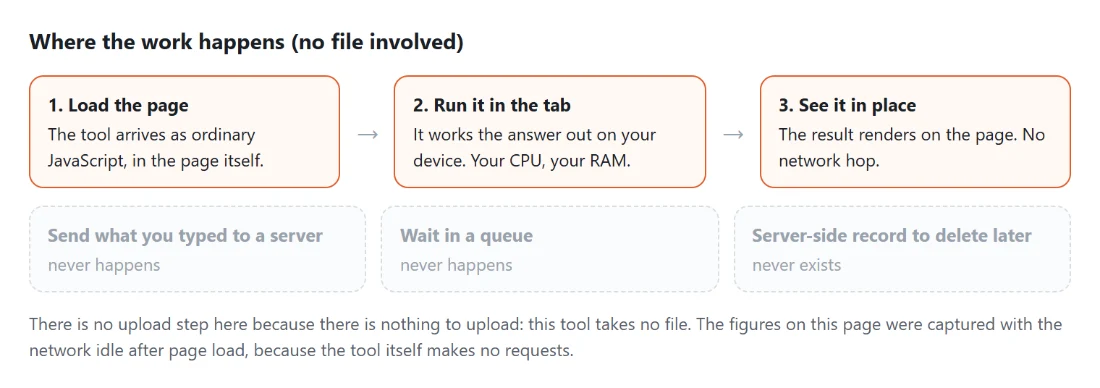
Everything here happens in your tab. The OpenPGP implementation is a JavaScript module delivered with the page, running against your browser’s own cryptography, and it has no network calls of its own. Your private key exists in the page’s memory for as long as the tab is open and then it is gone.

The library choice was checked rather than assumed. It has zero transitive dependencies, it does not require the cross-origin isolation headers that would break other parts of this site, and it runs identically in a browser and in a test runner, which is how the encrypt, decrypt, sign and verify paths here are tested against real generated keys rather than mocks.

Generating a key pair and using it

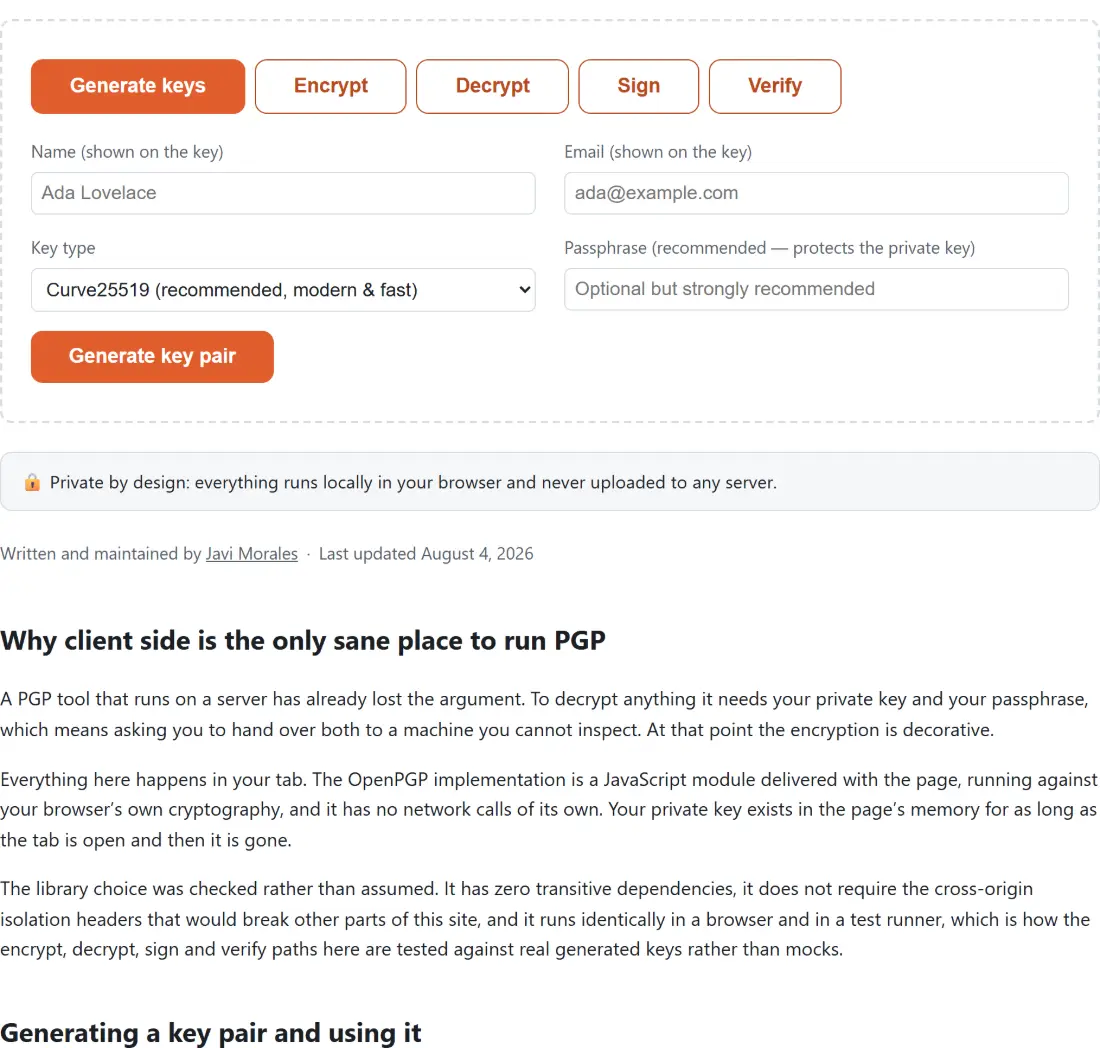
  1. Open the Generate keys tab. Fill in Name (shown on the key) and Email (shown on the key). At least one of the two is required, because an OpenPGP key carries a user ID.
  2. Pick a Key type. Curve25519 (recommended, modern & fast) is the default. RSA 3072-bit (legacy compatibility) and RSA 4096-bit (legacy, stronger, slower) are there for older software.
  3. Set a passphrase. The field is optional and the label tells you to use one anyway.
  4. Click Generate key pair. Save both halves with the download buttons, which produce publickey.asc and privatekey.asc.
  5. Switch to Encrypt, paste the recipient’s public key, type a message or attach a file, and click the encrypt button.
  6. The recipient uses Decrypt with their private key and passphrase.
  7. Sign produces a clear-signed message that anybody can read, with a signature block attached. Verify checks one against a public key.

Send the public key freely and never the private one. The two files look similar at a glance, which is exactly how people leak private keys, so check the header line before you attach anything.

Encrypting a file rather than a message

The encrypt tab accepts either, and picking a file disables the message box so there is no ambiguity about what is being encrypted.

An encrypted file keeps its whole original name and gains a .gpg extension, so report.pdf becomes report.pdf.gpg. That convention matters on the way back, because the decryption side uses it: if the sender’s software recorded a filename inside the message it is used, otherwise the trailing .gpg, .pgp or .asc is removed to recover the original name.

There is one sentinel worth knowing about. Some tools write a special marker instead of a real filename to signal that a message was meant to be read on screen and never written to disk. That marker is recognised and ignored rather than being used as a filename.

Errors that tell you what to fix

Cryptographic libraries produce accurate messages written for developers. Misformed armored text is a correct description of the problem and useless to somebody who just pasted half a key block.

Three of the most common failures are translated. Pasting something that is not a valid key or message gets a reply naming the header and footer lines you need to include. A wrong passphrase is reported as a wrong passphrase. A message that cannot be decrypted with the private key you supplied is reported as having most likely been encrypted for a different key, which is by far the usual cause.

Anything unrecognised passes through with its original wording, so a genuine bug stays diagnosable rather than being flattened into a friendly non-answer.

PGP is not the only kind of key you might need. SSH Key Generator produces a key pair for server access rather than for messages, and CSR Generator builds the certificate signing request a TLS certificate authority asks for.

For simply putting a file behind a password without any key management at all, Encrypt File uses a passphrase and symmetric encryption, and Encrypt Text does the same for a block of text. Those are the right choice when both ends share a secret and neither wants to exchange keys. Whichever you use, generate the passphrase itself with Password Generator rather than inventing one. The rest is on the dev tools hub.
See it in action

Screenshot of the PGP Encrypt & Decrypt Tool tool with tabs for generating keys, encrypting, decrypting, signing and verifying, with the key type chosen between Curve25519 - recommended as modern and fast - and RSA 3072-bit
PGP Encrypt & Decrypt Tool mid-process: tabs for generating keys, encrypting, decrypting, signing and verifying, with the key type chosen between Curve25519 - recommended as modern and fast - and RSA 3072-bit.
Diagram: where the work happens on a SysFenix page that has no file input at all: the tool arrives as ordinary JavaScript inside the page, works the answer out on your own device and renders it in place, so the upload, queue and server-side record a typical online tool needs never happen
Where the work happens on a SysFenix page that has no file input at all: the tool arrives as ordinary JavaScript inside the page, works the answer out on your own device and renders it in place, so the upload, queue and server-side record a typical online tool needs never happen.

Frequently asked questions

Why is Curve25519 the default rather than RSA?

Keys are far smaller, generation is close to instant instead of taking seconds, and the security margin is at least as good. The one thing RSA still buys you is compatibility with very old software. Both RSA sizes are offered for exactly that case, and generating a 4096 bit key will take noticeably longer than the elliptic curve option.

Will the generated key work with GnuPG?

Yes, and that constraint shaped the key format. The library can emit elliptic curve keys in a newer specification form that older GnuPG installations reject outright. This tool deliberately emits the earlier, widely deployed form instead, which current GnuPG, Thunderbird and the common mobile clients all read. A key that your recipient's software refuses to import is worthless no matter how modern it is.

What happens if I lose the passphrase on a private key?

The key is gone, and so is everything encrypted to it. There is no recovery path, no reset, and nobody to ask, which is the entire point of the design. Store the passphrase in a password manager at the same moment you generate the key, and keep the private key file somewhere you actually back up.

Is a passphrase optional?

Technically yes, and it is strongly discouraged. A private key file with no passphrase is usable by anyone who obtains the file, which turns a stolen laptop or a synced folder into a complete compromise. The passphrase field says it is recommended for this reason. Leaving it blank produces a working key and a bad habit.

What name will a decrypted file get?

Whatever the sender's software recorded inside the encrypted message, if anything. When that name is present it wins, because it is the sender's own intent. When it is missing, a trailing .gpg, .pgp or .asc is stripped from the uploaded file name. When neither applies, a .decrypted suffix is added, so the output can never silently overwrite the encrypted file it came from.

Can it tell whether an uploaded encrypted file is text or binary?

Yes, by looking at the first bytes for the standard armor header, tolerating a byte order mark and any leading whitespace before it. Files that start with that header are parsed as armored text and everything else as binary packets. You do not have to tell it which kind you have.

Why does verification say a signature is invalid rather than just failing?

Because the two reasons matter differently. If the signature was made by a different key pair than the public key you supplied, you are told that specifically. If the signature simply does not check out, you are told the message was altered after signing or signed by another key. A valid result also reports the signer's user ID, so you can confirm it is the person you expected.

Does any key material leave my browser?

No. The library is a plain JavaScript module served with the page, and every operation runs in your tab against the browser's own crypto. Keys, passphrases and plaintext live in the page's memory and disappear on reload. Nothing is stored to disk unless you use a download button, and nothing is transmitted at any point.

Related tools