The 88 characters this page can draw from
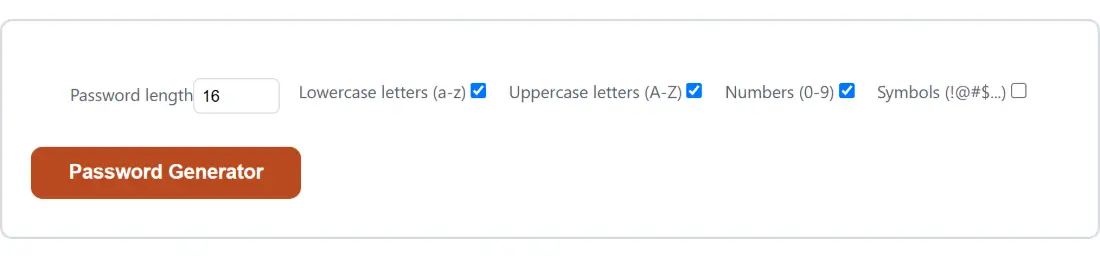
Four tick boxes control the pool. Lowercase letters (a-z) and Uppercase letters (A-Z) contribute 26 each, Numbers (0-9) contributes 10, and Symbols (!@#$…) contributes 26 more. All four together give 88 characters, not the 94 you get from every printable ASCII code point, because the symbol set is trimmed:
!@#$%^&*()_+-=[]{}|;:,.<>?The backtick, the tilde and the backslash are missing on purpose, since those three are the ones legacy signup forms most often reject or mangle. Quote marks and the forward slash never made the list either. That trimming costs a fraction of a bit per character and saves a lot of failed form submissions.
Out of the box, symbols are the one option left unticked, so a default run draws from 62 characters. That is a deliberate default rather than an oversight: letters and digits are accepted everywhere, and a password that a site refuses is worth nothing.
Generating a 20-character password with symbols on
- Set Password length to 20. The field accepts 4 to 64 and quietly pulls anything outside that back into range.
- Leave Lowercase letters (a-z), Uppercase letters (A-Z) and Numbers (0-9) ticked.
- Tick Symbols (!@#$…) to move the pool from 62 characters to 88.
- Click Password Generator. The options and the button are replaced by the result box.
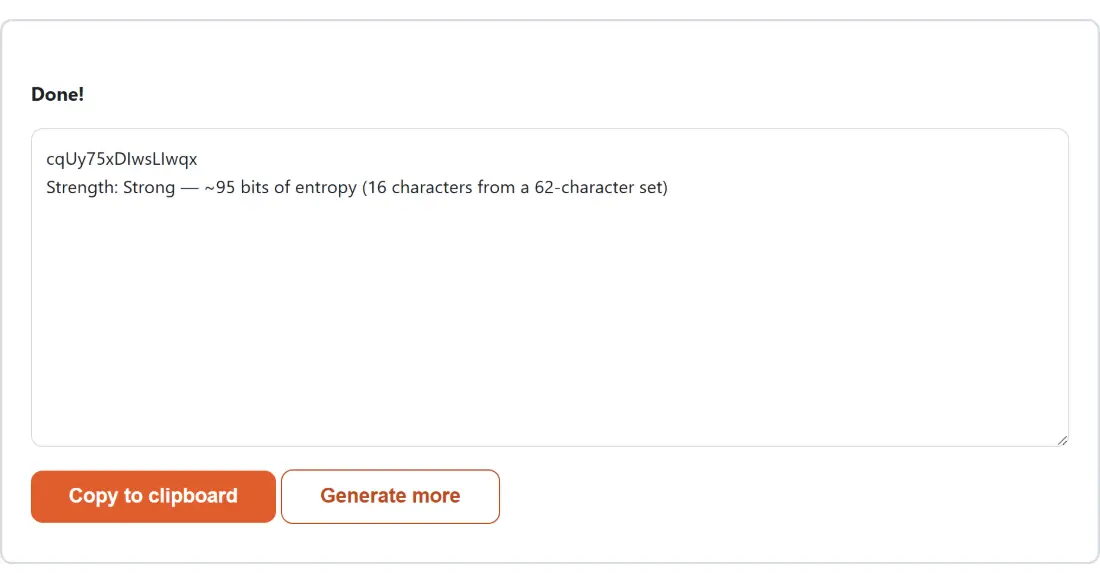
- Read the second line, which for these settings reports Very Strong at 129 bits from an 88-character set.
- Take it with Copy to clipboard, then Generate more if you want another and want the options back.
Clearing the length field entirely is the one thing worth avoiding. An empty number input reads as zero, zero is clamped up to the minimum of 4, and you get a four-character password labelled Very Weak at 23 bits without any complaint.
The bits figure, and what the five labels mean
Strength here is length multiplied by the base-2 logarithm of the pool size, rounded down. That formula is only valid because every character really is drawn independently and uniformly, which is what the generator does. The label comes from fixed thresholds: below 28 bits is Very Weak, under 36 is Weak, under 60 is Reasonable, under 128 is Strong, and 128 or more is Very Strong.
A few real results. Sixteen characters from the default 62-character pool gives 95 bits, Strong. The same 16 characters with symbols on gives 103 bits, still Strong. Twenty characters with symbols crosses into Very Strong at 129 bits. Eight characters, even with all four sets ticked, only reaches 51 bits and is labelled Reasonable, which is a polite way of saying it is fine for a forum login and nowhere near enough for anything that matters.
Rejection sampling, and the bias it exists to avoid
The obvious way to pick a character is to grab a random byte and take it modulo the pool size. That is subtly wrong. A byte has 256 values, 256 divided by 62 leaves a remainder of 8, so the first eight characters of a 62-character pool would come up slightly more often than the rest. Repeat that across sixteen positions and the distribution is measurably skewed.
The code computes the largest multiple of the pool size that fits inside 256, discards any byte at or above it, and re-rolls. Bytes are drawn from the browser’s own cryptographic random source, the same one used for encryption keys, rather than from the general-purpose pseudo-random function that powers animations and shuffles. That distinction matters here in a way it does not for a Lorem Ipsum Generator, which needs filler text and nothing more.
The same password, scored twice, by two different models
Paste a freshly generated 16-character password into the Password Strength Checker and it reports 1.00e+16 estimated guesses, which works out at about 53 bits. This page said 95. Both figures are correct within their own model, and the gap is worth understanding.
This page knows exactly how the password was made and can compute the real size of the space. The checker uses zxcvbn, which has no idea and therefore falls back to assuming ten possibilities per unmatched character. For a random string that assumption is heavily pessimistic. For a human-chosen password it is far more realistic than a naive charset count, which is precisely why the two tools exist side by side: use this one to make a password, use that one to judge one you invented yourself.
Storing it, hashing it, or encrypting with it
A generated password is only useful once it is stored somewhere you can reach it. If you are seeding a development database or a test fixture instead, the Bcrypt Hash Generator & Verifier will turn it into a real bcrypt hash at a chosen cost factor, and Encrypt a File with a Password will use it to derive an AES-256-GCM key through 600,000 PBKDF2 rounds.
For anything you intend to type from memory rather than paste, random characters are the wrong shape. The Passphrase Generator draws whole words from the EFF list instead, which trades a little density per character for something you can actually recall. Both live on the developer tools hub alongside the rest of the credential utilities.