Quality points, the number a transcript actually adds up
A grade point average is not an average of letter grades. Every course is first converted into quality points: its credit hours multiplied by the point value of its letter grade. Those quality points are added up, and the total is divided by the total credit hours. That single division is the whole of GPA arithmetic, and it explains how two students with an identical set of letters on their record can still finish a semester at different averages.
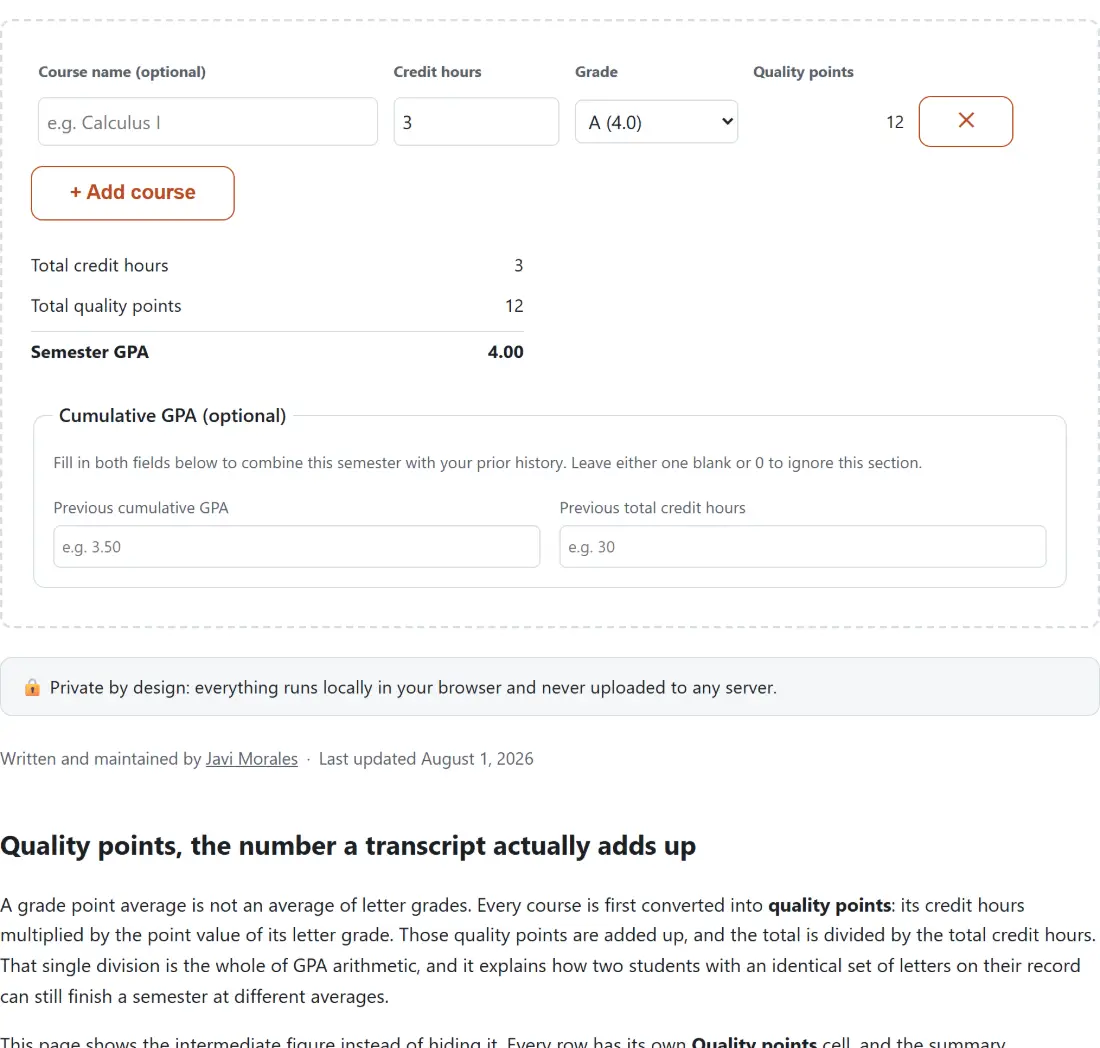
This page shows the intermediate figure instead of hiding it. Every row has its own Quality points cell, and the summary underneath reports Total credit hours and Total quality points before it reports Semester GPA, so you can check the working against your registrar’s own worksheet line by line rather than trusting a black box.
Entering a semester, column by column
- Type the course into Course name (optional) if you want the row labelled. The field is ignored by the maths and its placeholder reads “e.g. Calculus I”.
- Set Credit hours for that row. The box steps in halves from 0 up to 12, so a 1-credit lab or a half-credit seminar is no problem.
- Pick the row’s Grade. Each option carries its point value in the label itself: “A (4.0)”, “B+ (3.3)”, “C- (1.7)”, down to “F (0.0)”.
- Use + Add course for another row, or the ✕ button to drop one. The ✕ is disabled on the last remaining row, so the table can never be emptied completely.
- Read Semester GPA at the bottom. Nothing waits behind a Calculate button; every total is recomputed as you type.
- To fold the semester into your record so far, go to Cumulative GPA (optional) and fill in both Previous cumulative GPA and Previous total credit hours.
A 13-credit semester, worked all the way through
Here is a realistic spring load, with the quality-point column exactly as the tool fills it in:
| Course | Credit hours | Grade | Quality points |
|---|---|---|---|
| Calculus I | 4 | B+ (3.3) | 13.2 |
| General Chemistry | 3 | A- (3.7) | 11.1 |
| Chemistry Lab | 1 | A (4.0) | 4 |
| English Composition | 3 | B (3.0) | 9 |
| Public Speaking | 2 | C+ (2.3) | 4.6 |
Total credit hours: 13. Total quality points: 41.9. Semester GPA: 3.22. A plain average of those five grade points would be 3.26, and the difference is entirely the weighting: the 1-credit A counts for one thirteenth of the result here instead of one fifth.
The 1-credit lab and the 4-credit lecture, side by side
Take that same semester and drop one course by exactly two full letter grades, worth 2.0 grade points either way. Move Chemistry Lab from “A (4.0)” to “C (2.0)” and the semester lands on 3.07, a loss of 0.15. Move Calculus I from “B+ (3.3)” to “D+ (1.3)” and it lands on 2.61, a loss of 0.61. The same two-letter slide costs four times as much on the 4-credit course, because credit hours are the multiplier on both the top and the bottom of the fraction.
This is the practical reason a heavy lecture deserves the study time and the one-credit lab does not, and it is worth checking before you decide where to spend a revision week. If you want the same reasoning inside a single course rather than across a semester, the Grade Calculator does the percentage-weighted version, where the weights come from your syllabus categories instead of from credit hours.
Folding in a cumulative GPA you already know
The optional section combines your record so far with what you just entered, using the same weighted formula one level up. It multiplies your previous GPA by your previous credit hours to recover the quality points behind it, adds this semester’s quality points, and divides by the combined credit total.
Carry a prior cumulative GPA of 3.12 over 28 credit hours into the 13-credit semester above, and Combined cumulative GPA reads 3.15. Both fields have to be filled in and above zero for the section to appear at all: leaving either blank, or at 0, simply skips it and leaves you with the semester figure. That is also the honest limit of the feature, since a transcript GPA is already rounded before you type it in. The FAQ below shows how a hidden third decimal can shift the combined answer by a full 0.01.
Where this scale stops and your registrar takes over
The point values here are the common US plus/minus convention, and nothing more. Scales genuinely vary: plenty of schools use a flat A equals 4 with no plus or minus at all, some add a grade point for honors and AP sections, many replace rather than average a repeated course, and most exclude pass/fail credits from the GPA completely. None of that is encoded here, and no general calculator could encode all of it.
So treat this as a fast, checkable estimate and your transcript as the record. If you need to turn a raw points total such as 43 out of 50 into the percentage that decides a letter first, the Percentage Calculator has an “X is what percent of Y” mode for exactly that, and the Fraction Calculator will show the working step by step. More maths tools of this kind are collected on the calculators hub and compared in our guide to the best free online calculators.