A ratio of weight to the square of height
Body mass index is one division. Take a weight in kilograms, divide it by a height in metres squared, and the number that falls out is the index. Everything else on this page is presentation wrapped around that single operation.
The imperial version looks like a different formula and is not. The familiar 703 times pounds divided by inches squared is the metric formula with its units converted, using the exact international definitions of the pound and the inch. Carry those definitions through and the constant comes to 703.0695796391593, which is where the rounded 703 in textbooks originates. This calculator computes that constant from the same two definitions rather than storing a rounded copy of it, so the imperial and metric paths cannot drift apart from each other.
Squaring the height is what makes BMI a measure of shape rather than of weight, and it is also the source of the criticism that has followed the index for as long as it has been used, since real bodies do not scale as a neat square of their height.
Only half the fields on the form are read
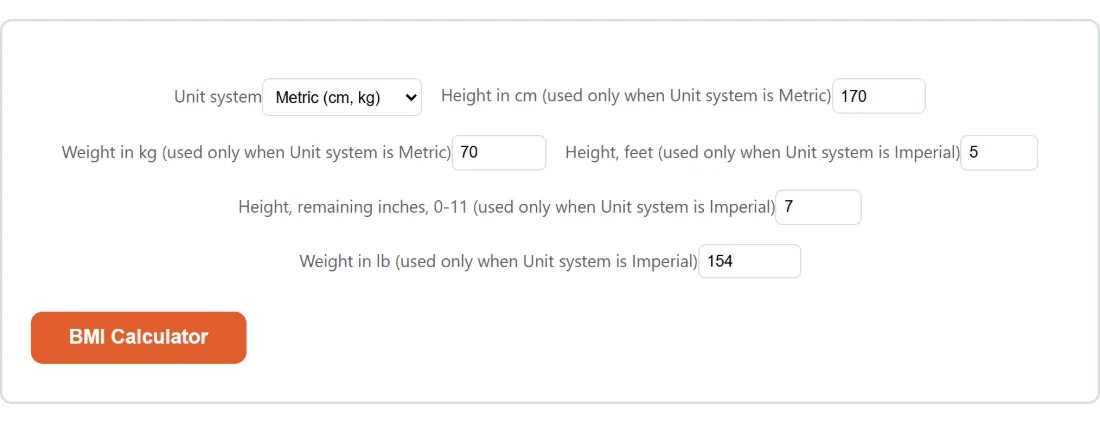
Both unit systems are shown at once, because the option list has no way to hide fields based on another field’s value. Only the set matching your choice is used.
- Pick a Unit system, either Metric (cm, kg) or Imperial (ft/in, lb).
- Fill in the two metric fields, or the three imperial ones. The other set can hold anything at all, since it is ignored.
- Click BMI Calculator.
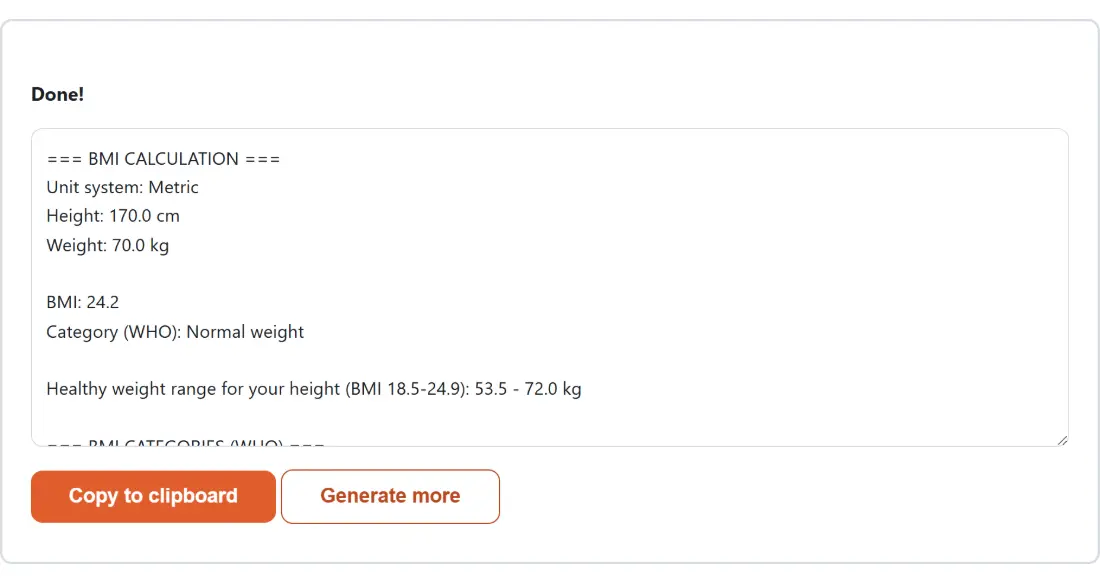
- Read the report, or press Copy to clipboard to take it with you. Generate more returns you to the form with your numbers still in place.
Every value is clamped before the arithmetic runs. Height in centimetres is held between 50 and 300, weight in kilograms between 10 and 500, feet between 1 and 8, the extra inches between 0 and 11, and pounds between 20 and 1000. Type something outside one of those ranges and the report is computed from the nearest allowed value rather than from what you typed, which is why the result begins by echoing the height and weight it used.
Where the boundaries fall, and which side owns 25.0
The report classifies your result against the WHO adult bands and then prints the whole table underneath it, so the neighbouring bands are visible as well as your own:
- Underweight, below 18.5
- Normal weight, 18.5 to 24.9
- Overweight, 25 to 29.9
- Obese (Class I), 30 to 34.9
- Obese (Class II), 35 to 39.9
- Obese (Class III), 40 or above
Boundary values belong to the higher band. A BMI of exactly 25.0 is classified as Overweight and exactly 30.0 as Obese Class I, matching the convention those published ranges use. The three obese subclasses are shown separately rather than collapsed into one bucket, because they are defined that way rather than invented here.
The healthy range is the same formula run backwards
Below the category line, the report prints a weight range for the height you entered. It is the same equation solved for weight instead of for the index: the weights that would place you at 18.5 and at 24.9 at that exact height, given in whichever unit system you selected and rounded to one decimal place.
It tends to be the part of the output people find most concrete, because a band on an index is abstract and a number in kilograms or pounds is not. It is also the part that changes fastest with a small change in height, which is a useful thing to notice about the index itself.
What a single ratio cannot see
BMI is computed from two numbers, so everything that is neither height nor weight is invisible to it. It cannot separate muscle from fat, which is why a heavily trained athlete can land in a high band with low body fat and why an older adult who has lost muscle can sit in the middle band with a high fat percentage. It says nothing about where fat is carried, which is health-relevant on its own. And this page has no age or sex field at all, so what it prints is the adult classification rather than the age and sex percentile system used for children and teenagers.
The report carries its own version of that caveat, noting that the figure does not account for muscle mass, bone density, age, sex or pregnancy, because a copied result travels away from the page it was computed on.
If you want the picture BMI cannot give, the body fat calculator estimates a percentage from tape measurements using the US Navy circumference method, the calorie calculator works out daily needs from the Mifflin-St Jeor equation and an activity multiplier, and the unit converter handles pounds to kilograms or inches to centimetres if your measurements arrived in the other system. The rest of the everyday calculators sit alongside these.
This is a screening number rather than a diagnosis, and nothing on this page is medical advice. Take questions about your own weight or health to a doctor or another qualified healthcare professional.