The library, and the gaps you should know about
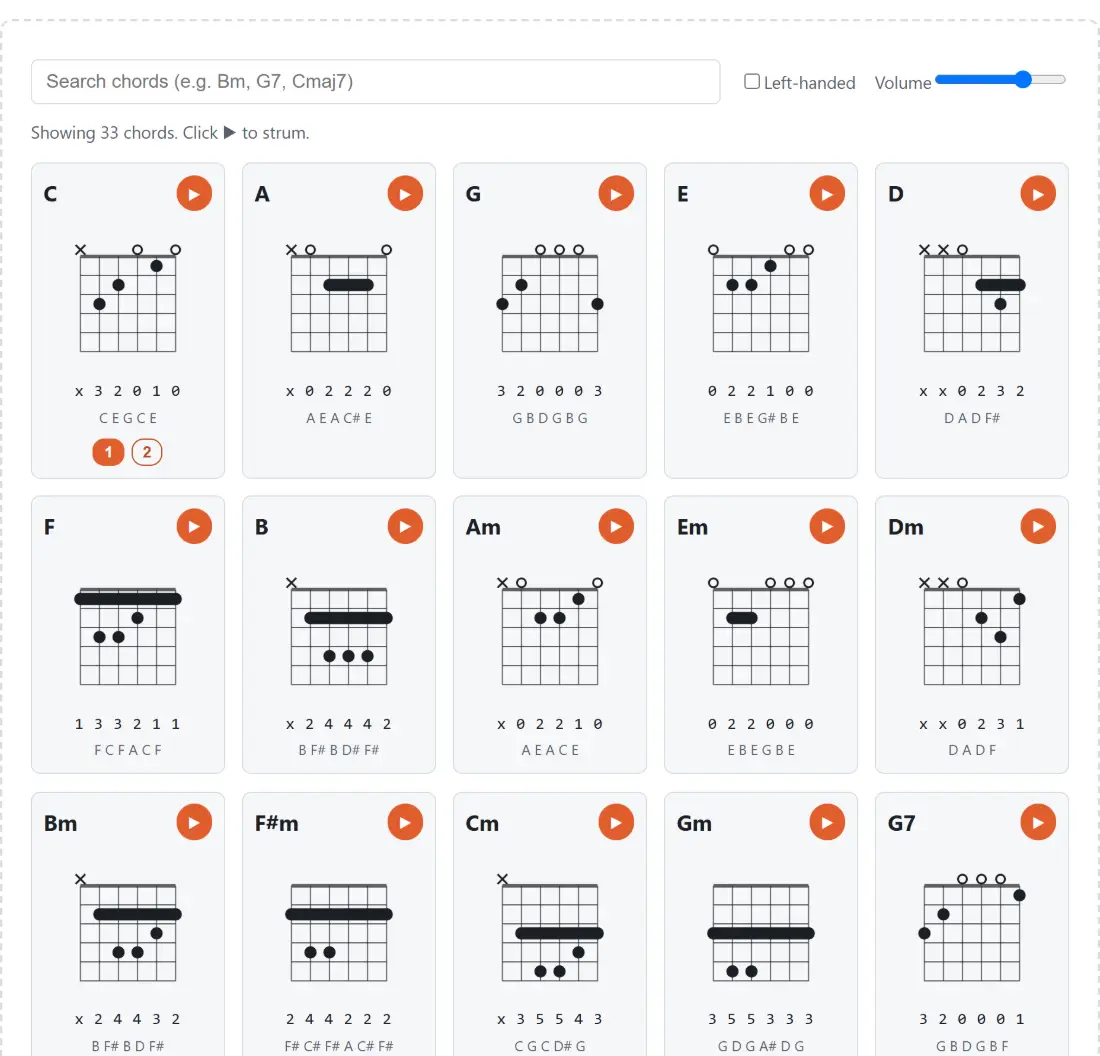
What is here is the set of shapes a self-taught player actually meets in their first year or two. The open majors and minors (C, A, G, E, D, Am, Em, Dm), the barre forms that unlock the rest of the neck (F, B, Bm, F#m, Cm, Gm), the dominant sevenths that make a blues work (G7, C7, D7, A7, E7, B7), a set of major sevenths and minor sevenths for anything jazz-adjacent, the suspended fourths (Dsus4, Asus4, Esus4) and a Cadd9 that turns up in more acoustic songs than it has any right to.
What is not here is worth stating plainly. There are no diminished or augmented chords, no sixths, no ninths beyond that single add9, no slash chords with a specified bass note, and no chords named with flats. Nothing here is generated on the fly from a chord formula either. Every voicing is a stored, hand-checked fingering, which is why the set is finite and why it is trustworthy: a chord-shape generator that produces anything you type will happily hand you a fingering no human hand can hold.
One structural quirk falls out of that curation. Every shape in the library tops out at the fifth fret or below, so every diagram is drawn from the nut with the thick nut line at the top. The code can shift the window up the neck and print a starting-fret marker beside it, but nothing currently in the library needs it.
Dots, circles, crosses, and the bar the diagram works out for itself
Six vertical lines are the strings and five horizontal gaps are the frets. A filled dot is a finger on that fret. A hollow circle above the nut means play that string open. A cross above the nut means do not play that string at all, which for a shape like x 3 2 0 1 0 means the low E is left out of the strum entirely.
The thick bar is the interesting one, because it is derived rather than authored. The diagram scans for the lowest fretted fret, and if two or more strings sit on it with nothing open, muted or lower in between, it joins them into a single bar. F comes out as a full six-string bar at the first fret. Bm is barred from the A string across to the high E, and not on the low E, because the low E is muted in that shape. A7, written x 0 2 0 2 0, gets no bar at all, since the open G string between its two fretted notes breaks the run.
Underneath each diagram are two lines of plain text: the fret numbers low to high, and the letters the shape actually sounds, computed from the fretted pitches with muted strings skipped. Bm reads B F# B D F#, which shows at a glance that its root sits on the A string, that the sixth string is silent, and that only one of the five sounding notes is the minor third.
Looking up a shape and hearing it back
- Type into the box marked “Search chords (e.g. Bm, G7, Cmaj7)”. The grid filters as you type and the line above it reports how many chords are showing.
- Read the diagram for the shape you want, checking the crosses first so you know which strings to avoid hitting.
- Press the ”▶” button on the card to strum it, and set the “Volume” slider beforehand if the level is not right.
- Tick “Left-handed” if you play left-handed, and every diagram in the grid mirrors at once.
- Play the shape on your own instrument and press ”▶” again to compare. If your version sounds wrong against it, the usual culprit is a string being muted by a lazy finger rather than a wrong fret.
Step five is the reason the play button exists at all. A diagram you are misreading looks exactly like a diagram you are reading correctly, and the ear settles it in about a second.
Six triangle oscillators, 35 milliseconds apart
There is no audio file anywhere in this page. Pressing play builds the chord live: one triangle-wave oscillator per non-muted string, each set to the exact frequency of that string at that fret, each with its own gain envelope that ramps up over 20 milliseconds and then decays away over 1.7 seconds.
The strum comes from the timing. Each sounding string starts 35 milliseconds after the previous one, low to high, so a six-string chord takes 175 milliseconds to roll across, and muted strings are skipped rather than counted, which means a four-string shape like D rolls faster than a full F. The level of each string is the volume setting divided by the number of strings sounding, so a six-string chord does not clip where a four-string one sits comfortably.
The audio engine is not created until you press play for the first time, which is both polite and necessary, since browsers refuse to start audio before a user gesture. It is honestly a crude instrument: a triangle wave with an exponential decay has none of the attack noise, body resonance or sympathetic ringing of a real guitar. As a reference for whether you have the right notes under your fingers, that turns out not to matter. If you want to hear the same note letters on a different instrument, the virtual piano sounds them on a keyboard layout.
Left-handed mode mirrors the columns, not the notes
Chord books almost never bother, so left-handed players learn to flip diagrams in their heads, which is a small tax paid on every single new shape. One checkbox here reverses the column order of every diagram in the grid at once, putting the low E on the right where a left-handed player looking down at the neck sees it. Barres are remapped along with the dots, so a bar that runs from the A string to the high E still covers the same five strings after the flip.
Deliberately unchanged: the notes, the frets, the strum and the two text lines under each diagram. The fret numbers stay in the standard low-to-high order that every songbook and tab site uses, because that notation is not handed, and quietly reversing it would break every comparison you make against another source.
Sharps only, and what to type when the songbook says Bb
Chord names here use sharps, and the library has exactly one black-key root, F#m. So a song calling for Bb, Eb or Ab has nothing to match against, and the search will report that no chords match.
That is a real limitation and there are two honest ways around it. The first is mechanical: barre chords are movable, so the F shape at the first fret becomes F# at the second and Bb at the sixth, and the Bm shape slides the same way. The second is to change the song instead of the shape. Paste your chord sheet into the chord transposer, shift it by however many semitones it takes to reach a key built from the open shapes here, and it will also suggest a capo position that puts the sound back where the singer wants it.
Two things worth having open alongside this page: the guitar tuner, because a shape you are fingering perfectly still sounds wrong on an out-of-tune instrument, and the metronome once you start moving between two chords in time rather than one at a time. Everything else for players sits under audio.