Three regressions fitted to three different data sets
A one rep max estimate is not a physical law. Each of the formulas below is a curve someone fitted to real lifters’ performances, and because they were fitted to different data with different shapes, they disagree. Showing one of them alone would present a guess as a measurement, so this calculator prints all three and their average.
Epley, published in 1985, adds a fixed fraction per rep: the lifted weight multiplied by one plus the reps divided by thirty. It is a straight line. Brzycki, from 1993, is hyperbolic: the weight times thirty six, divided by thirty seven minus the reps. Lombardi, from 1989, uses a power curve: the weight times the rep count raised to the power 0.1.
One consequence of that structure is worth knowing. At a single rep, Brzycki and Lombardi both collapse to exactly the weight you lifted, since thirty six over thirty six is one and any number to the power 0.1 is one when the base is one. Epley does not. It returns about 3.3 percent more than your input, which is a genuine property of the formula rather than a bug, because it was fitted against multi rep data and was never anchored to reduce to an identity at one rep.
Epley and Brzycki cross at exactly ten reps
Set the two formulas equal and the algebra gives a clean answer: they agree precisely at ten repetitions, and nowhere else in the usable range. Below ten, Epley reads higher; above ten, Brzycki pulls ahead and climbs steeply as its denominator shrinks. At 100 kilograms for ten reps both return 133.3.
Lombardi behaves differently again. Its power curve rises fastest at the very low rep counts and then flattens, so it tends to be the highest of the three at three to five reps and the lowest by the time you reach twelve. At 100 kilograms it reads 111.6 at three reps, 117.5 at five and 128.2 at twelve, while Epley over the same span goes 110.0, 116.7, 140.0.
That spread is the useful output. Three numbers close together mean the estimate is on solid ground. Three numbers far apart mean you are asking the formulas to work outside where they agree.
Filling in the four fields and reading the result
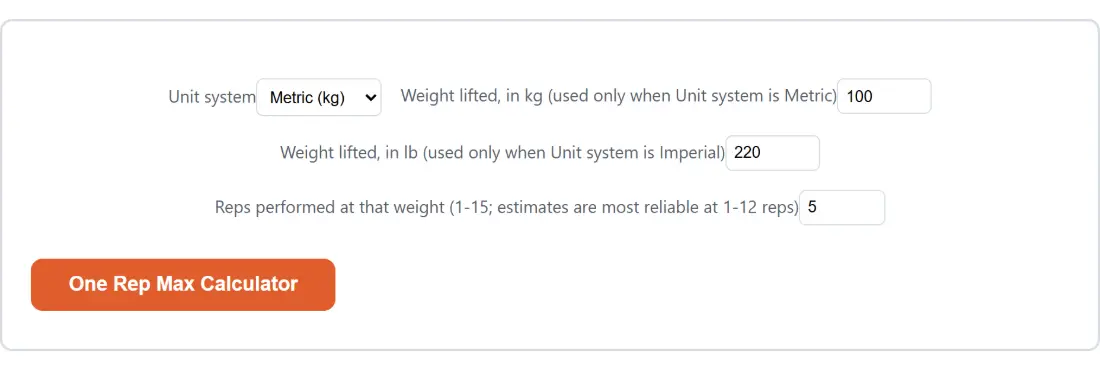
- Choose “Unit system”, either “Metric (kg)” or “Imperial (lb)”.
- Type into the box that matches, “Weight lifted, in kg (used only when Unit system is Metric)” or “Weight lifted, in lb (used only when Unit system is Imperial)”. The other one is ignored.
- Fill in “Reps performed at that weight (1-15; estimates are most reliable at 1-12 reps)”, using a set that was close to failure rather than a comfortable warm up.
- Press the “One Rep Max Calculator” button, which repeats the page title.
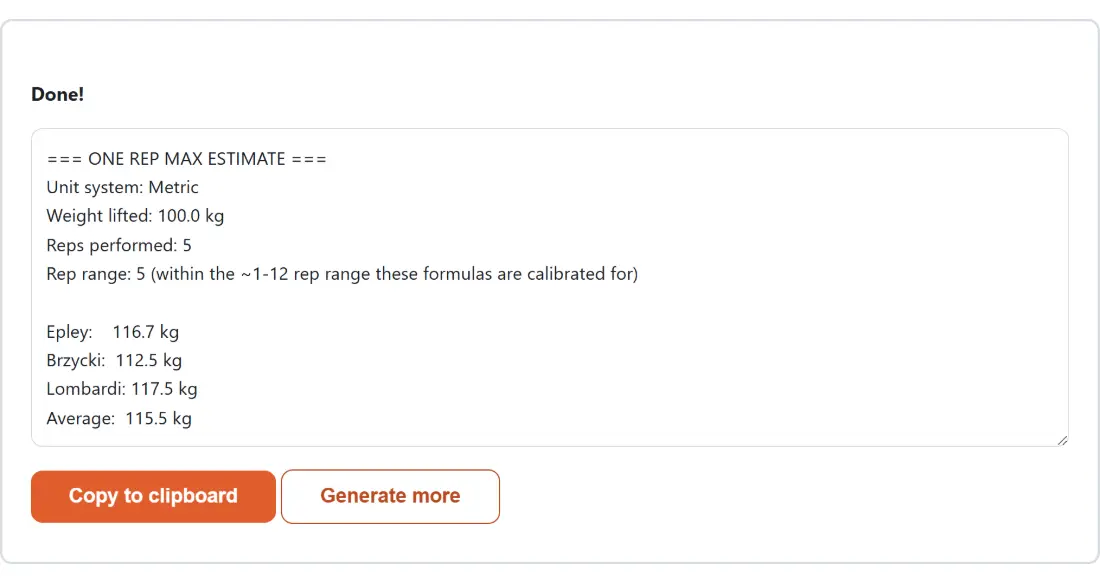
- Read the report, then press “Copy to clipboard” for the text, or “Generate more” to bring the options back with your numbers still in them.
Nothing is downloaded and nothing is saved. The result appears in a read only box on the page, and the options and the button are hidden while it is showing, which is why “Generate more” exists.
A 100 kilogram set of five, line by line
Run the defaults and the report comes back like this. Epley 116.7 kg, Brzycki 112.5 kg, Lombardi 117.5 kg, average 115.5 kg. Everything is printed to one decimal place, and a line above the estimates confirms that five reps sits inside the range the formulas are calibrated for.
The training table underneath then reads 69.3, 75.1, 80.9, 86.7, 92.4, 98.2, 104.0 and 109.8 kilograms for 60 through 95 percent. Multiply the printed 115.5 by 0.75 yourself and you will get 86.6, one tenth below the 86.7 in the table, because the table is built from the full precision average of 115.542 and rounded only when printed. The same gap shows up at 95 percent. Neither number is wrong; the table’s is simply the less rounded of the two.
Switch to imperial and enter 220 pounds for the same five reps and the shape repeats: 256.7, 247.5 and 258.4 pounds, averaging 254.2.
The rep cap at 15, and a safety branch you cannot reach
Rep counts are clamped to a maximum of 15 before anything is computed. That has a side effect worth documenting. The Brzycki formula genuinely breaks at 37 reps, where its denominator hits zero, and turns negative beyond that, and the module carries a guard that reports it as not applicable in those cases. Because the input can never exceed 15, that guard cannot fire through this page. If you have read elsewhere that this calculator can show a not applicable line for Brzycki, it cannot.
What you can reach is the reliability warning. Enter 13, 14 or 15 reps and the line describing your rep range changes to say the estimate sits above the roughly 1 to 12 window all three formulas are calibrated for, and that accuracy degrades for all of them there, not only for Brzycki. At 100 kilograms for fifteen reps the three answers spread from 131.1 to 163.6, which tells the story without any warning text.
Percentage based programming, and the neighbouring calculators
Strength programs usually prescribe work in percentages: five triples at 80 percent, a heavy single at 90 percent in a peaking week. The table exists so you do not multiply eight times by hand every training block, and it is deliberately keyed to the average rather than to any one formula, so a single outlier cannot drag your whole week of work sets with it.
For tracking change between blocks, the Percentage Calculator will give you the percentage difference between two estimates directly. If you are managing bodyweight alongside strength, the BMI Calculator and the Body Fat Calculator cover the two usual measures, and the Macro Calculator works out daily protein, carbohydrate and fat targets from an activity level. All of them run the same way this one does, with the arithmetic happening on your own machine; the full set lives on the calculators hub.