A suffix builder, honestly labelled
Most of what makes an AI image prompt work is not the subject. It is the trailing pile of qualifiers: the medium, the lens, the light, the shape of the frame. Those are the parts people copy from other people’s prompts, forget the exact wording of, and retype slightly differently every time.
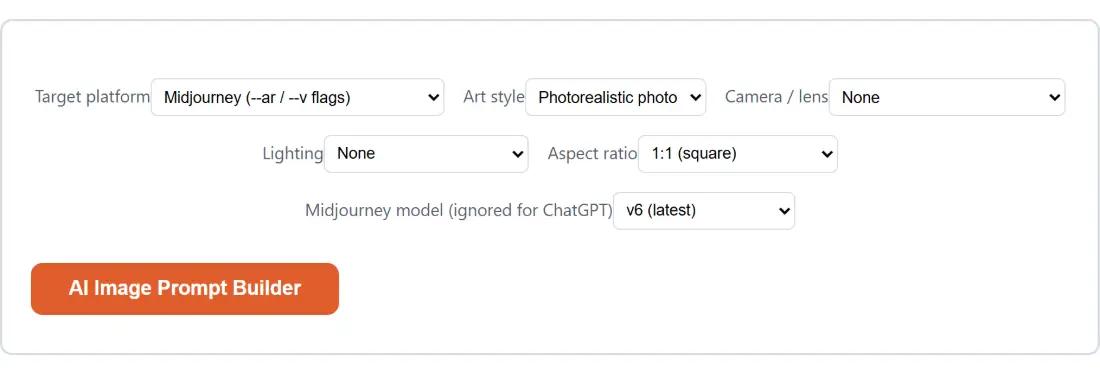
This tool holds that pile. You pick a style, optionally a camera and a lighting setup, an aspect ratio, and a target platform, and it assembles the fragments in a fixed order with the platform’s own parameter syntax bolted to the end. What it does not do is write your subject, and the output says so with a bracketed placeholder sitting in the first slot.
That limitation is structural rather than a design whim. Tool options on this site are dropdowns, numbers and checkboxes; there is no free text input to type a subject into. Offering eight canned subjects instead would have been worse than useless for an image tool, so the placeholder stays visible and the FAQ says why.
Building a cinematic 16:9 prompt
- Set Target platform to Midjourney (—ar / —v flags) or to ChatGPT / DALL·E (plain language). This decides only what gets appended at the end.
- Choose an Art style. Cinematic still expands to a fragment about film grain and dramatic composition.
- Optionally add a Camera / lens. Portrait lens, 85mm (bokeh) contributes shallow depth of field language; leaving it on None skips the fragment entirely.
- Optionally add Lighting. Golden hour contributes a warm sunset phrase.
- Pick an Aspect ratio, here 16:9 (widescreen).
- If you are targeting Midjourney, pick the Midjourney model (ignored for ChatGPT). Otherwise ignore it.
- Click AI Image Prompt Builder, then Copy to clipboard. Generate more returns you to the dropdowns.
- Paste into your image tool and replace the bracketed placeholder at the front with your actual subject.
The result appears as text in a read-only box rather than as a file, which is right for something whose entire purpose is to be pasted somewhere else within about four seconds.
Two platforms, two different grammars
Midjourney’s parameters are flags. They go at the very end of the prompt, space separated, with no punctuation in front of them, and the tool builds them that way: an aspect ratio flag followed by a model flag. Put a comma before them and Midjourney treats the flag as part of your description.
ChatGPT and DALL-E have no flag syntax. Feeding them double-dash parameters produces either a literal reading of the characters or, worse, silent nonsense. So for that platform the same aspect ratio is spelled out as an English sentence appended after a full stop, one written for each of the five ratios rather than templated from the numbers. The vertical option, for instance, mentions phone wallpapers and Stories, because that is what people are usually making when they ask for 9:16.
Everything before the suffix is identical on both platforms. That is the point: the descriptive vocabulary transfers, the parameter grammar does not.
Fragments, not a chatbot
Each dropdown value maps to one fixed string. Photorealistic contributes a run of four descriptors, the aerial drone option contributes a bird’s-eye phrase, neon contributes a coloured-glow phrase. They are joined with commas in a stable order: subject, style, camera, lighting.
Nothing is randomised and nothing is inferred. Two people picking the same six options on opposite sides of the world get byte-identical prompts, which is the property you actually want when you are trying to keep a set of twelve images visually consistent. It is also why an unrecognised option value quietly falls back to a sensible default rather than producing an empty slot: photorealistic for style, none for camera and lighting, square for the ratio.
If you want variation, vary it yourself in the subject you paste in. The suffix is meant to be the constant.
Where to go next
Prompt text is one input among several in most image workflows. If you are filling a layout before the real images exist, Placeholder Image Generator draws sized dummy images with your own colours and label. For social previews at a fixed size, OG Image Generator is the more direct route.
For filler copy to sit alongside the artwork in a mockup, Lorem Ipsum Generator will give you paragraphs, sentences or a word count on demand. The rest of the set is on the generators hub.
![Screenshot of the AI Image Prompt Builder result screen showing the generated output “[describe your subject here], ultra-realistic ph…”](/shots/prompt-builder-result.webp)