Refresh Rate Test

Measure the frame rate your browser is getting, with a median-based estimate, dropped frame count and snapping to standard rates. Nothing is uploaded.

🌐 Español

Measuring…

Sampling frames β€” keep this tab focused (0/20)

β€”Median frame time
0Frames sampled
0Dropped frames (3 s)
β€”Fastest / slowest frame

This is the frame rate your browser is receiving, measured with requestAnimationFrame β€” usually, but not always, your display's true refresh rate. It can't read the panel's hardware Hz directly: if your operating system is driving a 144 Hz monitor in a 60 Hz mode, this reads 60. Variable-refresh displays (G-Sync / FreeSync) make the number wander, and each monitor in a multi-monitor setup can differ. Nothing is uploaded β€” the timing runs entirely in this tab.

Motion smoothness (UFO test)

visual demo β€” not a measurement

The boxes below move a fixed distance every second. On a higher-Hz display the motion looks smoother and the moving edge looks sharper; if the browser drops frames, they visibly stutter. This is a qualitative feel-test, not the number above.

πŸ”’ Private by design: everything runs locally in your browser and never uploaded to any server.

What a browser can and cannot see

There is no way to ask a browser what refresh rate a monitor is running at. That information is not exposed to a web page, deliberately, and no amount of clever code changes it.

What a page can do is ask to be called before each frame is drawn, record the time it is called, and measure the gaps. If the gaps average about 16.7 milliseconds, the browser is receiving frames at roughly 60 per second. If they average 6.9, it is receiving about 144.

That measurement is honest and useful, and it is not the same claim as reading the panel. The distinction matters in several real situations. An operating system driving a high refresh monitor at a lower mode gives a lower reading, correctly. A variable refresh display has no single rate to report. A laptop on battery may be throttling. In every one of those cases the number here is what the browser is actually getting, which is arguably the more relevant figure anyway, since that is what your applications will render at.

Taking a reading

  1. Keep the tab focused and in the foreground. Do not switch windows while it samples.
  2. Wait a moment. The large reading shows that it is measuring, with a count of frames sampled against the minimum of twenty intervals it needs.
  3. Read the result. If it is close to a standard rate, the caption says which standard rate it matched.
  4. Check the four statistics underneath: the median frame time, the frames sampled, the dropped frames over the last three seconds, and the fastest and slowest frame seen.
  5. Use Restart measurement to start again, which is worth doing after moving the window to a different monitor.
  6. Watch the moving object lower down if you want to see the rate rather than read it.

If you switch away mid-measurement, a warning appears explaining that background frames were discarded and the reading has restarted.

Why the median, not the mean

This is the one design decision that makes the number trustworthy.

Real frame streams are not clean. Occasionally a frame is dropped or coalesced, and the interval that follows is roughly double the normal one, sometimes triple. Those long intervals are outliers in the statistical sense.

Take the mean and every one of them pulls the average interval upward, which pulls the reported rate downward. A 60 Hz display with a handful of hitches reports 55, and the user concludes something is wrong with their monitor.

Take the median and none of them matter, because the middle value of the sorted intervals is still the normal one as long as the majority of frames arrived on time. A stream with several deliberately corrupted intervals still reports about 60 Hz and a correct median frame time. That robustness is the whole reason median was chosen, and the outliers are not thrown away either, since they are counted separately as dropped frames.

Snapping to a standard rate

Real measurements are never exactly round. A 60 Hz display measures 59.94, or 60.02, depending on the sampling window.

So a measurement within three percent of one of the standard advertised rates is reported as that rate, with the raw measurement shown alongside. The standard list covers 30, 50, 60, 75, 90, 120, 144, 165 and 240, which is essentially every rate consumer displays are sold at.

A measurement that is not near any of them is shown exactly as measured with no match claimed. That happens on variable refresh displays, on a throttled laptop, and on any panel running an unusual mode, and reporting the raw figure is more useful than forcing it onto the nearest entry in a list.

Dropped frames and jitter

An interval at least half again as long as the median counts as a dropped frame. That threshold is deliberately above the small variation every real stream has and below the roughly doubled interval a genuinely missed frame produces.

A single very long gap can contribute more than one to the count, which is correct: a gap three times the normal interval means two frames never arrived.

The fastest and slowest frame figures give you the spread. On a healthy system they sit close together. A wide spread with a stable median usually means something else on the machine is competing for the graphics card rather than that the display is misconfigured.

For a resolution and pixel ratio readout rather than a timing one, What Is My Screen Resolution reports the screen size, the viewport, the device pixel ratio and the physical pixel estimate.

Dead Pixel Test fills the screen with solid colours to find stuck subpixels, which is the other thing worth doing on a new monitor. Browser Info covers the software side. And since your refresh rate is part of what a reaction test measures, Reaction Time Test is the natural companion. The rest is on the testers hub.
See it in action

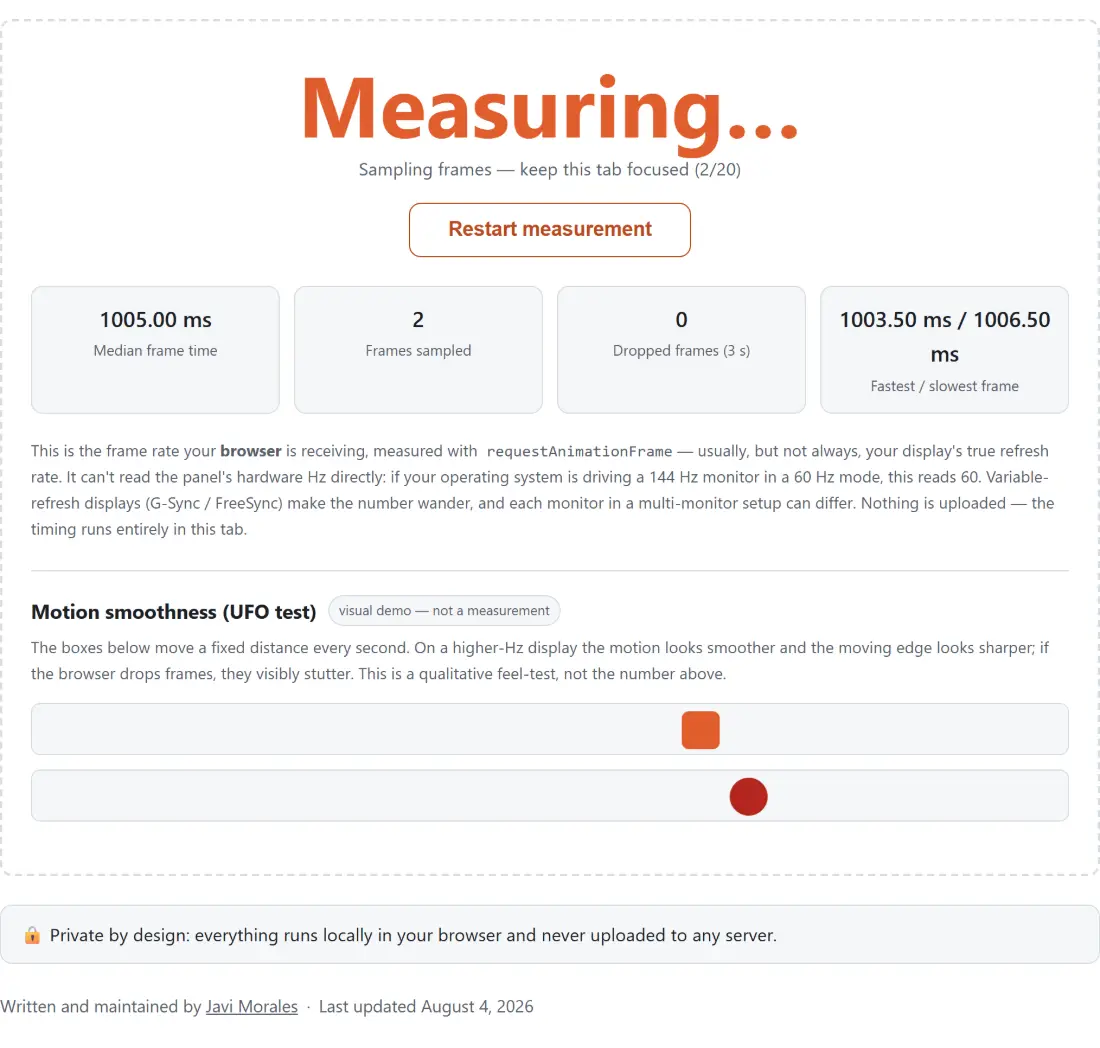
Screenshot of the Refresh Rate Test tool with a live measurement sampling twenty frames while the tab stays focused, reporting median frame time, frames sampled, dropped frames over three seconds and the fastest and slowest frame observed
Refresh Rate Test mid-process: a live measurement sampling twenty frames while the tab stays focused, reporting median frame time, frames sampled, dropped frames over three seconds and the fastest and slowest frame observed.
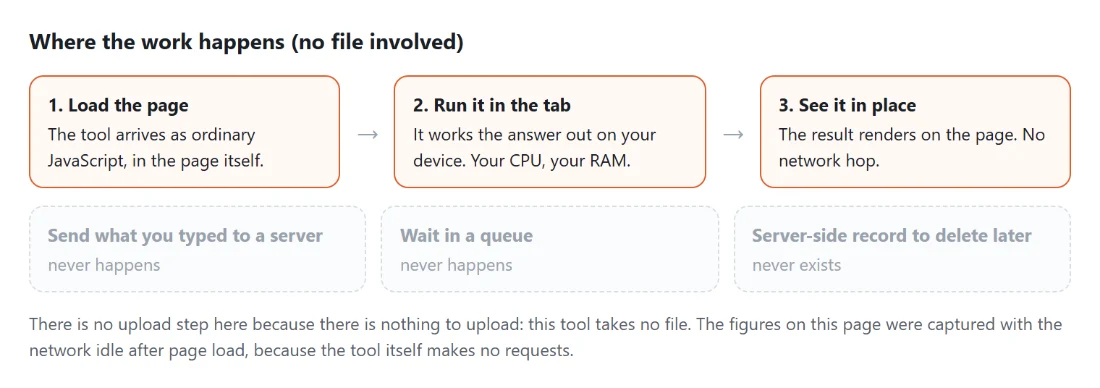
Diagram: where the work happens on a SysFenix page that has no file input at all: the tool arrives as ordinary JavaScript inside the page, works the answer out on your own device and renders it in place, so the upload, queue and server-side record a typical online tool needs never happen
Where the work happens on a SysFenix page that has no file input at all: the tool arrives as ordinary JavaScript inside the page, works the answer out on your own device and renders it in place, so the upload, queue and server-side record a typical online tool needs never happen.

Frequently asked questions

Does this read my monitor's hardware refresh rate?

No, and no page in a browser can. It measures the rate at which your browser is receiving frames, which is usually the same thing and sometimes is not. If your operating system is driving a 144 Hz panel in a 60 Hz mode, this reads 60, because 60 is genuinely what the browser is getting.

Why does the reading wander on my gaming monitor?

Because a variable refresh display deliberately changes its rate to match what is being drawn. On a G-Sync or FreeSync panel there is no single fixed number to measure, so the reading moves. That is the display working as designed rather than a fault in the measurement.

Why the median rather than the average?

Because a dropped frame reads as one interval of roughly double length, and an average is dragged upward by a few of those, under-reporting the rate. The median is the middle value, so a minority of long intervals cannot move it. A 60 Hz stream with several dropped frames still reports about 60, which is the correct answer.

What does the nominal rate line mean?

That the measured value came within three percent of a standard advertised rate and is being reported as that rate. The standard list runs 30, 50, 60, 75, 90, 120, 144, 165 and 240. A measurement close to one of those snaps to it; a measurement that is not close to any of them is shown as measured, without a match.

What counts as a dropped frame?

An interval at least half again as long as the median. That threshold catches a genuinely skipped frame, which arrives at roughly double the normal interval, while ignoring the small jitter that every real frame stream has. A single very long gap can register as more than one dropped frame, since it represents more than one missing frame.

Why does it need the tab focused?

Because browsers throttle background tabs hard, often down to about one frame per second. Frames collected while the tab was in the background are discarded and the measurement restarts once you come back, with a warning explaining what happened. A reading taken while you were looking at another window would be meaningless.

How many frames does it need?

At least twenty intervals before it reports anything, which takes well under a second on any normal display. Until then the reading shows that it is sampling, with a count so you can see progress. The dropped frame figure is reported over a rolling three second window.

Is the moving object a measurement?

No, and it is labelled as a demonstration rather than a reading. It is there so you can see what your refresh rate looks like in motion, and to compare two displays side by side. Nothing about it feeds the number at the top of the page.

Related tools