Five button codes, and the two that most mice do not have
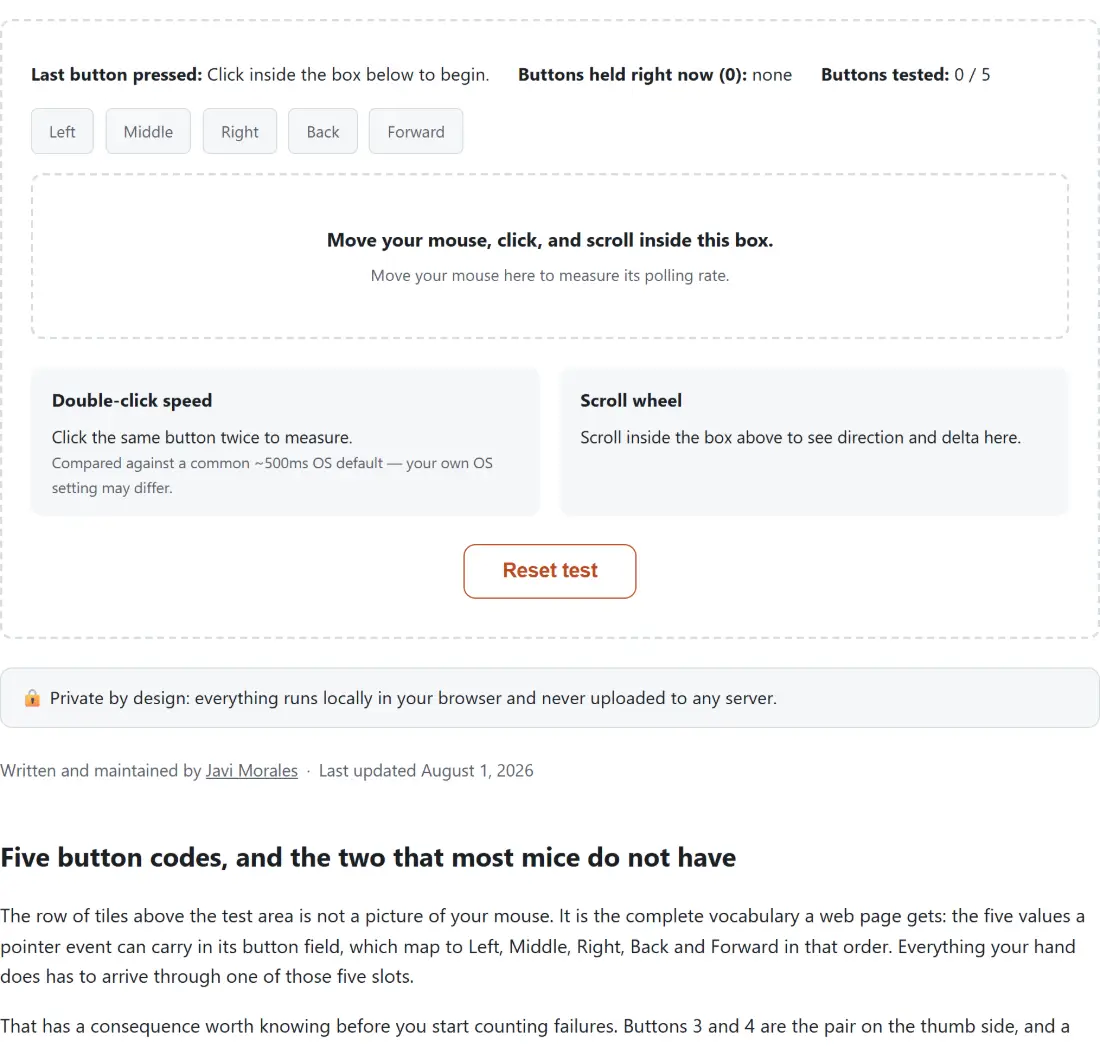
The row of tiles above the test area is not a picture of your mouse. It is the complete vocabulary a web page gets: the five values a pointer event can carry in its button field, which map to Left, Middle, Right, Back and Forward in that order. Everything your hand does has to arrive through one of those five slots.
That has a consequence worth knowing before you start counting failures. Buttons 3 and 4 are the pair on the thumb side, and a plain three-button office mouse has neither, so the counter will read 3 out of 5 no matter how long you sit there. That is a fact about the mouse, not a fault. Equally, a gaming mouse with twelve programmable buttons will not fill twelve tiles, because the extra ones are almost always sent by the vendor’s driver as keystrokes rather than as mouse buttons. To see what those are really emitting, the keyboard tester listens across the whole window rather than inside one box, which is what a macro-bound button needs.
Working through the dashed box
- Move the pointer into the panel headed Move your mouse, click, and scroll inside this box. Every listener in this tool is bound to that one element rather than to the page, so nothing outside it is being watched.
- Press and release each button in turn. A tile fills with the accent color while you hold it and settles to green once you let go, and the Buttons tested counter climbs.
- Click the same button twice in quick succession. The Double-click speed panel drops its “Click the same button twice to measure.” prompt and starts logging intervals.
- Roll the wheel up and down, and sideways too if yours tilts. Each event lands in the Scroll wheel panel with its direction, both delta values and its unit.
- Keep the pointer moving inside the box until the hint line stops offering to measure and starts reading Apparent polling rate.
- Press Reset test to clear the counters, both logs and the movement sample buffer in one go.
The box swallows a few things on purpose while you are in it. Right-clicking does not open the context menu, the wheel does not scroll the page, and each press cancels the browser’s own default action for it, which is what keeps behaviour like middle-click autoscroll from interrupting the test. Step outside the dashed border and all of that works normally again.
Reading the double-click log against a 500 millisecond yardstick
Every press is timed against the previous press of the same button, and only that button, so alternating left and right still writes a row for each of them, timing across the opposite-button click you made in between rather than a real double-click attempt. The gap is printed in milliseconds next to a word from a fixed five-step scale: below 150 is “Very fast”, below 300 is “Fast”, up to and including 500 is “Typical”, up to 800 is “Slow”, and anything longer is “Too slow for a double-click”. The note in parentheses after it is a separate yes or no, and its rule is simply 500 milliseconds or less.
The honest part is that 500 is a stand-in. It is a widely used default double-click time, but it is a slider on every desktop operating system and no browser interface reports the value currently set on your machine. So the verdict answers “would this have passed a common default”, not “will this pass on your computer”. Somebody who has pushed that slider toward the fast end will miss double-clicks the panel calls Typical, which is worth knowing before you decide the hardware is at fault.
Triple-clicking writes two rows, because every press after the first has a predecessor to compare against. Both this panel and the wheel panel keep the five most recent entries, newest at the top, and drop the rest.
Where the scroll panel’s delta numbers come from
Each wheel event carries a horizontal and a vertical delta, and the tool prints both rather than just the one it picked. The direction shown is whichever axis moved further, with vertical winning a tie because that is overwhelmingly the common case, so a diagonal trackpad flick still resolves to a single arrow.
The unit printed after the two deltas is the part people do not expect. A wheel event also reports which scale its numbers are in, and browsers genuinely disagree here: the same physical notch can arrive measured in pixels, in lines or in pages depending on the operating system, the pointing device and the browser build. The panel labels it rather than converting it, because a raw number with no unit is how scroll handling bugs get written in the first place. Anyone debugging their own scroll code will get more out of this panel than out of the button tiles.
What the polling rate figure is actually counting
Movement is sampled into a rolling buffer that holds the sixty most recent timestamps. The reading is one thousand divided by the mean gap between consecutive samples, with zero-length gaps discarded, and nothing is shown at all until the buffer holds two samples with a real gap between them. Because it is an average over a window that keeps sliding, the number wobbles while you are moving and settles when your speed is steady.
The interesting decision is which timestamps go into that buffer. Browsers batch several hardware samples into each move event they actually dispatch, and dispatched events land at roughly your display’s refresh rate, so timing them measures the monitor rather than the mouse. When the browser offers the coalesced events interface, this tool unpacks each dispatched event into the real samples inside it and times those instead, which is where a reading above your refresh rate can come from at all. When that interface is missing, the tool falls back to the single dispatched timestamp and prints a note under the reading saying the number may be capped near your display’s rate.
Limits worth knowing before you blame the mouse
Pen and touch input are filtered out of the button, release and movement handlers, so a stylus will not light anything up here even though the wheel panel is more permissive. Nothing is written to storage, so a reload gives you an empty session. And the whole thing measures what the browser was told, which means a driver profile, a smoothing setting or a remapped side button sits between the switch and this page.
For the failures that a button sweep will not surface, the neighbouring tools are more direct. Sustained clicking is what the click speed test is built around, over runs of 1, 5, 10 or 60 seconds. A misbehaving controller belongs in the gamepad tester, which reads sticks and triggers as analogue values and has its own deadzone control for drift. And if you are checking over a whole secondhand machine rather than one peripheral, the hardware testers guide runs through the screen and keyboard checks alongside the reaction and timing widgets, in an order that makes sense to work down.