Two fields, and the defaults the page opens on
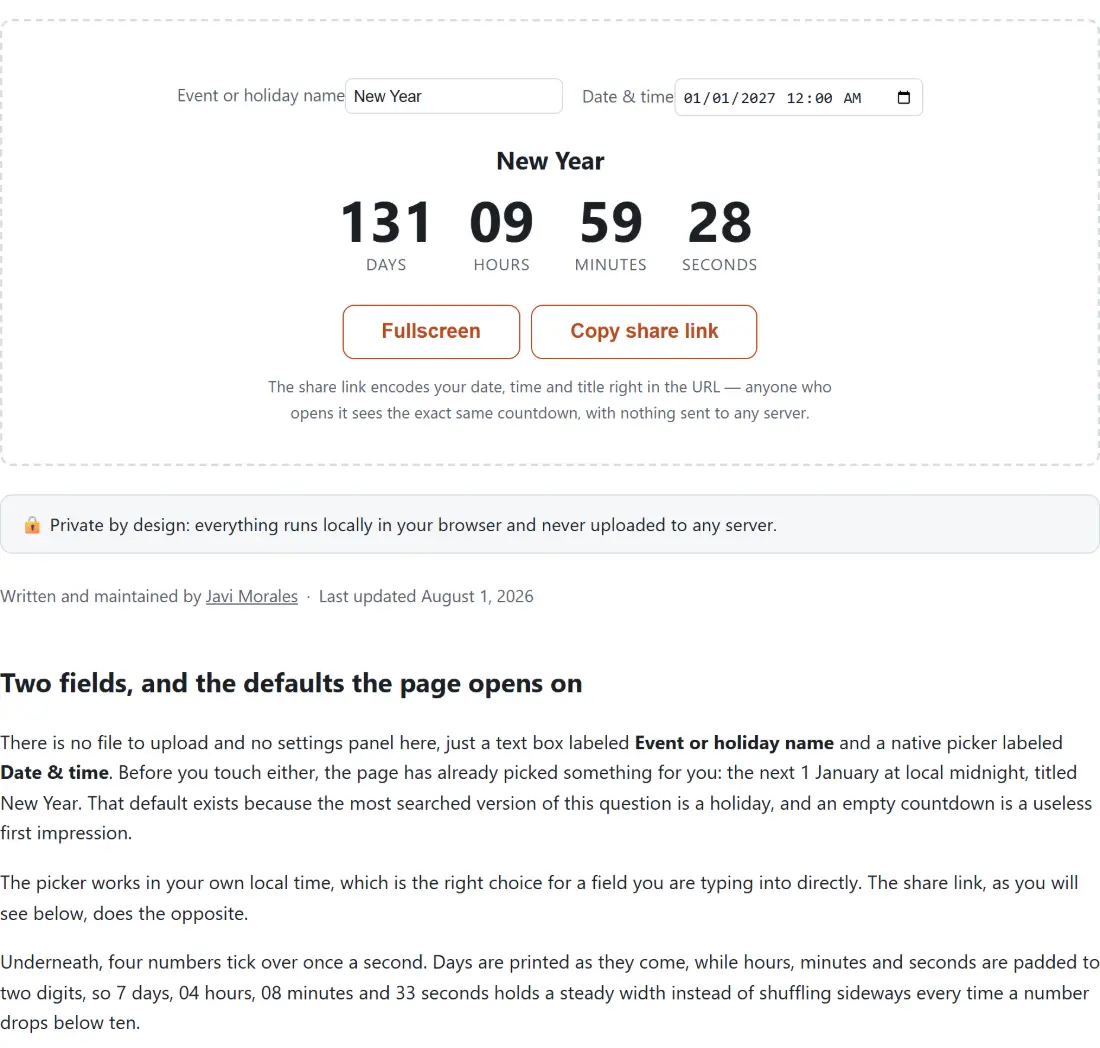
There is no file to upload and no settings panel here, just a text box labeled Event or holiday name and a native picker labeled Date & time. Before you touch either, the page has already picked something for you: the next 1 January at local midnight, titled New Year. That default exists because the most searched version of this question is a holiday, and an empty countdown is a useless first impression.
The picker works in your own local time, which is the right choice for a field you are typing into directly. The share link, as you will see below, does the opposite.
Underneath, four numbers tick over once a second. Days are printed as they come, while hours, minutes and seconds are padded to two digits, so 7 days, 04 hours, 08 minutes and 33 seconds holds a steady width instead of shuffling sideways every time a number drops below ten.
Setting a countdown up and putting it on a screen
- Type into Event or holiday name. A birthday, a launch, a deadline, a wedding, anything you would otherwise be counting on your fingers.
- Set Date & time with the picker. Both the date and the time of day matter, since the countdown resolves down to the second.
- Watch the four numbers. They recompute from the current clock on every tick rather than counting down an internal number, so they cannot drift, and a tab that has been asleep in the background snaps straight back to the correct value when you return to it.
- Click Fullscreen to fill the screen with the countdown, which is what you want on a projector, a spare monitor or a stream overlay. The same button then reads Exit fullscreen.
- Click Copy share link to put the whole countdown on your clipboard as a URL. The button confirms with Link copied! when it worked.
If your browser refuses clipboard access, the tool says so and points you at the address bar instead, which is a real fallback rather than a dead end.
A link that carries the whole countdown in its address bar
This site is static, so there is no database in which to park a shared countdown, and it turns out none is needed. The date and the title travel inside the URL itself. Paste that link into a group chat or an event page and everyone who opens it lands on the same live countdown, with no account, no short-link service and nothing kept on any server.
The target is encoded as a UTC timestamp on purpose. The picker you typed into is local, but the person opening your link may not share your time zone, and an absolute instant is the only version of “8pm on Friday” that survives the trip. The event name rides along as a second parameter, left out entirely when you have not set one.
Elapsed time, not calendar squares
The countdown is pure millisecond arithmetic, which is worth understanding before you argue with it. Ask Days Between Dates Calculator how far away a date is and you get whole calendar days between two dates, with a business-day count if you want one. Ask this page and you get how much time is actually left, which is a different quantity across a daylight-saving boundary. From midday on 1 August 2026 to midnight at the start of Christmas Day that same year, this tool shows 145 days and 13 hours in a zone that ends summer time in between, and 145 days and 12 hours in one that has no such change.
At zero, the display stops rather than going negative
When the target passes, the four numbers are replaced by a short “it’s here” message, and that is all that happens. There is no alarm sound, no browser notification and no confetti. A countdown that keeps ticking into negative numbers is confusing rather than useful, so it stops, and the tool does not pretend to still be running.
That also means this is the wrong page for anything you need to be woken up by. Online Timer and Stopwatch counts down a duration you set rather than a date on the calendar and does have a sound alarm, and it keeps a stopwatch and Pomodoro presets alongside it. If the event belongs in a calendar rather than a browser tab, ICS File and Add to Calendar Link Generator builds a proper .ics file plus Google and Outlook links, so the reminder comes from the calendar app that is already going to nag you.
Where the countdown lives between visits
Every edit to the name or the date is written to your browser’s local storage, so coming back to the page later picks up where you left off instead of resetting to New Year. A share link always beats that saved copy on load, and then replaces it. Nothing is synchronized anywhere, so a countdown you set on a laptop will not appear on your phone unless you send yourself the link.
If you are announcing the date somewhere else as well, Discord Timestamp Generator turns the same moment into the codes Discord renders in each reader’s own time zone, which pairs neatly with a shared countdown. The other live widgets on this site are collected under testers and walked through in our guide to the hardware testers and widgets here.