UTM Link Builder

Build campaign URLs with utm_source, medium, campaign, term and content, generate one per campaign name in bulk, and keep a local history. No account.

🌐 Español

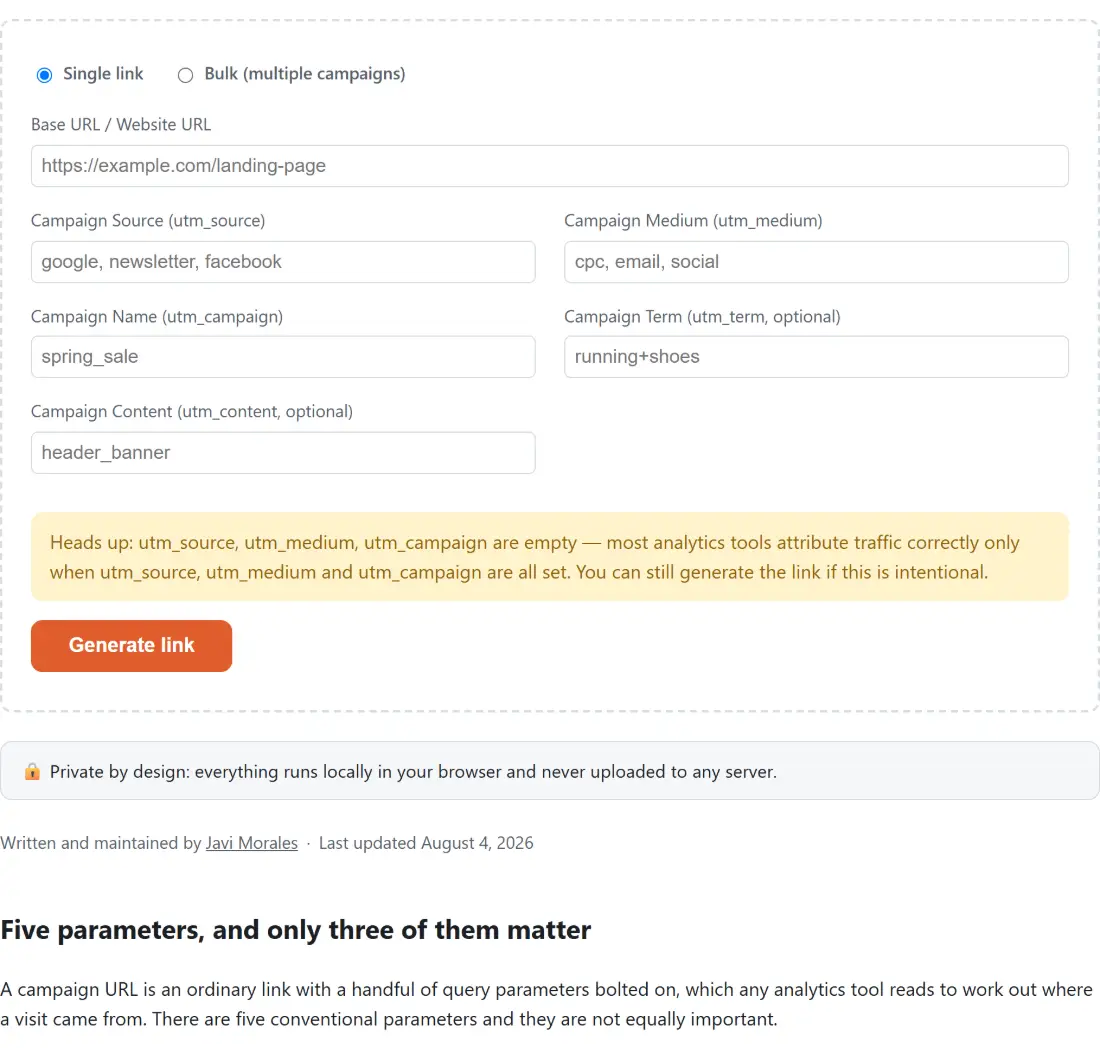
Heads up: utm_source, utm_medium, utm_campaign are empty — most analytics tools attribute traffic correctly only when utm_source, utm_medium and utm_campaign are all set. You can still generate the link if this is intentional.

🔒 Private by design: everything runs locally in your browser and never uploaded to any server.

Five parameters, and only three of them matter

A campaign URL is an ordinary link with a handful of query parameters bolted on, which any analytics tool reads to work out where a visit came from. There are five conventional parameters and they are not equally important.

Source names where the traffic came from, medium names the kind of channel, and campaign names the specific push. Those three are what make a visit attributable, and a link missing any of them reports incompletely. Term and content are refinements, originally for paid search keywords and for distinguishing two links in the same email, and plenty of campaigns never use either.

This builder flags the first three when they are empty and stays quiet about the last two, which is the distinction that actually reflects how the parameters are used.

  1. Enter the base URL. A bare domain is fine.
  2. Fill in source, medium and campaign. The builder tells you if one is missing.
  3. Add term and content only if you have a reason to.
  4. Copy the generated link, which updates as you type.
  5. Switch to bulk mode when you need one link per campaign name.

Why the URL is assembled rather than concatenated

The most common way to produce a broken tracking link is to build it as a string. It works until a value contains a space, an ampersand or an accented character, at which point the link either breaks outright or silently truncates a parameter at the ampersand.

Here the parameters are set through the browser’s own URL handling, which encodes each value as it is written. A campaign name containing spaces, punctuation, non ASCII characters or even emoji comes out correctly encoded, and an existing query string on the base URL survives untouched rather than being clobbered.

The bare domain case is the one place a deliberate guess is made. Typing a domain with no scheme is a genuine mistake people make constantly, and treating it as https is what they meant. A URL that already declares some other scheme is refused by name instead, because guessing there produces an address that looks plausible and goes nowhere.

Bulk mode, and the interpretation it commits to

Bulk generation could mean several things and this one picks a specific interpretation, which is worth stating because it will not fit every workflow.

You give one base URL, one shared set of source, medium, term and content, and a list of campaign names. Each name produces its own link with everything else held constant. That covers the situation that actually recurs, which is one landing page and several differently named campaigns on the same channel, and it fits in a single text box.

Names can be separated by commas, by newlines or by both, so pasting a column out of a spreadsheet works as well as typing a list. Order is preserved and duplicates are kept, on the basis that a repeated name is far more likely to be a mistake you want to notice than something the tool should quietly deduplicate.

Consistency is the real benefit

Analytics tools treat parameter values as literal strings, so email and Email are two different mediums and will appear as two separate rows in every report from then on. Nothing warns you. The numbers simply split.

Keeping a history of previously built links, held locally on your device, helps with exactly this. Before starting a new campaign you can see what you actually used last time rather than what you think you used, which is the cheapest possible way to avoid a taxonomy that fragments over a year.

To inspect or hand encode a value rather than build a whole URL, URL Encode does the conversion directly. To turn a finished campaign link into something scannable for print, QR Code Generator produces the image, and WhatsApp Link Generator covers click to chat links with a prefilled message.

For the other side of the site’s marketing surface, Schema Markup Generator writes structured data, Robots.txt Generator controls crawling, and Social Character Counter checks a post fits. The rest are on the dev tools hub.
See it in action

Screenshot of the UTM Link Builder tool with a single-link mode and a bulk mode for multiple campaigns, with the base URL and the standard utm_source, utm_medium, utm_campaign and utm_term parameters assembled into a tagged link
UTM Link Builder mid-process: a single-link mode and a bulk mode for multiple campaigns, with the base URL and the standard utm_source, utm_medium, utm_campaign and utm_term parameters assembled into a tagged link.
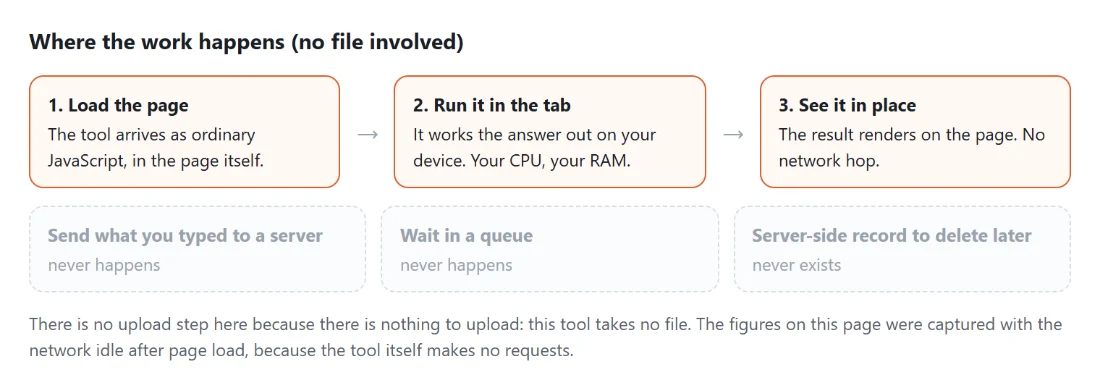
Diagram: where the work happens on a SysFenix page that has no file input at all: the tool arrives as ordinary JavaScript inside the page, works the answer out on your own device and renders it in place, so the upload, queue and server-side record a typical online tool needs never happen
Where the work happens on a SysFenix page that has no file input at all: the tool arrives as ordinary JavaScript inside the page, works the answer out on your own device and renders it in place, so the upload, queue and server-side record a typical online tool needs never happen.

Frequently asked questions

Do I have to type the scheme on the base URL?

No. A bare domain has https prepended automatically, because that is what people mean when they type one and rejecting it would be pedantic. What is not guessed at is a URL that already declares a different scheme, since prepending https onto one of those produces a nonsensical address rather than a clear refusal. Only http and https addresses are accepted, and anything else is named as unsupported.

What happens to query parameters already on my URL?

They are kept. The UTM parameters are added alongside whatever the base URL already carries rather than replacing the query string, so a landing page that already takes its own parameters keeps working. If the base URL already contains a UTM parameter of the same name, the value you enter here replaces it.

Are empty fields written into the link?

No. Only fields with something in them after trimming become query parameters, so leaving term and content blank produces a clean URL rather than one with two empty parameters trailing off the end. That matters for readability, since a campaign link is often pasted somewhere a person will see it.

Does it warn me about missing parameters?

It flags the three that analytics tools genuinely need, which are source, medium and campaign. Those three together are what makes a visit attributable, and a link missing one of them still works but reports incompletely, which you usually discover weeks later when the numbers do not add up. Term and content are optional by design and are never flagged.

How does the bulk mode work?

One base URL and one shared set of source, medium, term and content, plus a list of campaign names separated by commas or newlines or both. You get one link per name, all sharing the other parameters. That covers the common case of one landing page and several differently named campaigns on the same channel. Input order is preserved and duplicate names are kept rather than collapsed, since a repeated name is more likely a typo you want to see than something to silently fix.

What about spaces and accented characters in a value?

They are percent encoded properly on the way into the URL. Spaces, ampersands, equals signs, non ASCII characters and emoji all come out correctly encoded, because the parameters are set through the browser's own URL machinery rather than glued together as text. Hand built UTM links break on exactly this.

Is my history of built links stored anywhere I should worry about?

It is stored in your browser's own storage on your device, capped at thirty entries, and never transmitted. Nothing about your URLs, campaign names or the fact that you built them leaves the machine. If storage is unavailable, for example in a private window, the builder still works and simply does not remember previous links.

Why build links here rather than in a spreadsheet?

Mostly because of encoding and consistency. A spreadsheet formula that concatenates strings will happily produce a link with a raw space in it, and a campaign name capitalised differently from last month's quietly becomes a separate row in your reports. Building through a form that encodes properly and keeps a history of what you used removes both failure modes.

Related tools