The character set a URL is allowed to carry
URLs were specified for a world of teletypes and mail gateways, and the caution shows. The syntax admits a small alphabet: the letters A to Z in both cases, the digits, and a handful of punctuation marks. Everything else has to be rewritten before it can travel.
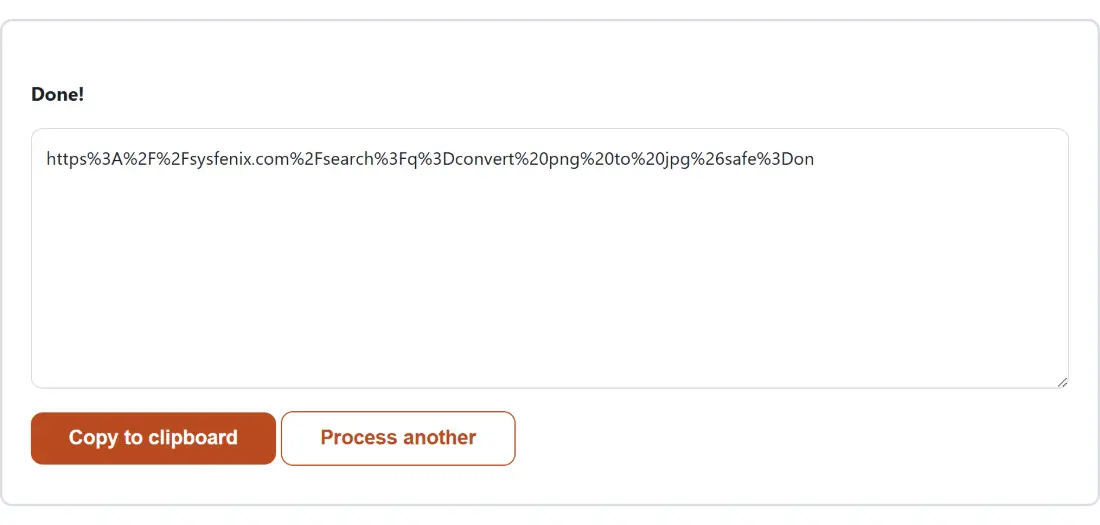
The rewriting scheme is percent-encoding. A character is converted to its bytes in UTF-8, and each byte is written as a percent sign followed by that byte’s value in two hexadecimal digits. A space becomes %20. An é becomes %C3%A9, two escapes for two bytes. A single emoji becomes four escapes.
This is why an encoded string grows so much faster than people expect, and why encoding is a one-way transformation you should apply exactly once. It is also why the operation has nothing to hide: it is a fixed table lookup over bytes, with no interpretation of what your text means.
Reserved punctuation and the query string it breaks
The second category is more interesting than unprintable characters, because these are marks you can type and that look completely harmless.
A URL uses punctuation structurally. ? opens the query string, & separates one parameter from the next, = splits a parameter’s name from its value, # starts the fragment, / divides path segments and : follows the scheme. A parser scanning your address applies those meanings mechanically, with no idea which of them you intended as data.
So a search term of “Q&A” becomes a parameter that ends after the letter Q, and a second parameter called “A”. A product name containing a slash creates a path segment that does not exist. A note containing a hash silently truncates everything after it, because the fragment is never sent to the server at all. These failures are quiet: no error appears, the request succeeds, and half the data is simply missing.
Component scope versus encoding a whole URL
Two functions do the work, and the choice between them is the only real decision on this page.
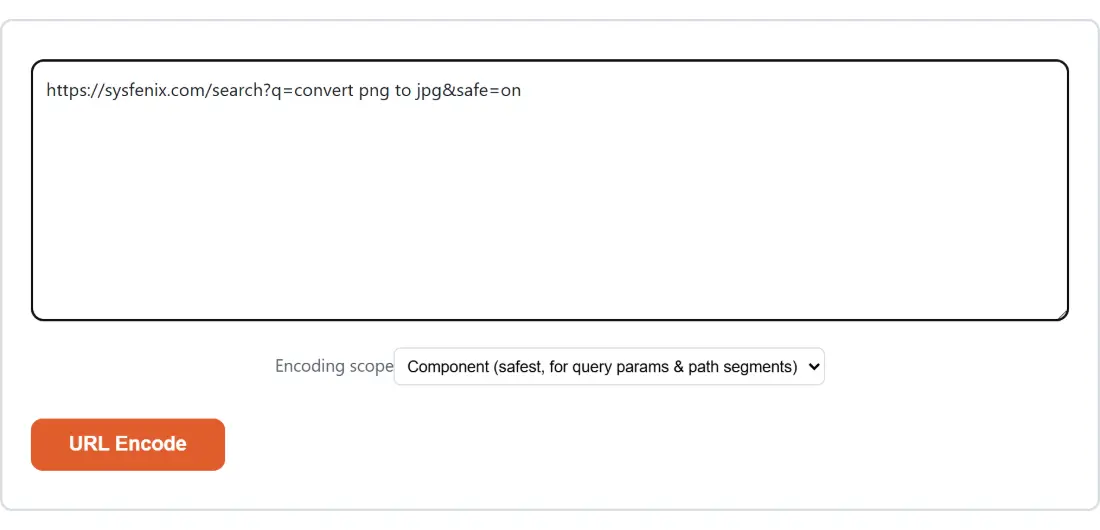
Component (safest, for query params & path segments) runs encodeURIComponent, which escapes the structural punctuation along with everything else. Use it for a value going inside a URL: one parameter, one path segment, one form field. That is why the option is labelled safest, and why it is the default.
Full URL (keeps /, :, ?, & untouched) runs encodeURI, which leaves the structural marks intact and escapes only what could never be valid anywhere in a URL, chiefly spaces and non-ASCII text. Use it when you already have a complete, correctly assembled address that merely contains a space or an accented character and you want it made transmissible without rearranging it.
Getting this backwards is the usual bug. Encode a redirect target with Full URL scope and its slashes and ampersands stay bare, so when it is dropped into a parent URL’s query string the parent’s parser eats it.
The five marks encodeURIComponent still leaves bare
There is a wrinkle worth knowing before you trust the output against a strict server. encodeURIComponent was specified against an older URI document than the one in force today, and it leaves five punctuation marks unescaped that RFC 3986 classes as reserved: !, *, ', ( and ).
In practice almost nothing cares. The exceptions turn up around OAuth signatures, some AWS request signing, and older enterprise gateways, where a signature computed over a differently-escaped string will not match. If you are in that territory, replace those five characters with their escapes yourself after running the text through here.
The alphanumerics plus -, _, . and ~ are left bare too, and those four need no attention at all: section 2.3 of RFC 3986 defines the unreserved set as exactly the letters, the digits and those four marks, so none of them ever requires escaping. The tilde is the one people expect to find on the list above, because an older specification treated it as a mark rather than as unreserved.
Encoding a value for a query string
- Paste your text into the box above, which shows the placeholder Paste your text here….
- Choose an Encoding scope. Leave it on Component (safest, for query params & path segments) unless you are encoding a whole address.
- Click URL Encode. The button stays disabled while the box is empty and reads Working… during the run.
- Take the result with Copy to clipboard. The button changes to Copied! and stays that way, because the input box and the encode button are no longer on screen; Process another clears both boxes and starts over.
A space becomes %20, never a plus sign
You will see spaces written as + in plenty of real query strings, and that is a different specification. HTML forms submit with application/x-www-form-urlencoded, which predates the modern URI rules and uses + for a space. Percent-encoding uses %20.
Neither scope here will ever produce a plus sign for a space. That is the correct behaviour for a URI, and it is safe almost everywhere, since %20 is understood by form parsers too. Trouble only appears in the other direction, when something written for form encoding reads your %20 correctly but hands a literal + back to you as a plus rather than a space.
The consequence for assembling links by hand: pick one convention and stay with it. Mixing + from a copied fragment with %20 from this tool inside the same query string is how a value ends up with a stray plus in the middle of it.
Where UTM Link Builder takes over
Encoding one value at a time is the right tool for debugging, and the wrong one for building a campaign link with five parameters. UTM Link Builder assembles the whole utm_source, utm_medium and utm_campaign set and handles the escaping as part of the job.
For the reverse direction, URL Decode turns escapes back into readable text with the matching pair of scopes. If what you actually need is to move binary or awkward data through a text channel rather than through a URL, Base64 Encode is the better fit. The rest of the collection is on the developer tools hub, with a tour of it in the developer tools guide.