Where entity-escaped text actually comes from
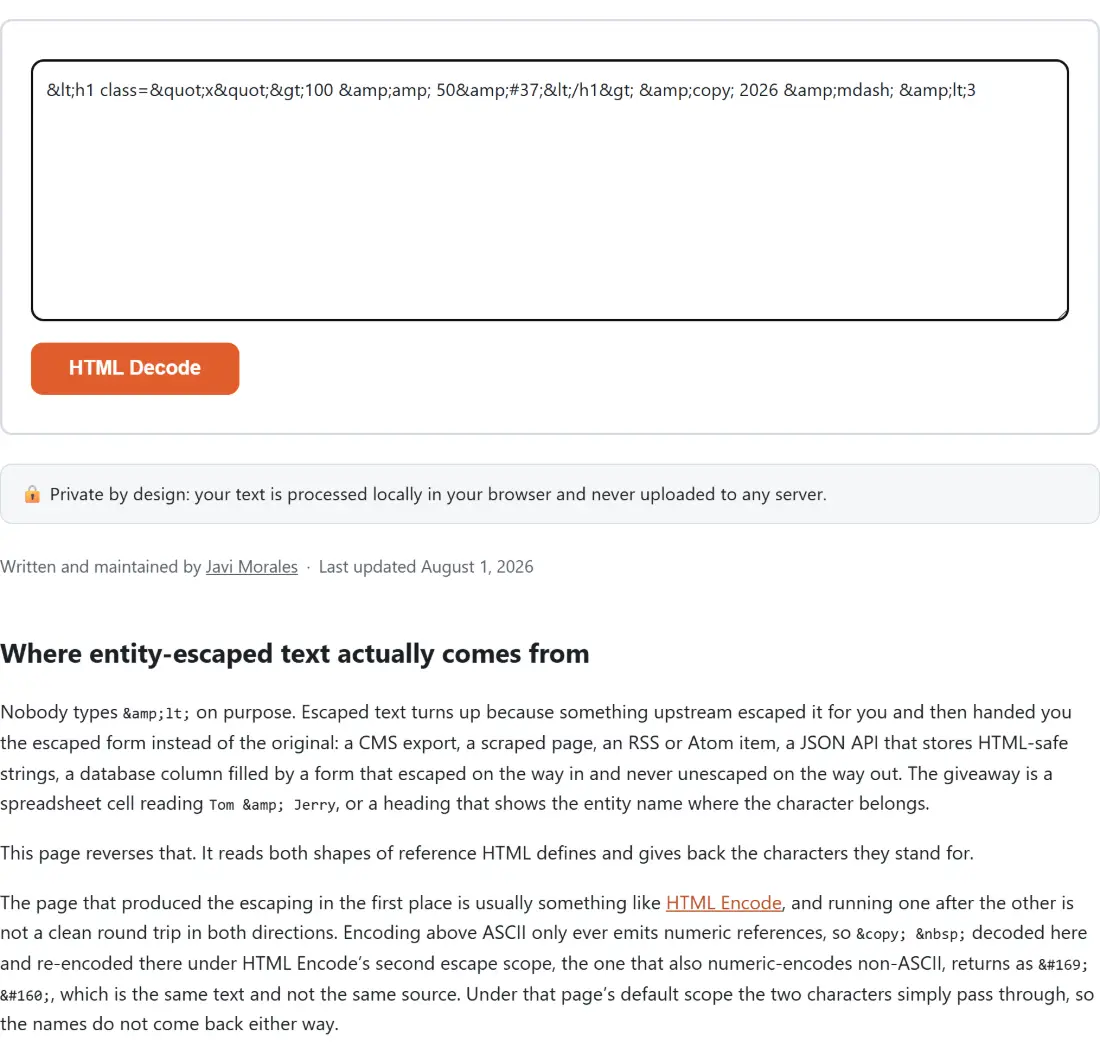
Nobody types < on purpose. Escaped text turns up because something upstream escaped it for you and then handed you the escaped form instead of the original: a CMS export, a scraped page, an RSS or Atom item, a JSON API that stores HTML-safe strings, a database column filled by a form that escaped on the way in and never unescaped on the way out. The giveaway is a spreadsheet cell reading Tom & Jerry, or a heading that shows the entity name where the character belongs.
This page reverses that. It reads both shapes of reference HTML defines and gives back the characters they stand for.
The page that produced the escaping in the first place is usually something like HTML Encode, and running one after the other is not a clean round trip in both directions. Encoding above ASCII only ever emits numeric references, so © decoded here and re-encoded there under HTML Encode’s second escape scope, the one that also numeric-encodes non-ASCII, returns as ©  , which is the same text and not the same source. Under that page’s default scope the two characters simply pass through, so the names do not come back either way.
Three clicks between escaped source and readable text
- Paste the escaped text into the box at the top of the page. Named references like
&and numeric ones likeécan be mixed freely in the same paste. - Click HTML Decode. There is nothing to configure on this page, so the plain text appears as soon as the single pass finishes.
- Click Copy to clipboard to take the result away, or Process another to empty the page and start again.
The thirty-nine names in the table, and the two thousand that are not
The HTML5 specification defines well over two thousand named character references. The table in this tool holds thirty-nine: the five that always have to be escaped (amp, lt, gt, quot, apos) plus thirty-four common typographic and symbol names. Those thirty-four cover nbsp, copy, reg, trade, hellip, the two dashes, all four curly quotes, euro, pound, yen, cent, sect, para, deg, plusmn, times, divide, the two guillemets, bull, both daggers, permil, micro, middot, the three vulgar fractions and the two inverted punctuation marks.
Shipping the complete table would mean shipping a large data file that almost no pasted text ever touches, so the list stops where the usefulness does. A name outside it, ♠ or α for instance, comes back exactly as you typed it.
Two details of the lookup are worth carrying away. It is case-sensitive by design, because HTML’s names are: † and ‡ are different characters, so quietly case-folding an unrecognised name could hand you the wrong one. & accordingly stays as &. And the closing semicolon is mandatory, so & on its own is left alone.
One decoded character deserves singling out. produces U+00A0, a non-breaking space, not the ordinary space your keyboard makes. It is indistinguishable on screen and behaves differently everywhere else, which is why prose that looks perfectly normal after decoding can still fail to split on whitespace in a script.
Decimal, hexadecimal, and the fromCharCode trap
Numeric references come in two shapes and both work here: ' in decimal and ' in hexadecimal, with an uppercase ' accepted as well. They need no lookup table at all, since the number is the character, so between them they cover anything Unicode can express.
The subtlety is which JavaScript function turns that number back into text. String.fromCharCode operates on 16-bit UTF-16 code units, so any code point above 0xFFFF gets truncated into half of a character. Most emoji live up there. This module calls String.fromCodePoint instead, which reassembles the real code point in one step, and that is the whole reason 🎉 decodes to a single party popper rather than two pieces of one.
One pass only, so a double-escaped < stops halfway
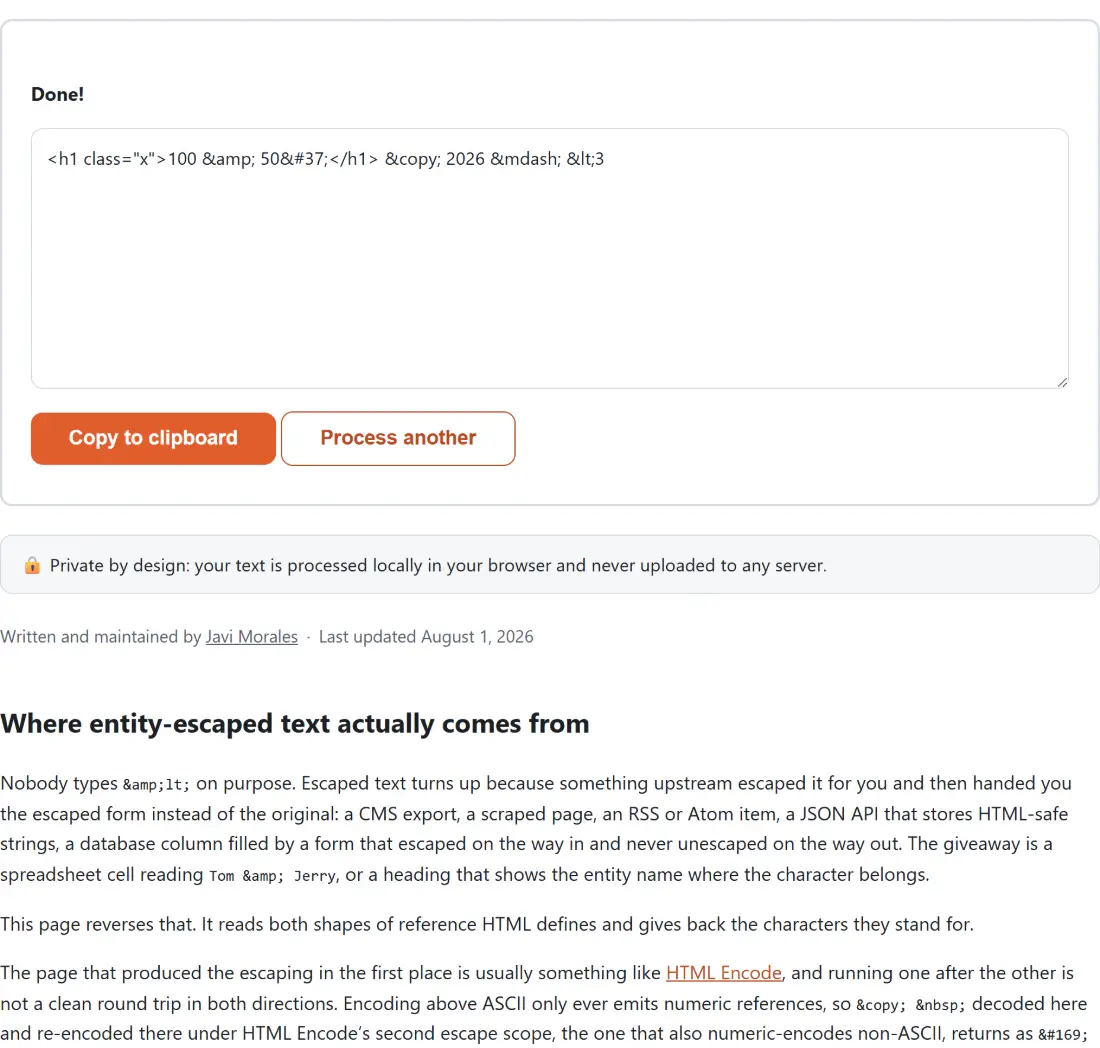
Decoding runs a single regular expression over the text and replaces each match once. Replacements are never re-scanned. So &lt; becomes < and stops, not <.
That is the right answer for a document that was escaped twice, because the outer escape is the only one that was ever meant to come off. It still surprises people who expect a decoder to keep going until nothing entity-shaped remains. Run the result through the page again if you want the next level.
The same rule explains a slightly odder case: &lt; also lands on <. & is the ampersand, but by the time it exists in the output the scan has already moved past that position and will not double back.
Left alone on purpose: bare ampersands, unknown names, impossible numbers
Three kinds of input are deliberately returned untouched rather than guessed at, dropped, or turned into an error.
A bare ampersand never matches the pattern at all, so “Tom & Jerry” and “R&D” survive as ordinary text. A well-formed but unrecognised name such as ¬real; is returned as written, on the reasoning that a decoder which silently deletes what it does not know is worse than one that leaves the evidence in place for you to see. And a numeric reference outside Unicode’s valid range, � say, which sits one past the highest legal code point, is left visible instead of crashing the run over a single bad character in an otherwise fine document.
One consequence is worth a warning. Values that are in range but not printable do decode: � yields a real NUL character, invisible in the output box and perfectly capable of confusing whatever you paste it into. The check is a range test, not a sanity test.
No DOMParser, no hidden textarea
The quick way to build an entity decoder in a browser is to let the browser do it. Assign the escaped string to a detached element’s innerHTML and read the text back, or hand the whole thing to DOMParser. Both are short, both are correct, and both need a real DOM to exist.
This module uses one regular expression, one plain lookup object and String.fromCodePoint, with no DOM anywhere in the path, so its decoding logic can be exercised in a plain Node test runner instead of only ever inside a browser tab. Every result quoted in this article was produced that way, by importing the function and calling it directly.
Percent-encoding is a different scheme that needs a different reverser: URL Decode, whose default Component mode runs decodeURIComponent and therefore unescapes structural characters like %2F along with everything else. Base64 is different again, and Base64 Decode handles that. All three sit alongside the rest of the encoding and formatting utilities on the developer tools hub.