Reading a logged redirect URL back to plain text
The version of a URL that ends up in a server log, an analytics export or a support ticket is rarely the version a human can read. Somewhere along the way a whole URL got stuffed into another URL’s query string, and every character that would have confused the parser was rewritten as a percent sign followed by two hexadecimal digits.
What you are usually looking at is a redirect chain. A click on a marketing email hits a tracking domain, which carries the real destination as a parameter, which itself carries a campaign string, which may carry a return path. Each nesting level escapes the level below it, and by the third one you are reading %253A%252F%252F and guessing.
Percent-encoding is a byte-level scheme, not a character-level one. Each escape names one byte of the UTF-8 representation, which is why a single accented letter shows up as two escapes and an emoji as four. Working that back by eye is not realistic, and it is exactly what the browser’s built-in decoders exist for.
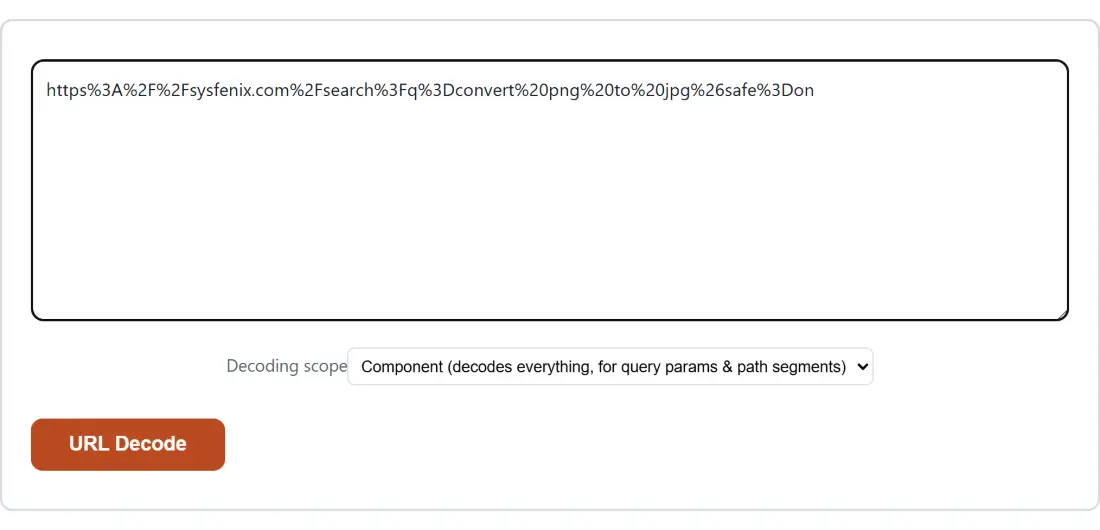
Decoding a pasted URL or query string
- Paste the encoded text into the box above, which shows the placeholder Paste your text here….
- Set Decoding scope. Leave it on Component (decodes everything, for query params & path segments) for a single parameter value, or switch to Full URL (leaves encoded /, :, ?, & untouched) for a complete address.
- Click URL Decode. The button is greyed out while the box is empty and reads Working… during the run.
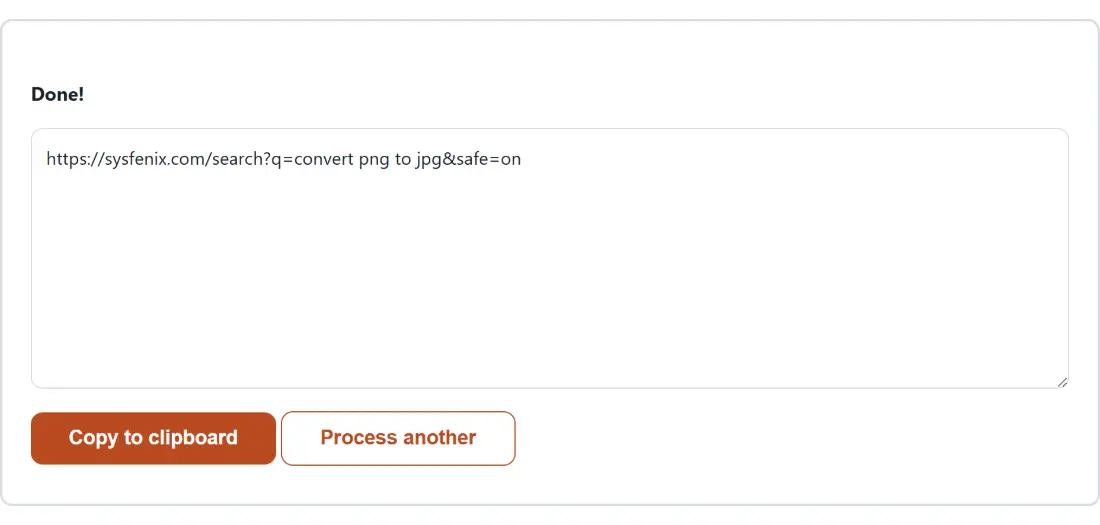
- Read the result in the read-only box, then click Copy to clipboard to take it, or Process another to start over with something else.
decodeURI leaves the reserved punctuation alone
The two scopes are not “thorough” and “less thorough”. They are two functions with different jobs, and picking the wrong one produces a plausible-looking answer that is wrong.
Component scope runs decodeURIComponent, which turns every valid escape back into its character with no exceptions. That is correct when what you hold is a single value: one query parameter, one path segment, one form field. Inside a value, a %2F was only ever a literal slash somebody wanted to store, so decoding it back to / restores the truth.
Full URL scope runs decodeURI, which refuses to decode escapes for the punctuation that gives a URL its structure. Encoded forms of /, ?, &, #, :, ;, =, ,, @, $ and + are all preserved as escapes. The reasoning is that if you hand it a whole address, turning an encoded slash inside a parameter into a real slash would silently change which path the URL points at. Both functions decode spaces and non-ASCII characters identically.
The practical rule: if you copied a whole address including the scheme, use Full URL. If you copied the bit after an equals sign, use Component.
A plus sign is not a space
This trips up more people than any other detail on the page. In application/x-www-form-urlencoded, the format HTML forms use for GET query strings and classic POST bodies, a space is written as +. In URI percent-encoding, a space is written as %20. They are different specifications that happen to share a syntax.
decodeURIComponent implements the second one only. Paste first+name=Ada+Lovelace and you get it back unchanged, plus signs and all, because as far as the URI grammar is concerned a plus is an ordinary reserved character with no special meaning inside a value.
There is a nastier corner to this. A form encoder writes a genuine plus sign as %2B, so after decoding, a real plus and a plus that meant a space look identical. If you are cleaning up form data by hand, replace plus signs with spaces before you decode, not after.
Double-encoded values need two passes
A URL that has passed through two systems that each escaped it carries two layers. The tell is %25, the escape for the percent character itself: %253A is %3A with the percent escaped again, and %3A is a colon.
One run peels one layer. To go further, copy the result with Copy to clipboard, click Process another, paste it back in and run it again. That is genuinely how the tool works, since the output box is read-only and starting a new run clears both boxes rather than feeding one into the other.
Stop when the output has no percent signs left, or when it stops changing. Decoding once more than necessary is not harmless: it can turn escapes that were meant to be literal text into structural punctuation, which is one of the classic ways a URL parser can be tricked.
Malformed percent sequences and the message you see
Both built-in functions are strict. A percent sign must be followed by exactly two hexadecimal digits, and multi-byte sequences must form valid UTF-8. A lone %, a sequence like %zz, or a truncated escape such as the first two bytes of a three-byte character all throw rather than guessing.
What reaches the page is the shell’s general failure message asking you to check the input and try again. The precise diagnosis is logged to the browser console instead, which is worth knowing when you are staring at a long string and wondering which end of it is broken. Trimming a trailing partial escape from a copied log line fixes it more often than not.
For the opposite operation, URL Encode percent-encodes text with the same two scopes. If the value you decoded turns out to be a token, JWT Decode reads its payload, and HTML Decode handles entities such as & rather than percent escapes. More utilities are on the developer tools hub and in the developer tools guide.