The off-by-one that most Pomodoro apps get wrong
Ask three people when the long break happens and you will get two answers. Before the fourth focus session, or after it?
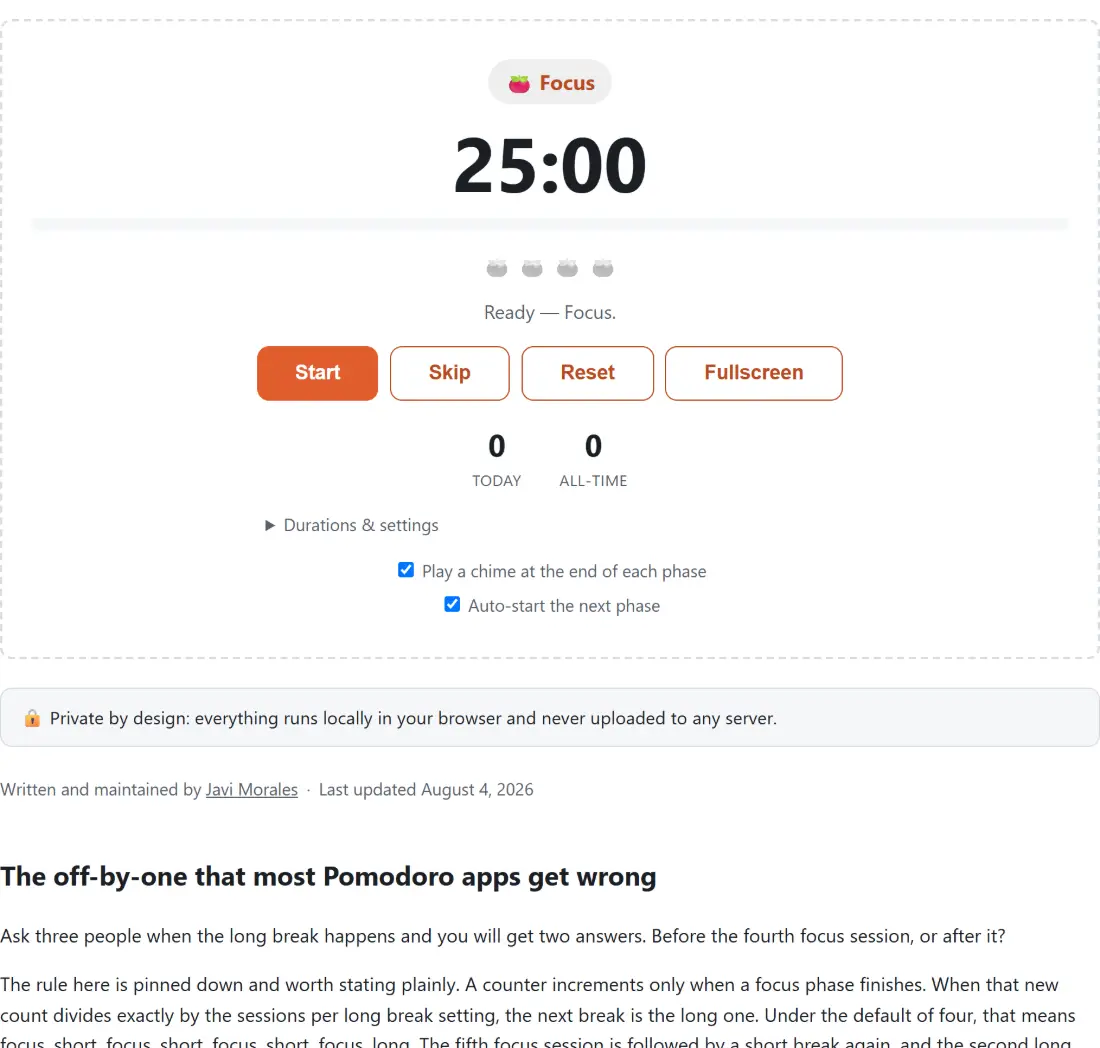
The rule here is pinned down and worth stating plainly. A counter increments only when a focus phase finishes. When that new count divides exactly by the sessions per long break setting, the next break is the long one. Under the default of four, that means focus, short, focus, short, focus, short, focus, long. The fifth focus session is followed by a short break again, and the second long break arrives after the eighth.
The row of tomato dots above the controls is the visual form of the same counter. During a long break every dot is filled; the rest of the time the filled count is your position within the current set. If you have changed the sessions per long break number, the dot row changes length to match.
Running your first set
- Press Start. The phase badge reads Focus and the countdown begins from 25 minutes.
- Work. The tab title shows a tomato, the remaining time and the phase, so a backgrounded tab still tells you where you are.
- When the clock hits zero the chime plays, your tally goes up by one, and the timer moves to Short break.
- Press Pause at any point and Resume to continue. Pausing is reflected in the tab title too.
- Skip jumps to the next phase without waiting. Reset returns everything to a fresh first focus session, leaving your tally alone.
- Fullscreen hands the whole screen to the clock, which is the setting I actually use. It removes the temptation to look at anything else.
- Open Durations & settings to change Focus (min), Short break (min), Long break (min) and Sessions per long break.
Two checkboxes sit at the bottom. Play a chime at the end of each phase controls the sound, and Auto-start the next phase decides whether the break begins on its own or waits for you to press Start again.
Skip and the tally do not agree, on purpose
This is the one behaviour worth knowing before you trust the numbers.
Pressing Skip during a focus session advances the cycle. The counter goes up, the dot fills, and the break is queued. What it does not do is record a completed pomodoro against today’s date. Only a focus phase that runs all the way to zero is written to storage.
That is the right call for a tally that is meant to mean something. A number you can raise by clicking a button four times is not a measure of focused work. But it does mean the dots and the Today figure can disagree within a set, and if you skip often, the daily number will be lower than the dots suggest. Believe the number.
Time that does not drift
Browsers throttle timers in background tabs, sometimes to once a minute. Any countdown built by subtracting a second per tick loses time, and after an hour in another tab it can be minutes out.
Nothing here counts that way. Pressing Start records an absolute timestamp, and every value on screen is derived from the current clock against that anchor, including the digits, the progress bar and the tab title. Pausing records the elapsed span and resuming sets a new anchor. The consequence is that the display can only ever be right, whatever the browser did to the tab while you were away.
The tab title is deliberately verbose for the same reason. Icon, clock, phase name, and a paused marker when relevant, so a glance at the tab strip answers the question without switching to it.
Two numbers and where they live
Under the controls sit Today and All-time. Both are read from a single entry in this browser’s local storage, keyed by local calendar date rather than by a UTC date, so a session finished at eleven at night counts toward the day you think it does.
Nothing syncs. There is no account, so the tally on one device knows nothing about another, and clearing site data erases it. That is a real limitation and the honest trade for a tool that never asks you to sign in.
Durations are configurable within limits. Any phase can run from 1 to 180 minutes, and the sessions per long break setting accepts 1 to 12. Values outside those ranges, or a field left empty, fall back rather than breaking the cycle.
Tools that pair with a focus block
For a plain countdown with no cycle attached, Online Timer is the simpler tool, and Interval Timer handles repeating work and rest blocks for exercise rather than study.
If it is background sound you are missing during the focus block, White Noise Generator and Binaural Beats Generator both run happily in another tab. Breathing Exercise fits the short break better than scrolling does. To track the habit across days rather than a single session, Habit Tracker is the better fit. The rest is on the testers hub.